
Most of us are focused on building AI teammates and workflows right now, and we should be. The early results are faster execution, better output, time back in the day, and even new ways to work that weren’t possible before. When something is working, you keep building.
What many haven’t bumped into yet is what these workflows cost when they move beyond individual use. When AI was just a chatbot, the cost was simple. You asked, it answered, your subscription covered it. Now AI is doing work on its own. It’s running steps, calling tools, and making choices while we’re not watching. That change is what makes the cost question different, and GTM teams don’t have to figure it out from scratch.
For this one, I asked Megan Cabrera to think it through with me. Megan is a GTM Operations Strategist and Advisor who works on the operational side of AI adoption, including the cost questions most GTM teams haven’t hit yet. Her perspective influences a lot of what’s in this piece.
I wanted to write this before most of us need it. This is what we think GTM teams should know to scale. We want to elevate the conversation so that we can all learn together and from each other.
Quick Take
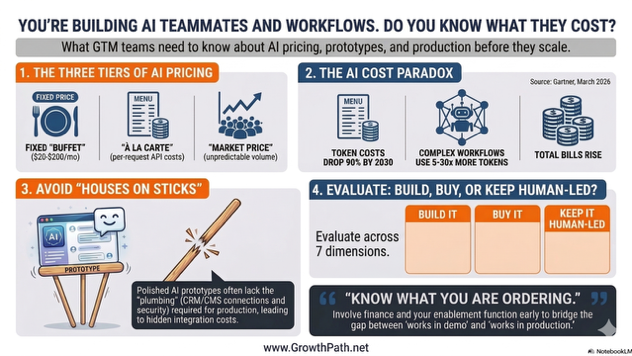
We think of AI subscriptions as a fixed monthly cost. For individual use and even for connected workflows within your subscription, it is. When workflows need to run at org scale, production reliability, or in front of customers, the pricing shifts to variable, usage-based models that many GTM teams haven’t encountered yet.
Engineering and product teams have been managing this for a while. Megan and I are bringing what they’ve learned to GTM.
What we’re seeing so far:
- AI has three pricing tiers based on how and where your workflow runs: fixed subscription, variable API (Application Programming Interface) costs, and unpredictable volume when workflows are public-facing. This is like three tables at a restaurant, each with a different menu and a different level of visibility into what you’re spending.
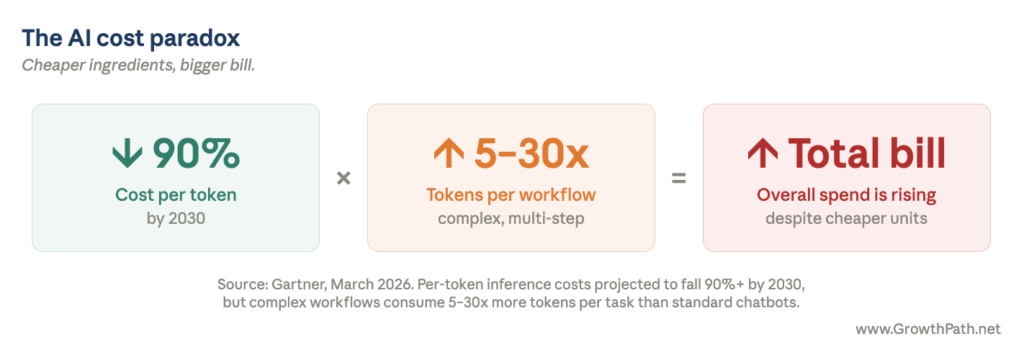
- Per-token costs are dropping over 90% by 2030, but total spend is rising because complex workflows consume 5 to 30x more tokens per task (Gartner, March 2026). That’s cheaper ingredients but a bigger total bill.
- Cost is one of several evaluation criteria. Architecture readiness, ongoing ownership, skills and team readiness, time to production, and business risk all factor into whether you should build a custom workflow, buy a specialized tool, or keep the work human-led.
- The gap between a working prototype and a production-ready workflow is bigger than many teams expect. A polished demo is not a finished product.
- The governance and enablement structure to manage this evaluation probably already exists on your team, often in your operations function. But it needs a new competency: understanding token economics well enough to simulate workflow costs before deployment.
- The good news is your technical counterparts likely have experience with usage-based pricing, whether from cloud or AI. Whoever handles enablement can bridge what they’ve learned to what GTM needs to know. We don’t have to figure this out from scratch.
AI Video Explainer and AI Podcast Versions of This Newsletter
To support different learning styles, this newsletter is available as a 7-min video explainer and a 20-min AI podcast with two AI hosts. I used Google’s NotebookLM to create these and personally reviewed them for accuracy and responsible AI use.
Three Tables at the Same Restaurant
I think about AI pricing as three tables at a restaurant. Each one has a different cost model and a different level of visibility into what you’re spending.
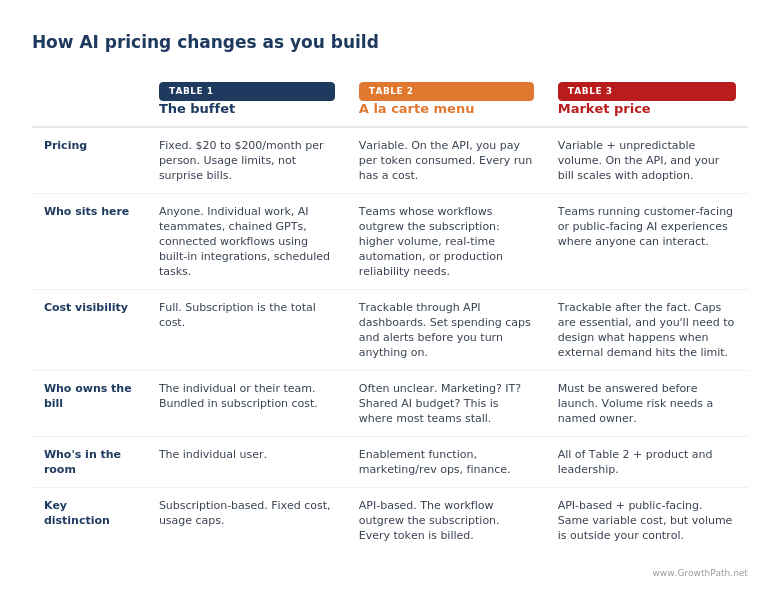
Table 1 – The Buffet
Your subscription is $20 to $200 a month depending on the plan, fixed price, and more capable than many teams realize. You can build AI teammates, connect workflows to your email, Slack, and Google Drive through built-in integrations, and set up tasks that run on their own. You can even chain Custom GPTs (AI teammates you build in ChatGPT for specific tasks, trained on your data) or build workflows in Cowork (Claude’s desktop tool for knowledge work), all without leaving your subscription.
You’ll hit usage limits before you hit a surprise bill. For most individual and team- level work, you can stay here longer than you think, and you should. (Helpful tips: Charlie Hills shares 8 ways how you can get 3X more from your Claude subscription.)
Table 2 – The À La Carte Menu
When a workflow outgrows what your subscription can handle (volume exceeds usage caps, or it needs real-time responsiveness or production-level reliability), you move to the API, which is the direct connection used to build AI into custom applications and systems like your CRM, your project management platform, or workflows that run on their own.
Every time an agent (an AI teammate that takes actions on its own, not just a chatbot you prompt) runs, it’s consuming tokens, making API calls, and potentially invoking external tools or search. Tokens are the small chunks of text AI reads and generates, roughly one word each.
Megan pointed out that a single agentic workflow might look simple on the surface, say an automated competitive intel brief that pulls from web search, synthesizes findings, and shares via a Slack summary. Behind the scenes that one workflow is making a series of AI calls, often 10 to 20 or more depending on how it’s built, each one consuming tokens. Multiply that by frequency and team size, and you’re looking at real spend.
Gartner’s March 2026 research backs this up. Per-token costs for large AI models are projected to drop over 90% by 2030, but agentic workflows use five to 30 times more tokens per task than a simple chatbot conversation. The price per call is going down. The number of calls per workflow is going up much faster. Cheaper ingredients, bigger total bill.
A tech executive I know connected AI to his email, project tracking, and task management through the API and let it run on autopilot. He let it run without spending limits, and within weeks the charges were piling up. He described it as walking out of Costco with three carts full of tokens. The technology worked exactly as designed. The bill was a different story.
Once a workflow is running at scale, here’s one way to make the cost concrete: think of it as CPM by workflow type. Every marketer already knows how to manage cost per thousand impressions in a media buy. Cost per thousand runs of a specific workflow is the same shape, with one important difference. Each workflow has its own cost profile. A simple lookup and a multi-step agentic workflow on the same product can differ by 100x. Track and manage them separately, the way you’d track separate ad campaigns.
Megan flags that this is avoidable. The AI companies all support spending caps and usage alerts. Set them before you turn anything on, and the Costco moment doesn’t happen.
Table 3 – Market Price
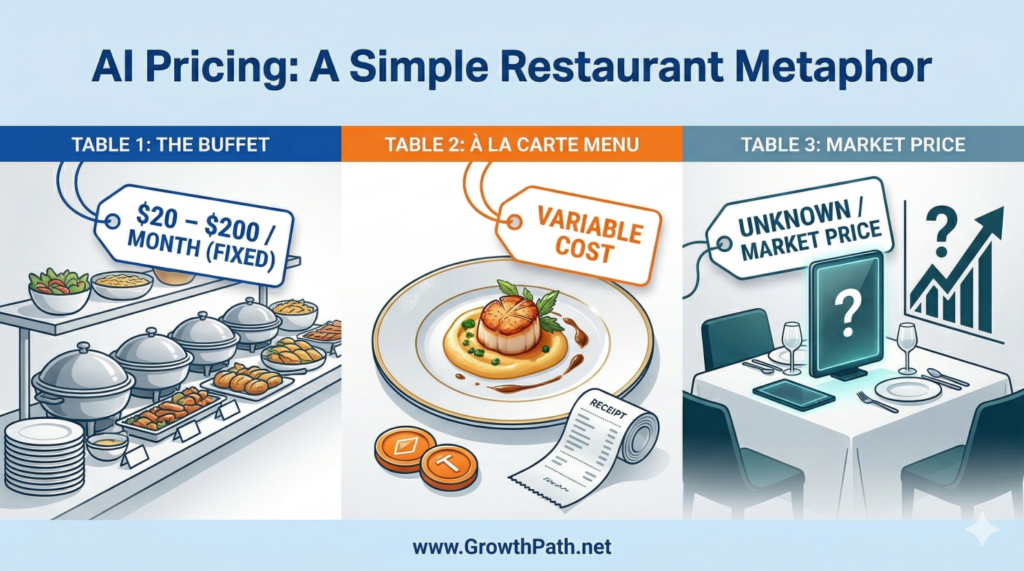
The table with no prices listed. When your AI workflow is customer-facing, prospect-facing, or open to the public, you’re on the API and you’ve lost visibility into volume. Every person who interacts with it runs up a tab. If the experience works well and gets popular, your success is directly tied to your cost. Every time AI handles a request, that processing costs something.
Most GTM teams have operated in a world with seat-based SaaS pricing. You buy 10 licenses, and you know what you’re getting. With AI-powered experiences, every interaction has a compute cost. More usage means a bigger bill, even if the number of users stays the same.
Megan also points to model choice as a major lever. The difference between running a workflow on a larger, more capable model versus a smaller, faster one (for example, Claude Opus versus Claude Haiku) can be 10x to 30x on the same task. Think of it the way you’d think about delegation. You wouldn’t put your most expensive person on a task an intern could do. Use the bigger model for high-value, low-volume work where reasoning quality is important. Route the high-volume repetitive work to the smaller, faster, cheaper model. It’s one of the biggest levers teams can use to control cost at this table.
Caps are even more important here, and they work differently. You’re capping not just your own usage but also what happens when external demand exceeds your budget. Does the experience degrade gracefully, queue up requests, or pause until the next billing cycle? Worth thinking through before you go.
Workflows like personalized buyer experiences or automated onboarding can create real competitive advantage. Don’t avoid Table 3. Just understand the pricing model.
Who Should Own the Tab
One question GTM teams need to answer is who pays the tab. When marketing spins up an agentic workflow on the API, does that hit the marketing budget? IT budget? A shared AI center of excellence that may or may not exist yet? Most organizations haven’t answered that question, which means the bill is either going unmonitored or heading toward a finance clawback conversation.
When budget ownership is ambiguous, agentic initiatives stall at the worst possible moment: after the proof of concept works, right before scale. The conversation to have is “who will own the cost when it grows, and what does that approval chain look like.” That conversation turns AI adoption from an experiment into something procurement and finance can support.

“In a lot of orgs, marketing ops or rev ops is already tracking vendor spend and tool budgets. Where that’s true, AI workflow costs are the next thing to add to the list, and most teams haven’t started. You don’t need a new function to do it. You need your existing ops lead talking to tech peers.”
The Beautiful House on Sticks and Twigs
There’s another gap between prototype and production that isn’t about cost. It’s about whether the thing you built can function in a business context.
Vibe coding has made this more visible. If you haven’t heard the term, it means using AI to build software by describing what you want in plain language rather than writing code line by line. You vibe and AI codes. You can go from idea to working prototype in an afternoon. The result looks polished, it functions when you click around, and you can deploy it for people to use.
“Looks finished” and “is production-ready” are two very different things.
A head of demand gen I work with saw this across several teams. Someone builds an interactive ROI calculator, a competitive comparison tool, or a custom landing page in a day. The demo is impressive and leadership gets excited. Then someone asks whether the components are built in the CMS, whether the lead forms flow into Salesforce, whether there’s analytics tracking, or whether the content team can update anything without going into the custom HTML. The answer is usually no across the board.
She described it as building a beautiful house on a foundation of sticks and twigs. It looks like a house. You can walk through the rooms. There’s no plumbing, no electrical, and no foundation that will hold up in bad weather.

The prototype took an afternoon. Connecting it to your business systems, getting it through security review, configuring it for your environment, and testing it against real data is where the real time and budget go. AI has made the integration work faster (writing connectors and configuration code goes much quicker now), but the approvals, testing, and rollout still take days to weeks. Those timelines are mostly organizational, not technical.
Some teams discover that the cost and effort of making a prototype production- ready ends up being more than a purpose-built SaaS tool would have cost for that same job. Worth knowing before you commit to either path.
Build It, Buy It, or Keep It Human-Led
Megan and I have been working through an evaluation rubric for this. It covers cost structure (including what happens at scale), architecture readiness, ongoing ownership and flexibility, skills and team readiness, time to production, human role, and outcome and risk. It applies whether you’re running on the subscription or on the API. The cost row changes, but the rest of the evaluation applies either way.
This builds on the three-layer tech stack approach I’ve written about before: start with what you already have, then go deep on AI models, then add specialized tools where they solve a clear problem. The rubric below is the cost and readiness lens you layer on top of that decision. (Also refer to “Your AI Teammates Aren’t a Team Yet” and the Cin7 AI growth engine case study for more insights.)
This assumes your team is already reviewing for security and compliance. These are the additional criteria to layer in.
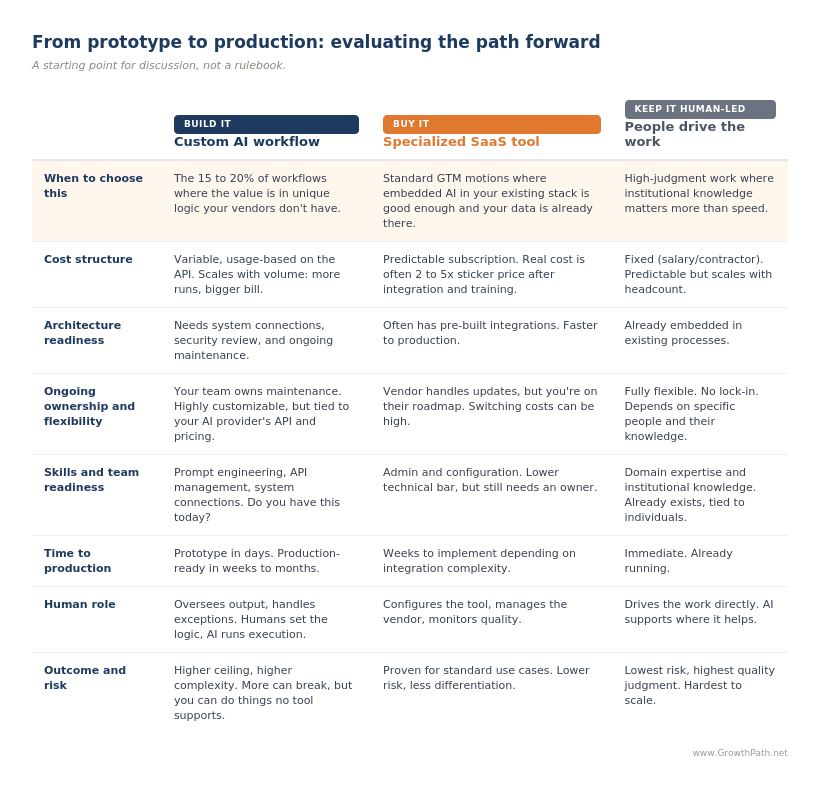
Megan and I agree that the case for Buy is often stronger than it gets credit for. Your CRM, MAP, ABM tools, and workflow platforms are all embedding AI features quickly. For standard GTM motions like lead scoring, email personalization, and call analysis, the embedded AI in your existing stack is usually good enough, and it comes with a big advantage. It’s already connected to your data, your team knows the interface, and the cost is often bundled into your existing contract. Watch for the exceptions, but there’s value in the default.
Teams that rush into building agentic workflows can end up duplicating what they already have, then carry the maintenance burden when those tools need debugging, updating, or scaling.
There’s another angle to the Buy case. The companies offering specialized SaaS tools have people whose entire job is thinking about one problem. They’re talking to dozens of customers solving the same thing, watching what’s working, and shipping improvements. Your in-house build is competing for attention with six other priorities, and the workflow you launched six months ago is probably not getting the iteration cycles it needs. Focused beats distracted, even when distracted is more customized.
The case for Build is real, and narrower than it looks at first. Custom AI workflows win in the gaps between your tools, in the connective tissue and processes that are unique to how your organization operates. The value is in the logic itself, which is unique to how your business operates.
A competitive intelligence pipeline that pulls from specific sources, synthesizes against your positioning framework, and distributes to sales in a format they’ll actually use is a good example. Build for the 15 to 20% (range may vary by company) of workflows that are genuinely differentiated, that connect systems in ways your vendors don’t, or that create customer-facing experiences you can’t buy off the shelf.
Sri Srinivasan, Chief AI Officer at Hellman & Friedman, shared the guidance he gives their portfolio companies.

“Before building custom AI, ask what makes you special. If AI is your product’s advantage, build it. If it’s just how you run your business, use existing tools. Many teams waste time building things that will soon be standard features. The real cost isn’t building—it’s maintaining and improving it over time. Most value comes from configuring what already exists, not creating something new.”
The Structure Probably Already Exists
If you’ve been reading my newsletters, you’ve seen me write about the enablement function: the group (or person) that handles governance, IT and legal coordination, system integrations, and cost management on behalf of builders. (For how this works in practice, see “AI Moved Fast: What Changed and What to Do Next” and the cybersecurity company case study.)
The model is democratized building, centralized enablement. Everyone closest to the work keeps building. A smaller team makes it safe and scalable. In some organizations that’s a dedicated team. In others it’s one person in ops who manages governance alongside everything else. The roles still apply. How they map depends on your team’s size and structure.
Many organizations already have some version of this: marketing ops, rev ops, or an AI governance council. Builders submit use cases. Legal weighs in on risk. IT weighs in on security. Builders then build the workflows.
What I’m finding in my own client work is that the economic lens is the piece usually missing. Cost governance for AI workflows is new territory because the cost model itself is new. The review structures teams use for security and compliance can extend to cover it, but the economic lens has to be added on purpose. When teams see the move from buffet to à la carte, the gap is obvious, and the conversation turns to whether finance and P&L owners should be in the review.
Charlie Treadwell, CMO at Elisity, leads the strategy and rolls up his sleeves on the build. He’s been working through this in real time and shared what his team is doing.

“Our finance team is working hard to rebuild our budget models. We used to plan around program spend plus headcount, that was the fixed part of the equation. Now there’s a new variable.
The easy case would be: AI makes someone 2x more productive, you cut a role, you spend that money on tokens. That’s not what we’re seeing. We’re getting more productivity out of the same people, but it’s costing more money, and it’s hard to predict.”
Kelly Herrell, a CEO, posted a response on LinkedIn that takes this further, connecting AI workflow costs directly to the profitability question the CEO cares about.
Megan’s framing on this is that GTM teams should treat AI consumption like usage-based infrastructure. Engineering teams have been managing usage- based pricing for a while, whether it’s cloud bills or AI inference costs (what it costs to run a model in production), and they know what visibility and controls this kind of pricing needs. You need active visibility into what’s running, how often, and what it costs per execution, or you’ll find your team facing a monthly invoice you didn’t expect.
If you’re adding the cost lens to your existing process, here are some questions to start with.
- What does this workflow cost to run at production volume, not just at prototype scale?
- Is there an existing tool, vendor, or human-led process that gets the same outcome? How does it compare across the evaluation rubric?
- Is this connected to our business systems, or is it a standalone prototype that still needs integration work?
- If this is customer-facing or public-facing, have we modeled what happens to cost and performance when volume spikes?
- Who on the team will maintain this after it launches?
If the builder can’t answer all of these, that’s expected. That’s what the enablement function is for. Your marketing or rev ops lead who already tracks vendor spend and tool budgets is a natural owner, and they’ll want to connect with their technical counterparts to learn how usage-based AI costs work. Many engineering and product teams have been tracking inference costs, setting token budgets, and evaluating build-vs-buy trade-offs. The ones that haven’t yet are working through the same questions we are. Either way, we can learn from them instead of rediscovering it on our own.
What We’re Still Figuring Out
The evaluation rubric is a starting point, and we expect it to evolve as we all learn more. A few open questions we’re sitting with:
- How do you compare truly different cost structures? A SaaS subscription is predictable but rigid. A custom AI workflow is flexible but variable. A human-led process comes with institutional knowledge you can’t replicate but doesn’t scale cheaply. We’re still learning how to evaluate these side by side in a way that’s useful.
- How should this change as AI matures? A workflow that’s too expensive or too complex to run on the API today might make sense in 18 months. Do you build now and wait for the rest to catch up, or pilot at low volume and revisit later? Teams are making different calls depending on how strategic the workflow is.
If you’ve started running workflows through a cost lens, what’s on your rubric that isn’t on ours? We’ll share what comes back.
Know What You’re Ordering
AI is worth the investment. The people on your team who are experimenting and building are doing exactly the right thing. They need better visibility into what happens when a workflow moves from prototype to production, and a place to ask questions before the bill shows up.
The structure to manage this probably already exists on your team, whether that’s a dedicated enablement function, your ops lead, or someone who wears that hat part-time. Add the economic and readiness lens. Bring finance into the conversation. Learn from your technical counterparts, whether they’ve figured it out or are figuring it out with you. And actively monitor any live workflows.
This week, whoever handles enablement on your team should connect with engineering or product about how they’re managing usage-based infrastructure costs. Then pick one workflow your team is building or recently launched and run it through the evaluation rubric.
The Practical AI in Go-to-Market newsletter shares learnings and insights in using AI responsibly. Subscribe today and let’s learn together on this AI journey.
For applied learning: Explore our applied AI workshops, offering both strategic sessions (use cases and roadmaps) or hands-on building (create AI teammates during the workshop). You’ll leave with either a clear plan or working solutions. Office hours provide follow-on support to keep momentum going.
For ongoing advisory: I work with leaders as a strategic advisor through their AI transformation, providing guidance, frameworks, and a sounding board as they build. If that’s what you need, let’s talk.
For team transformation: I partner with GTM leaders to move from scattered AI adoption to an operating model where human and AI teammates work together across workflows. See real examples: a lean GTM team’s step-by-step playbook and a global cybersecurity leader scaling to 150+ marketers with 57 AI teammates integrated into daily workflows.
For speaking: Here are virtual and in-person events where I’ve covered a variety of AI topics. I’ve also keynoted at many organization and corporate-wide events.
If any of this resonated, I’d love to hear from you. Reply to this email, find me on LinkedIn, or come say hi at an event.