
A data readiness project comes with a cost and a timeline. What it unblocks is often unclear, so it gets funded on faith or it doesn’t get funded at all.
That’s where I started with a marketing team. I could have spent the session showing them how to fill out their channel performance decks faster, and automating that would have saved real hours. We went a different direction.
I asked what it would take for the same workflow to tell them which blog posts compete for the same readers, which persona they’re under-serving, and what to test next. Then a second AI agent would read across all three channels (blog, gated assets, and webinar) and challenge the plan before anyone spent budget on it.
Everyone wanted that version. So I asked one question: how do you tag your content today, by topic, by persona, or by funnel stage?
There was very little tagging at all. The closest thing was a product code sitting inside the blog page address, like the “exp” in /blog/exp/cut-expense-report- cycle-time/. AI had nothing it could filter on, group by, or read as a category.
That team isn’t unusual. In Dun & Bradstreet’s latest AI Momentum Survey of 10,000 businesses across 32 countries, only 6 percent said their enterprise data is fully ready to support AI at scale. In the same survey, more than three quarters reported some measurable return from AI anyway.
That question uncovered our first data gaps. Working out what the better version needed uncovered the rest. We built it so we could test it and see the outputs. Based on the outputs, we refined, and that’s how we confirmed data was the issue.
Quick Take
The usual advice is to get your data in order first, then use AI. But there’s another way.
Ask AI for the more valuable version of the job, and it will tell you what your data is missing and how each piece would be used.
Here’s what happened when we tried it with one marketing team.
Key takeaways:
- Build first with dummy data. Set a higher goal, reimagine the workflow, and find out what AI can and can’t do before you invest in getting the real data.
- Filling out a report faster works fine on messy data. The problem is when you ask for analysis by persona, product, or funnel stage.
- You can find some gaps before you build anything. Ask your team how the data behind that workflow gets categorized today. If you get different answers, you’ve found one already.
- Sometimes the answer is that the data was never collected and never will be. Better to learn that in one working session than after months of data work.
- Be clear about which demos are running on dummy data. Otherwise the disappointment gets pinned on AI.
- Fix one gap first, the one that blocked what you wanted most. A small win gives you something working to expand from.
There’s a prompt at the end you can run on your own workflow.
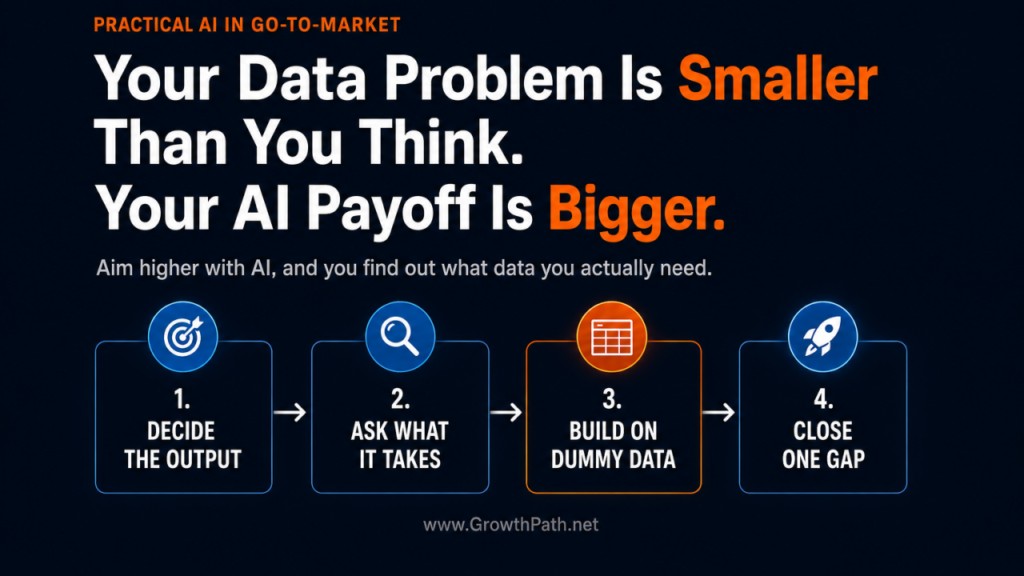
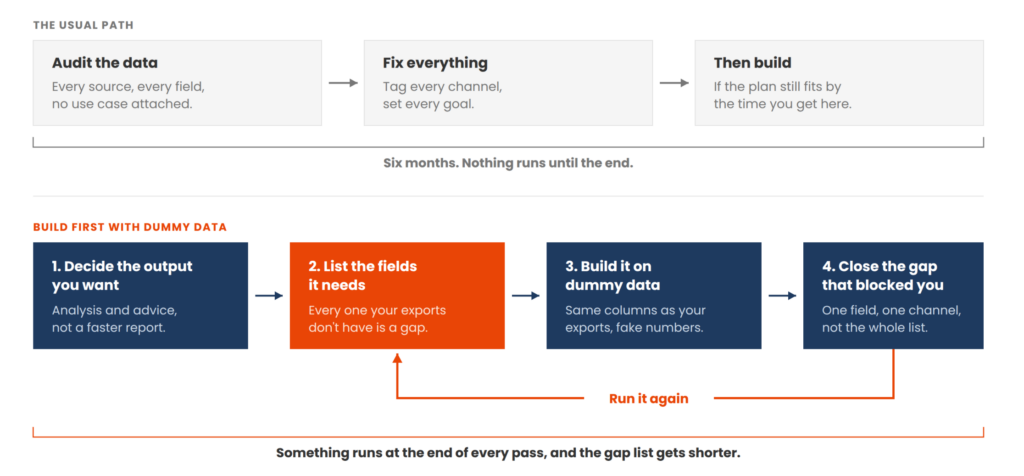
The four steps we took, in order.
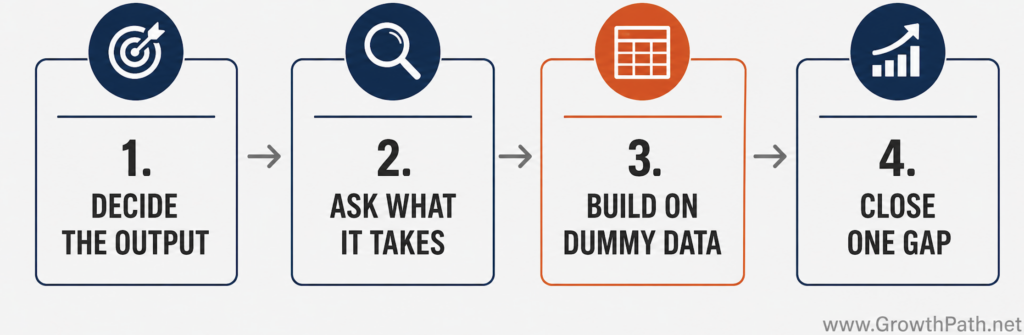
Decide the more valuable output you want, ask AI what that output requires, build it on dummy data where the real data isn’t there, then start by closing the one gap that blocked what you wanted most.
Watch Or Listen Instead
To cater to different learning styles and time constraints, this newsletter is also available as a 9-min AI video explainer and an 11-min AI podcast with two AI hosts. Both were made with Gemini Notebook and personally reviewed for accuracy and responsible AI use.
Speed Hides the Problem
A workflow that pulls three channel performance exports, formats them, and populates a template saves hours whether or not anything is tagged well.
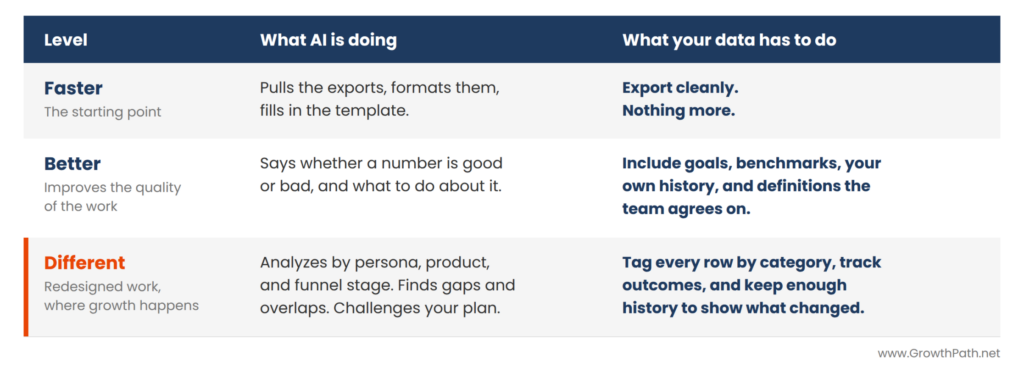
The data problem shows up when you want analysis instead of a finished report: results by persona, recommendations by funnel stage, or a coach that challenges your plan. All of that asks AI to sort and compare by category. If nothing in the file shows those categories, you get observations back. This blog did well, that one didn’t. It’s accurate but not as helpful.
That’s the difference between faster, better, and different, and each level asks more of your data. (That framing is reframe four in The 8 Reframes That Change How GTM Teams See AI.)
Here is the same channel report with and without those data gaps.
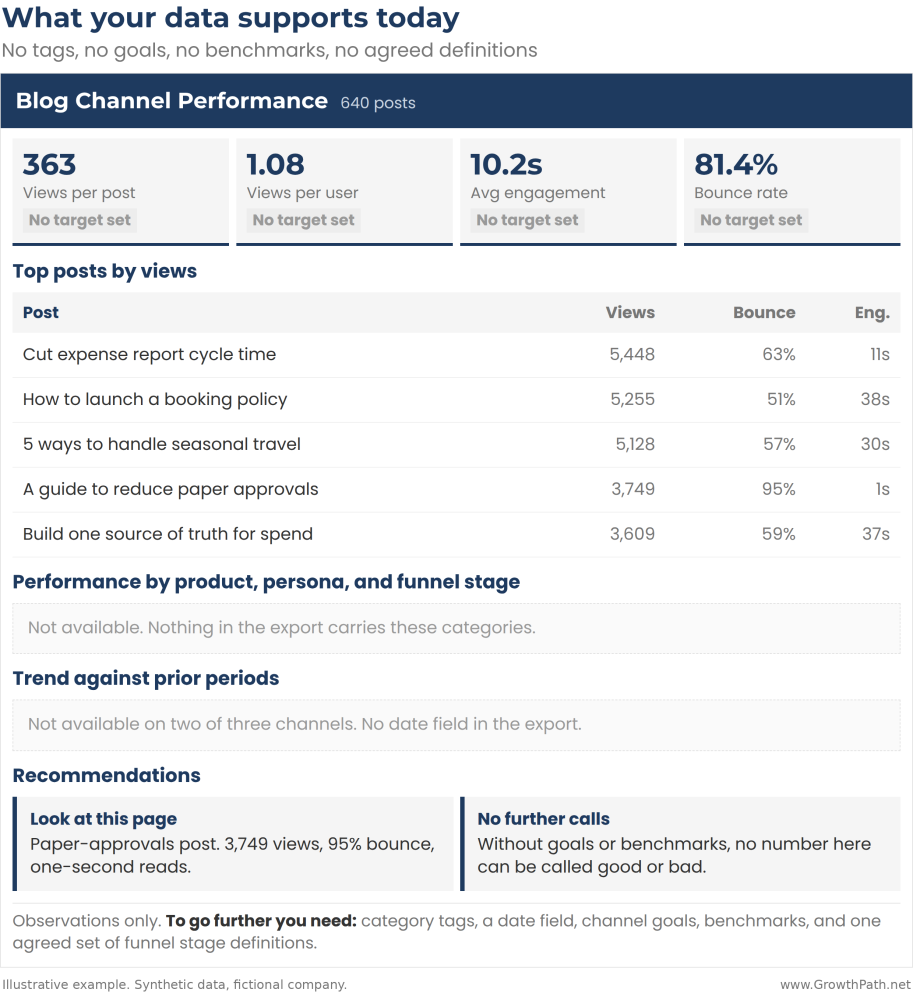
With no tags, no goals, and no agreed definitions, you get a list of your most- read posts and no judgment on whether any number is good, because there’s nothing to judge it against.
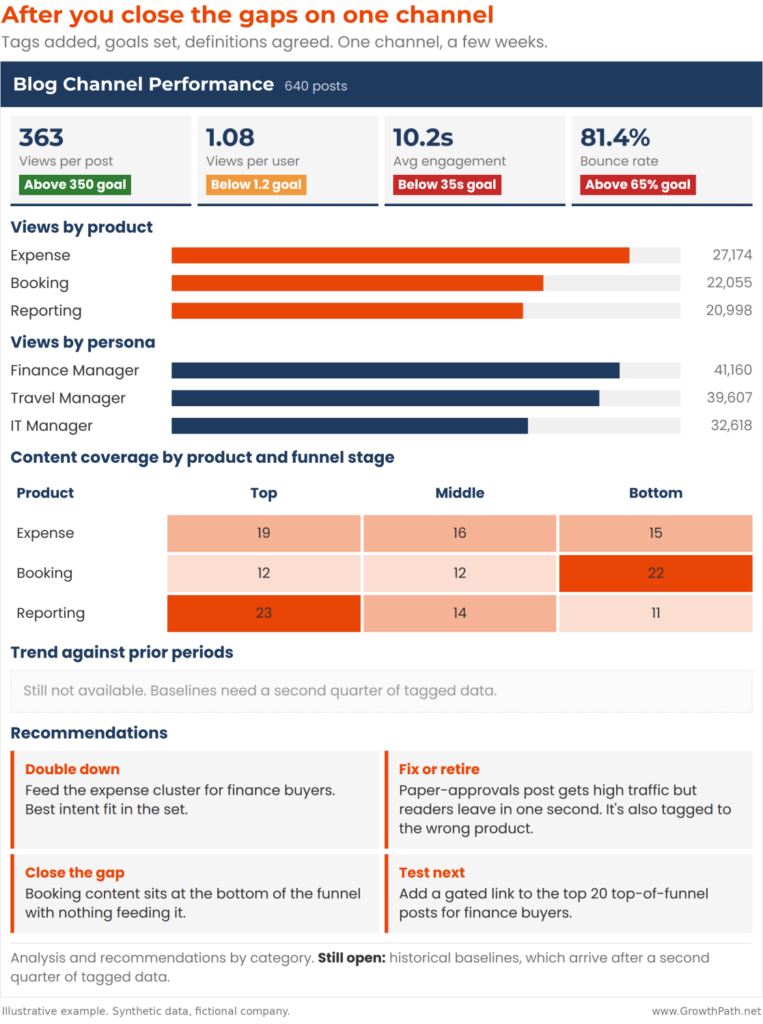
Once we closed the data gaps, the same workflow could tell you the expense- management cluster aimed at finance buyers is your fastest-growing topic, and the one page in it that matches reader intent keeps people reading for 38 seconds. Your highest-traffic page loses them in one second and is tagged to the wrong product. Rewrite that page and publish more in that cluster.
The first version stops at one bad page. The second tells you what to write next, for which buyer, and where the gaps are.
Both run on synthetic data, including the tags that made the second one possible.
Build It With Dummy Data
We didn’t stop to fix anything first, because we didn’t yet know what needed fixing. The team generated dummy files that kept the same structure as their real exports, with fake names and numbers, so we weren’t processing sensitive data in the experiment.
Check your company’s responsible AI policies before you start. If the data you’d need is customer-identifying or regulated, find out what your policy allows you to collect and where you’re allowed to process it.
If your policy allows it, you’ll eventually build with real data. If it doesn’t, dummy files let you keep going, and you’ll know from the start that closing the gap may mean redacting fields, replacing identifiers with codes, or asking for aggregated numbers only.
Then we built on the dummy files.
- A channel analyst agent reads a single export and produces a completed KPI report with insights and recommendations.
- A coach agent reads across three channels and pushes back on the plan.
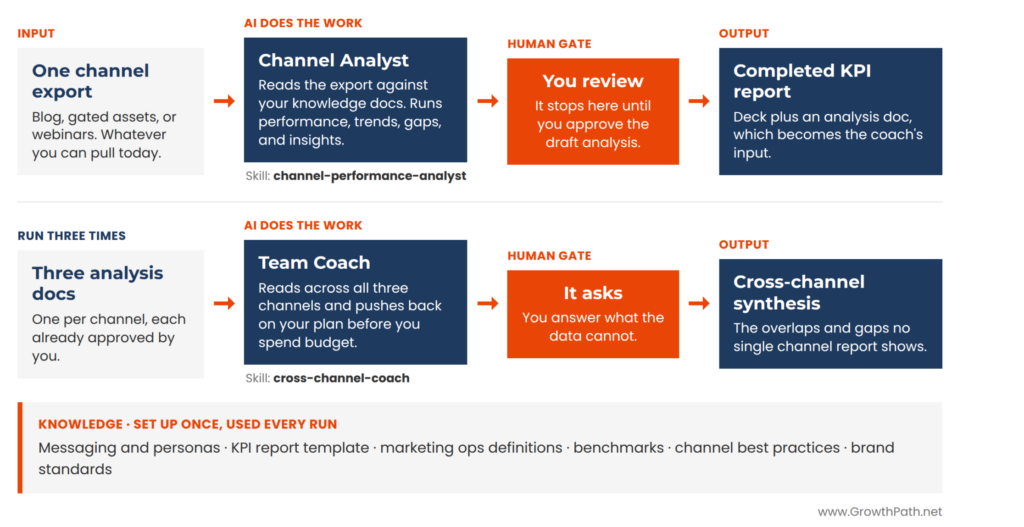
The dummy fields standing in for data we didn’t have became the requirements list.
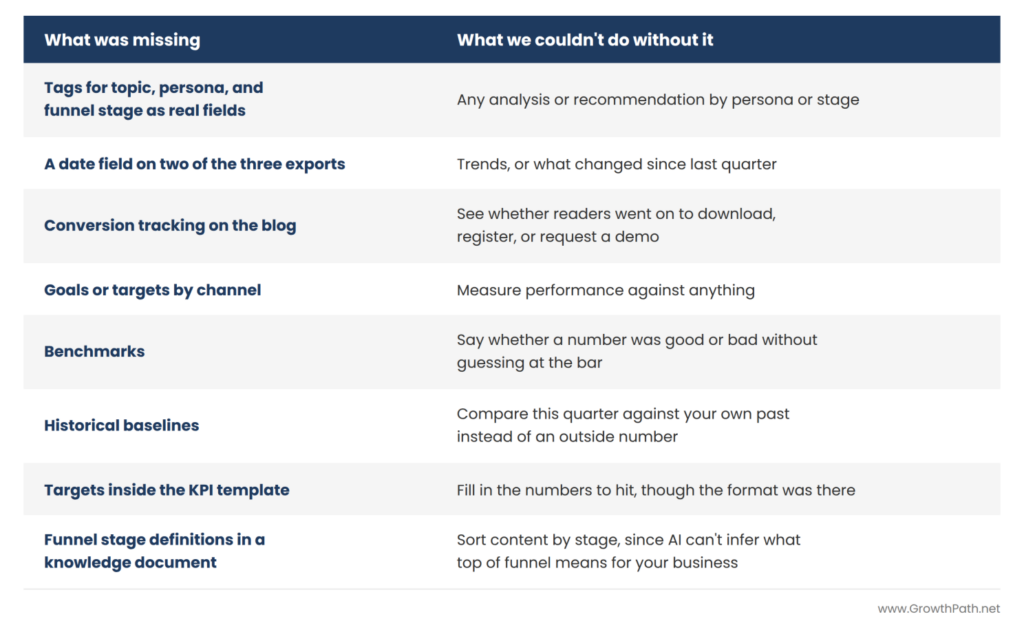
Eight Things We Were Missing
We decided the output we wanted, then asked AI what it would take to produce it. Recommendations by category meant tags had to exist for topic, persona, and funnel stage. A trend meant a date field, which two of the three exports didn’t have. Judging whether a number was good meant a goal for the period, a benchmark to compare against, a baseline from your own history, and a target. Knowing what a page actually accomplished meant conversion tracking. And the funnel stage definitions had to be written down where the AI could use them.
Each answer we wanted turned into a requirement, eight in all, and the dummy files filled those in.
They picked the tags first, on one channel, because that was the gap blocking the recommendations they wanted.
Tell Them What They’re Seeing
There’s a version of this that goes poorly. You show a team an impressive output built on dummy data, everyone gets excited to try it on their real data, it doesn’t come close, and they decide AI is overhyped.
So I pre-empted this at the start of the session. The AI is doing what it can with what it has.
It stops people from blaming the tool for a weak answer, and it turns the excitement into a list of data requirements for consideration.
Fix the Gap that Blocked What You Wanted
Close one gap, not the full list. Pick whatever blocked the output you most wanted. If it’s recommendations by persona, tag one channel. If leadership asks for trends every quarter, add a date field to that one export.
Getting all of it in place can run six months, stall the rest of the process, and be out of date by the time it’s done. Closing one gap gets you started and leaves you with something working you can expand from.
Dun & Bradstreet’s chief strategy officer made the same point. A pilot can run on the data you have. Scaling across the systems people depend on is where AI- ready data becomes the constraint. We can run the pilot with one workflow on one channel, then address the data gaps needed to scale.
Ask your analytics team what data you have and you get a list of everything. Ask whether persona can become a field on the blog export and you get a yes or a no. Go to whoever owns the data with the second question.
Julie Zadow, Growth Marketing Advisor at The Riverside Company, sees this from the investor side, across a portfolio of marketing leaders.

“I work across a portfolio of CMOs, and I’ve seen the same data challenge play out repeatedly: someone walks into budget planning and says the data needs work, but nobody knows exactly what they’re approving. If a CMO walks in with four specific fields and the workflow each one unblocks, that’s a completely different conversation.”
When you ask that question, answers come back in one of four ways.
- The field already exists and nobody was using it.
- Adding it is a small piece of work rather than a project.
- It isn’t there yet, so you start collecting it and the workflow includes it later.
- It will never exist, so you change what the workflow produces and build around what you have.
Any of those is better than funding a data readiness project and finding out at the end. Until people see the output they want, they keep using the same data they always have.
Justin Parnell, my business partner and a forward deployed engineer who specializes in AI automation and agents, built a territory planner for a client whose data warehouse wasn’t ready. The agent had to rank accounts and map each rep’s stops for the day.

“Instead of waiting, we built on synthetic data matching the structure the warehouse would eventually have. The first maps the agent drew put pins in the middle of lakes, and chasing that told us precisely what the real data had to look like, down to storing zip codes as text so a zip like 02134 doesn’t lose its leading zero and land you in the wrong state.
The data team never had to tell us they hadn’t collected it. We found it first, and came to them with a tested checklist instead of a vague ask.”
Some answers depend on someone else’s timeline. If the field lives in a system another team or a vendor owns, getting it means asking them and waiting. Find that out before you commit to a date. (On sorting which workflows deserve the effort, see Think Before You Build.)
Think big, start small, move fast.
Run This on Your Own Workflow
Open your AI tool of choice and give it this prompt:
I want to build an AI workflow that does this job: [describe it in plain language, including the analysis and recommendations you want, not just the report].
Here are the inputs I can give it today: [list your exports and documents, with column headers if you have them].
Tell me what fields have to exist in those inputs and what has to change about how they’re structured. Then tell me what other sources I’d need and what definitions we’d have to agree on first. After that, what you could produce today versus what I’d have to add, and which one to fix first, and why.
Then flag anything on that list we can’t get retroactively, so I know what to stop chasing.
Pick one workflow you wish AI could run for you. Write down every field, definition, and target it would need, then pull the export you’d feed it and compare. That list is your starting point, and it’s shorter than fixing your whole data foundation. Close a few of those gaps and the same workflow starts telling you what to do rather than what happened.
The Practical AI in Go-to-Market newsletter shares learnings and insights in using AI responsibly. Subscribe today and let’s learn together on this AI journey.
For applied learning: Explore our applied AI workshops, offering both strategic sessions to shift mindsets through practical AI uses and hands-on sessions to build human+AI workflows. You’ll leave with either a clear plan or working solutions. Office hours provide follow-on support to keep momentum going.
For ongoing advisory: I work with leaders as a strategic advisor through their AI transformation, providing guidance, frameworks, and a sounding board as they build. If that’s what you need, let’s talk.
For team transformation: I partner with GTM leaders to move from scattered AI adoption to an operating model where human and AI teammates work together across workflows.
For speaking: Here are virtual and in-person events where I’ve covered a variety of AI topics. I’ve also keynoted at many conferences and corporate events.
If any of this resonated, I’d love to hear from you. Reply to this email, find me on LinkedIn, or come say hi at an event.