You’ve seen the LinkedIn posts. Someone built an app in 20 minutes. Someone else automated a full content workflow over the weekend. What those posts don’t show: the enterprise security policies, the legal reviews, the IT constraints, the fact that half your team doesn’t have access to the same tools. AI capabilities jumped in the last eight weeks. Your team’s security policies, legal reviews, and IT constraints stayed right where they were.
Quick Take
AI platforms shipped more capability in the last eight weeks than in the previous six months. Autonomous agents, desktop AI assistants, enterprise workflow studios, all went live in a short timeframe. If you feel like you missed a month and everyone else already caught up, you didn’t and they haven’t.
The progression I’ve been writing about still holds: Tool to Teammate to Workflow. But what’s possible inside each stage changed fast enough that your mental model from December needs an update.
Key takeaways:
- AI teammates now have agency. They plan, execute, and check in at decision points. The shift from “I ask, it answers” to “I delegate, it delivers” is real, and most teams haven’t caught up to it yet.
- Self-contained workflows stay inside your AI platform. Anyone can build them today. System-connected workflows touch your CRM, HRIS, or marketing automation. Those need IT and Legal. That determines whether you can start now or need to loop in others first.
- The gap between “what’s possible” and “what’s possible for your team” depends on constraints like security policies, legal reviews, tool access, and organizational complexity.
- Not everyone needs to be orchestrating human+AI workflows now. Knowing where you are is more important than racing to the next stage.
- There’s an interactive AI Evolution Framework guide at the end that helps you find your starting point, the right platforms, and whether you need IT involved.
AI Video Explainer and AI Podcast Versions of This Newsletter
To support different learning styles, this newsletter is available as an 6-min AI video explainer (see below) and a 19-min AI podcast with two AI hosts. If you haven’t seen these AIs in action, they’re worth a view. The tech is advancing in amazing ways. I used Google’s NotebookLM to create these and personally reviewed them for accuracy and responsible AI use.
Here’s What Actually Happened
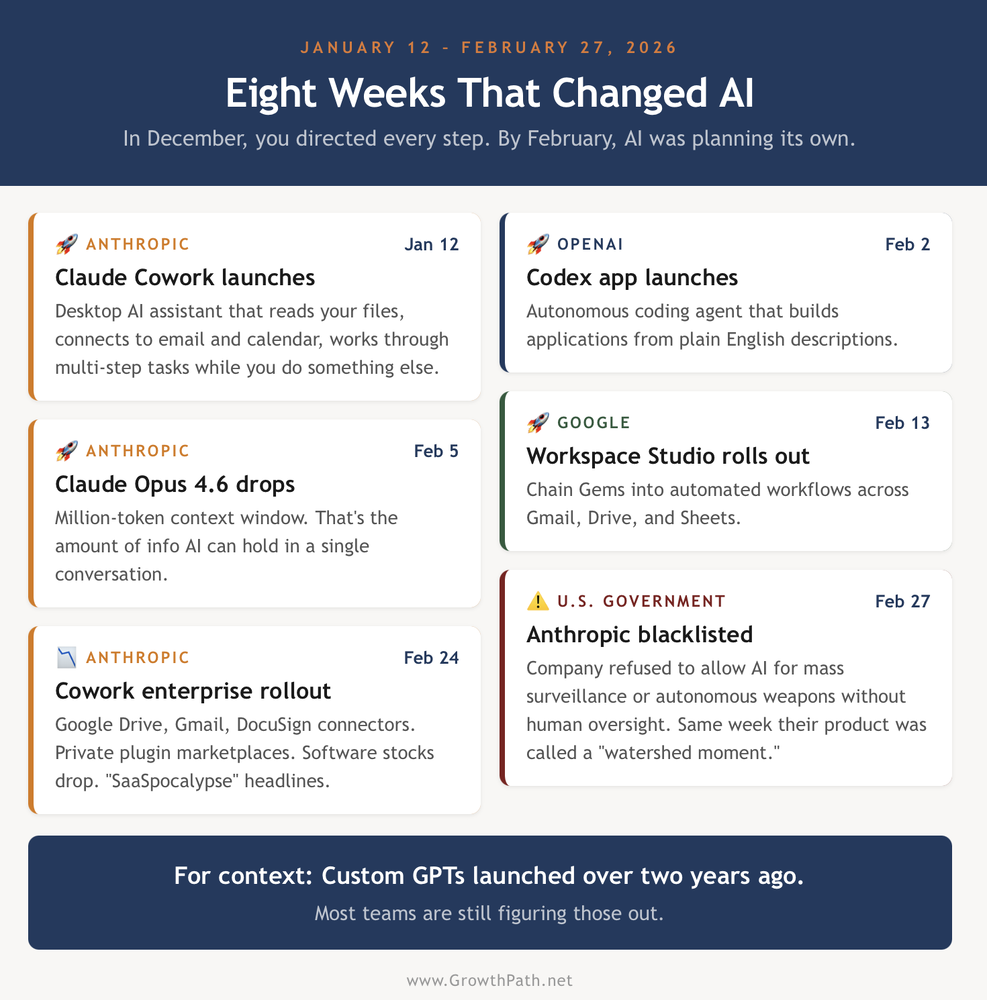
That’s eight weeks. For context, Custom GPTs launched two years ago and most teams are still figuring those out.
If the people you work with seem confused, stressed, or frozen, this is why. The capabilities moved but the constraints didn’t. IT policies, security reviews, legal approvals, tool access, organizational complexity, these are all right where you left them. And nobody is mapping the difference between “what’s technically possible” and “what’s actually possible for your team, in your org, with your constraints.”
The Stages Haven’t Changed. What’s Inside Them Has.
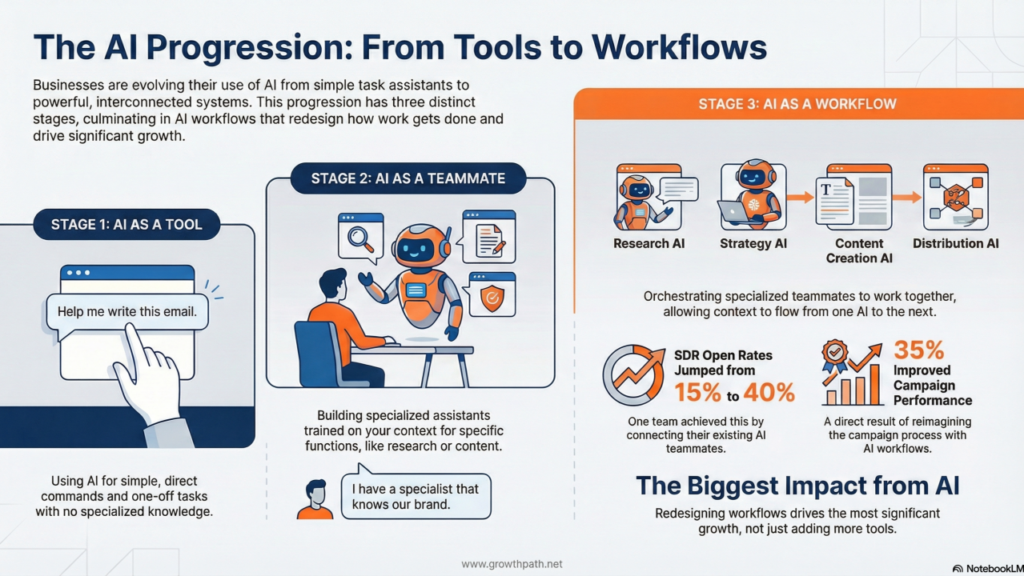
If you’ve been reading this newsletter, you know the progression: Tool to Teammate to Workflow.
Stage 1 got better. When AI gives you a ‘good enough’ answer, you stop pushing. You stay at Stage 1 longer than you need to.
Stage 2 is where the real change happened. AI teammates now have agency. They plan, break work into steps, execute, and check in with you at decision points. The shift from “I ask, it answers” to “I delegate, it delivers” is real. They work inside your computer, navigating files, apps, and browsers to get the job done while you focus on something else.
Anthropic’s head of product described Cowork as enabling AI to “deliver polished, near-final work.” OpenAI’s CEO said you can go “from a clean sheet of paper to sophisticated software in a few hours.”
But the biggest change is at Stage 3. Workflows split into two distinct modes, and the line between them changes who needs to be involved, what you can build on your own, and where governance actually matters.
The interactive AI Evolution Framework guide maps each stage in detail, including platforms and who needs to be involved.
Self-Contained vs System-Connected Workflows
The most important distinction in this whole framework is one you won’t find in any AI product announcement. It’s the line between self-contained and system- connected workflows.
1) Self-contained workflows keep everything inside your conversation or uploaded files within your AI platform. You chain multiple AI teammates together. You feed the output of one into the next. You produce a complete sales toolkit, a campaign brief with supporting assets, a market analysis with recommendations, all from a single starting prompt.
No external system connections. No sensitive data flowing through APIs. You can build these today, by yourself, without permission from anyone.
2) System-connected workflows reach into your CRM, your HRIS, your marketing automation platform. They read and/or write sensitive data. They need connectors, security reviews, and often legal sign-off.
You’ll hear the term MCP (Model Context Protocol) more and more. It’s how AI connects to business systems, and it already has over 100 million monthly downloads. Anthropic and Microsoft both launched enterprise connector ecosystems. This infrastructure is moving fast.
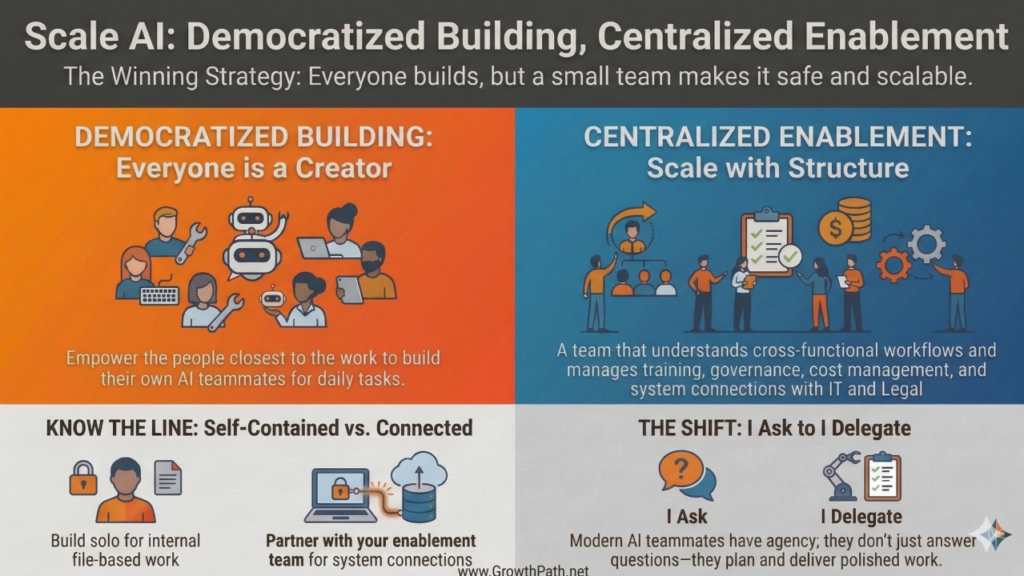
These workflows need an enablement team, working with IT and legal, to build the connections. You bring the knowledge and expertise of the jobs to be done. They provide the infrastructure.
This helps answer the common question: “Can I build this myself, or do I need to loop in others first?”
For self-contained work, start. For system-connected work, partner with your enablement team.
Who Makes This Work at Scale?
When I say “enablement team,” I don’t mean a new department. I mean a function. It might live in marketing ops, rev ops, IT, or a small cross-functional group. Someone who understands how work flows across teams, knows how to build automations and integrations, and can work with IT and Legal on security. People with this combination are hard to find right now.
They’re responsible for:
- Training people to build well from the start
- Supporting them when they get stuck
- Prioritizing which system connections to build now and which to hold
- Setting up governance so the organization isn’t flying blind
- Watching the costs, because usage-based pricing on automation tools, API calls, and connectors adds up fast once workflows go live
That last one catches people off guard. Most AI subscriptions are flat-rate but most workflow infrastructure is not. Few teams are budgeting for this yet. The training, support, governance, and cost management are what keep it from breaking.
Here’s what it looks like when you find these people. Some may be in your org already.
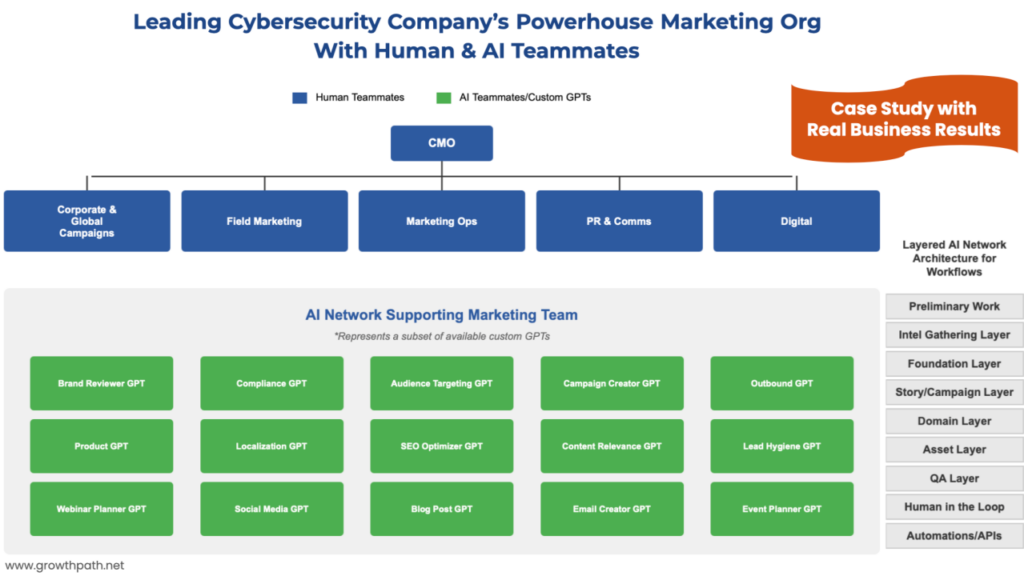
At a global cybersecurity company I work with, Marketing Ops stepped into this role. Everyone across marketing built their own AI teammates freely. Over 200 were created during experimentation. 57 are now in daily use. But when those teammates needed to connect to CRM, marketing automation, or internal repositories, Marketing Ops handled the integration and governance. They worked with Legal and IT to make sure the access was responsible and secure. Full case study here.
The model is democratized building, centralized enablement. Everyone builds. A smaller team makes it safe and scalable. This works because the people closest to the work know what to build. A product marketer knows what a positioning teammate should do. A field marketer knows what an event planning teammate needs. You don’t want to bottleneck that. But when those teammates need to connect to business systems, you need someone who knows how to do that without creating risk.
Dominic Abou-Jaoude is the Director of Marketing Data & Analytics at Sophos, sits on his company’s AI Committee, and built an internal triage system that helps people figure out when to bring in his team.

“The way I know when to step in is pretty straightforward. If someone is building something with their own files and their own thinking, they should just go do it. I want them to. That’s how they figure out what works.
The second a workflow needs to push or pull from a core system, like Salesforce, then I step in to help. Because one bad connection to a live system could create a stability or a security issue. My job is to work with our engineering and security teams to make sure the plumbing is secure and reliable so people can keep building on top of it.”
Kimber Spradlin, Chief Marketing Officer at Graylog, is coming at this from the other direction. Her team already has custom GPTs. Now she’s moving them toward orchestrated workflows using Claude.

“I built a drag-and-drop workflow designer for our team offsite inspired by Liza’s dynamic ‘AI teammate and workflow Ideator’ app. Vibe-coded the whole thing.
The reason I could design the system is because I’d already built the individual piece using custom GPTs. I knew what each step needed because I’d spent time using them one at a time first. Now we’re moving it to a production server and building the actual agents behind each step. We learned a lot from building and using custom GPTs . It was the reason I could see how the pieces fit together.”
Here’s the dynamic AI workflow app that sparked Kimber’s approach. It offers sample AI workflows and AI teammates for each one.
Dominic and Kimber are at different starting points in the same progression. Both are building.
Find Your Starting Point
Your situation is different from the person sitting next to you. Different tools, different constraints, different starting point. A CMO at a 5,000-person company and a VP of Sales at a 50-person startup are both reading this newsletter right now, and their next move isn’t the same.
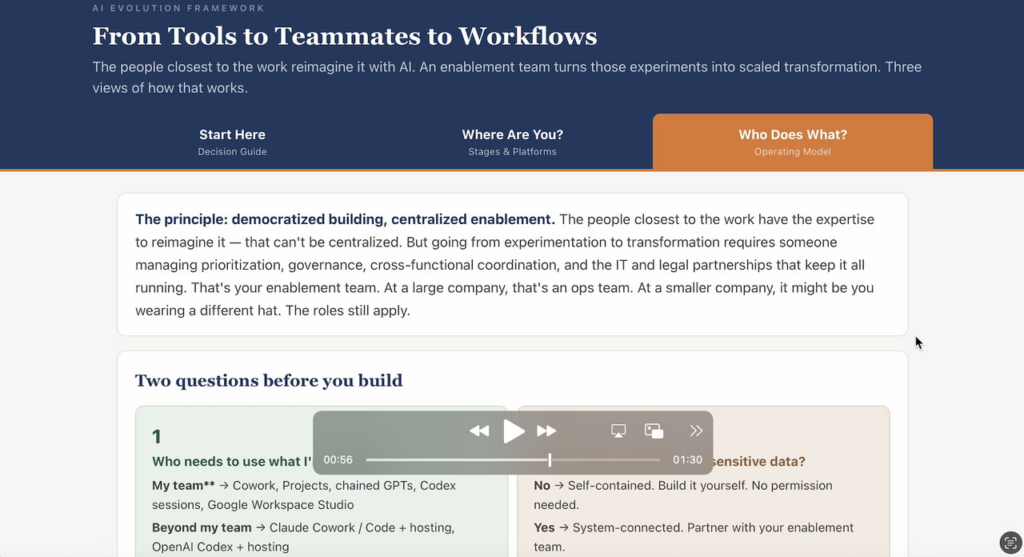
I built an interactive AI Evolution Framework guide that helps you figure out yours. It has three tabs.
Start with the decision guide on the first tab. Pick what you’re trying to do, and it maps you to the right stage, the platforms that fit, and whether you need to involve your enablement team. Takes about 30 seconds.
The other two tabs go deeper. One breaks down what’s changed inside each stage, including the platforms available now and how to know where you are. The other shows the operating model: what you build, what your enablement team builds, and how the roles work together. The short video below walks through both.
Interactive AI Evolution Framework Guide
See the 90-sec video preview of the interactive guide below.
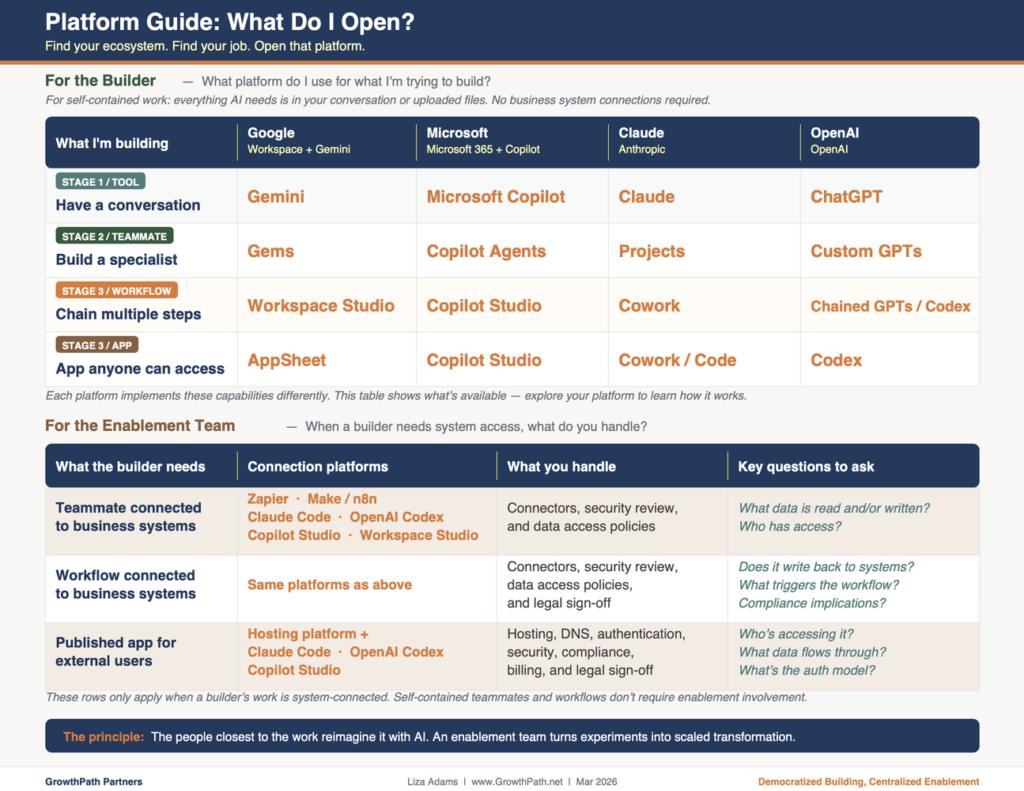
If you want the quick-reference version, the one-pager maps every platform to every stage across all four ecosystems (Google, Microsoft, Claude, OpenAI) on a single page. Keep it open when you’re deciding what to build next. Here’s the one-pager.
What Comes Next
The framework gives you a starting point. These are the decisions that come after.
- How fast should teams move from Stage 2 to Stage 3? Some teams I work with are still building their first AI teammates. Others are ready to orchestrate. The temptation is to push everyone toward workflows, but rushing past the teammate stage means you miss the part where people learn to evaluate AI critically. That skill is what makes Stage 3 work.
- Where does the enablement team role land in smaller organizations? At a large company, you have an ops team, IT resources, and legal review capacity. At a 50-person company, the person building AI teammates might also be the person managing governance. The roles still apply. The question is how they map when one person is wearing three hats.
- Are Custom GPTs a dead end? Ethan Mollick said they are. I get why. AI is moving toward systems that orchestrate themselves, picking tools and skills without you directing every step. But the thinking behind the GPTs is important. The knowledge you put in, the way you learned what AI is good at and where it falls short, the judgment about when to trust the output, all of that carries forward. You can’t set up AI-orchestrated workflows well if you’ve never orchestrated them yourself.
Go Deeper
- Watch three human+AI workflows built live on Leveraging AI with Isar Meitis
- How to connect individual AI teammates into workflows that produce better results
- How chained AI teammates move expertise across teams without losing context
- Applied AI workshops: shift your team’s mindset through applied use cases, then build AI
Your Turn
This is my best thinking right now. It will keep evolving as the platforms advance and as I learn with teams putting this into practice. I want to hear from you.
- Where is your team in this progression?
- Where are you stuck?
- What would be most helpful to go deeper on?
I read every response, and your input directly shapes what I write next. The conversations that feed this newsletter go both ways. Always have.
The Practical AI in Go-to-Market newsletter shares learnings and insights in using AI responsibly. Subscribe today and let’s learn together on this AI journey.
For applied learning: Explore our applied AI workshops, offering both strategic sessions (use cases and roadmaps) or hands-on building (create AI teammates during the workshop). You’ll leave with either a clear plan or working solutions.
For team transformation: See real examples—a lean GTM team’s step-by-step playbook and a global cybersecurity leader scaling to 150+ marketers with 57 AI teammates integrated into daily workflows.
For speaking: Here are virtual and in-person events where I’ve covered a variety of AI topics. I’ve also keynoted at many organization and corporate-wide events.
Whether through the newsletter, multimedia content, or in-person events, I hope to connect with you soon.