You’ve built the AI teammates. Custom GPTs, Copilot Agents, Gemini Gems for content, research, email, social. Now they’re sitting in separate chats, doing separate things, with no idea the others exist.
Connecting them is where the real value lives. McKinsey’s 2025 State of AI report found workflow redesign drives the biggest impact from gen AI. Yet only 21% of organizations have done it. Most are still bolting AI onto existing processes.
This is Part 2 of a two-part series. Part 1 covered designing individual AI teammates. Part 2 covers connecting them into workflows. New here? Start with this one or go back to Part 1. Either works.
AI Video Explainer and AI Podcast Versions of This Newsletter
To support different learning styles, this newsletter is available as a 7-min AI video explainer and a 14-min AI podcast with two AI hosts. If you haven’t seen these AIs in action, they’re worth a view. The tech is advancing in amazing ways. I used Google’s NotebookLM to create these and personally reviewed them for accuracy and responsible AI use.
Quick Take
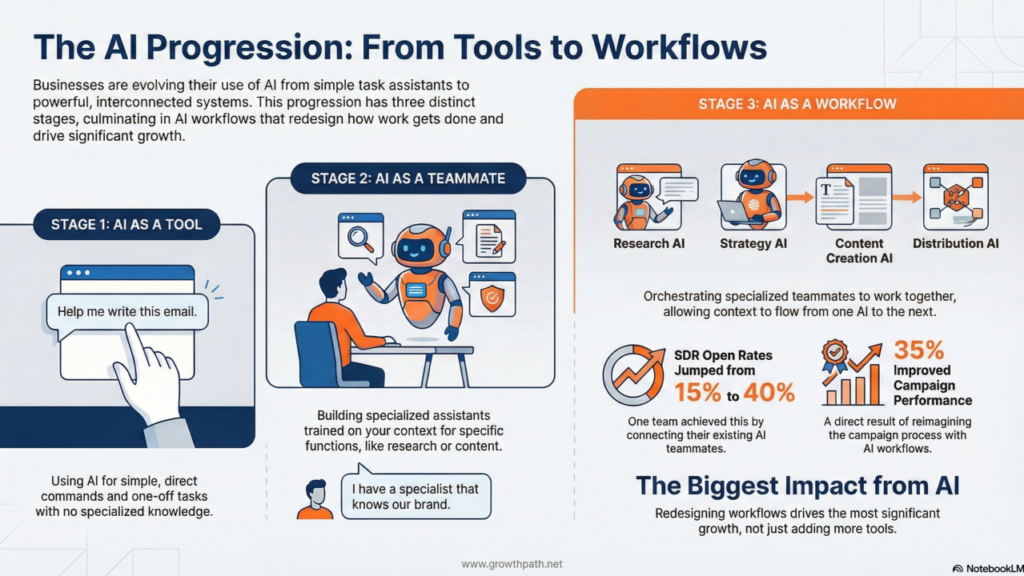
There’s a progression: Stage 1 is using AI as a tool. Stage 2 is building AI teammates. Stage 3 is connecting them into workflows. Not everyone needs Stage 3. But knowing it exists changes how you build.
How do you know if you’re ready? You have AI teammates that work well on their own but require you to copy outputs between them. Multiple people touch the same workflow with no shared context. Handoffs are where things break down. If that sounds familiar, keep reading.
One team’s SDR open rates jumped from 15% to 40%. Another saw 35% improved campaign performance. Not from building more AI teammates, but from connecting the ones they had.
Here are a few key insights:
- Not everything needs to be a workflow. If a tool or standalone teammate solves the problem, use it.
- The best workflow opportunities hide in the gaps between teams, where handoffs break and context gets lost.
- Let people across the org build AI teammates freely. When those teammates need to connect to business systems, a centralized team steps in.
Four questions to answer before connecting AI teammates into workflows:
- Do I need to build this at all?
- Teammate or team?
- Where does this workflow add value?
- Who builds and who integrates?
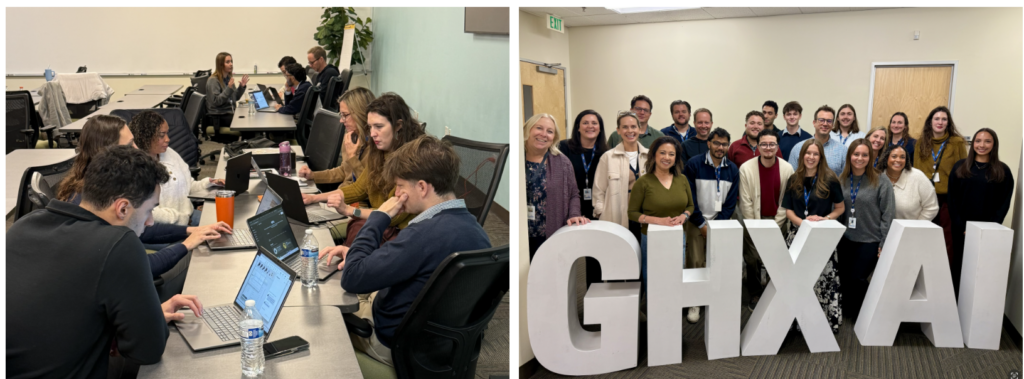
Bryan Bowles, VP Marketing at GHX, watched his team make this progression during a hands-on workshop.

“Our teams moved from ‘using AI as a tool’ to ‘designing AI teammates and workflows’ in just a few hours. Real use cases, hands-on building, open sharing. That combination sparked a level of creativity and collaboration that’s going to change how we work going forward. The hardest part of AI isn’t the technology. It’s helping humans rethink what’s possible.”
Bryan Bowles, VP of Marketing at GHX
Question 1: Do I Need to Build This at All?
The fastest way to fail at AI is to build something that already exists or automate something that shouldn’t exist at all.
Before you build, know where you are in the AI tech stack:
- Start with what you already have – Your CRM, marketing automation, CMS, and analytics tools already have AI built in or coming soon. Use those first.
- Use foundational models to innovate – Pick one or two platforms like ChatGPT, Claude, Gemini, or Copilot. Go deep. This is where you build custom teammates and workflows. This newsletter covers this.
- Consider specialized AI tools where they add clear value – If layers 1 and 2 don’t solve it, evaluate niche tools. They can deliver fast ROI. Just stay flexible — don’t sign long-term contracts for tools that might not exist in their current form in 18 months.
I discussed this AI GTM tech stack strategy in more depth in a previous post, including how to evaluate specialized tools.
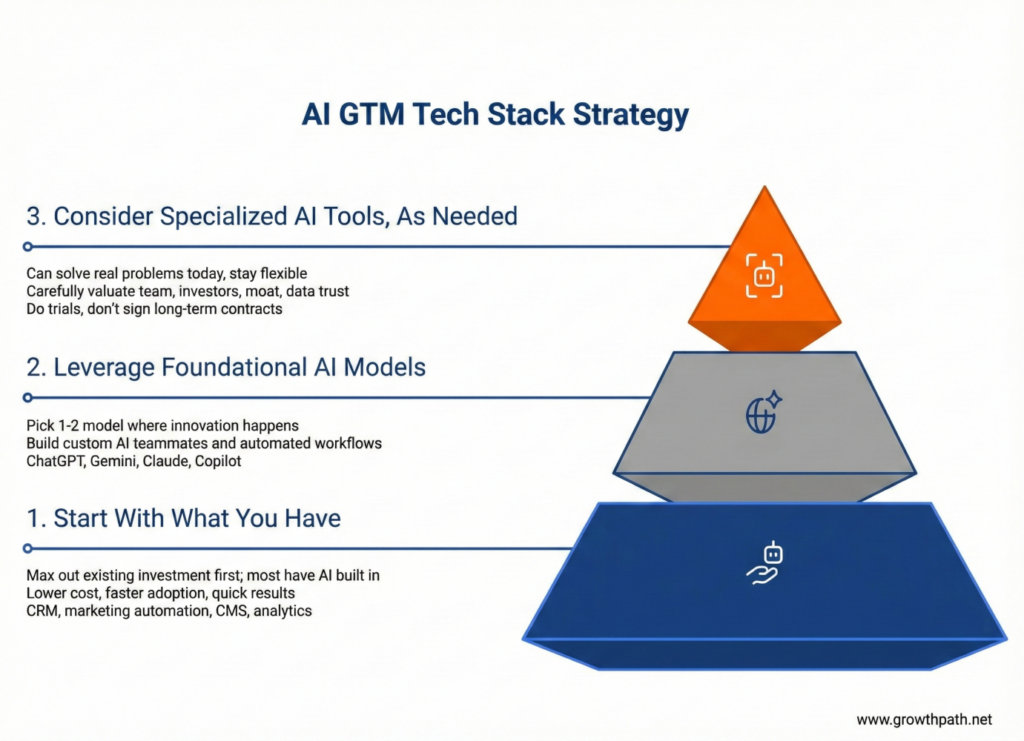
Know your options before you build. Sometimes the answer is a tool you already have. Sometimes it’s a specialized platform. Sometimes it’s custom. The wrong move is assuming you need to build everything from scratch.
Question 2: Teammate or Team?
Part 1 covered how to build one AI teammate well. Before you build more, ask: am I adding a specialist to a system, or creating a generalist that handles multiple jobs?
Think LEGOs. One big brick looks impressive but limits what you can build. Smaller pieces take more thought to put together, but they combine into anything.
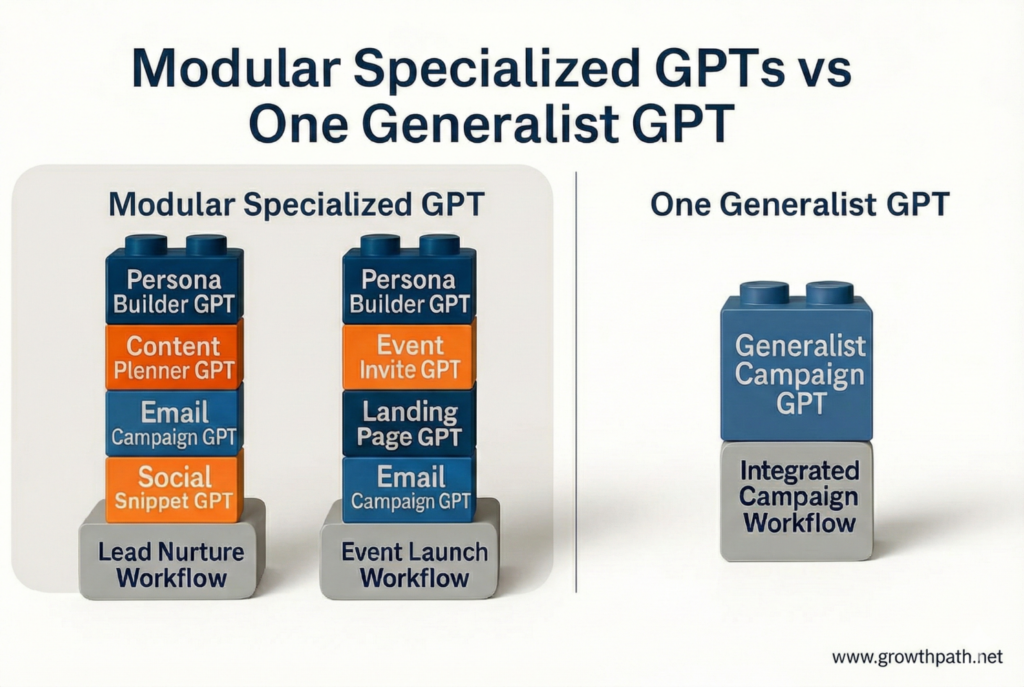
A generalist works well when:
- Your process is predictable and repeatable
- One person runs the full workflow
- You want quick answers in a single thread
- Simplicity beats depth for your use case
Specialists work well when:
- Campaigns vary in type, steps, or audience
- Multiple people own different pieces
- Deep domain expertise adds value
- The playbook changes depending on the project
Neither is wrong. Just make the choice on purpose.
One practical constraint: some AI platforms limit how many knowledge documents you can attach to a single teammate. A generalist trained on everything may hit that ceiling. Specialists go deep in a narrower domain, so they’re less likely to run into this.
What Chaining Means
Chaining connects AI teammates so they work in sequence in a workflow. Each one sees the full conversation and builds on what came before. Instead of copying outputs between chats and re-explaining context, information flows through.
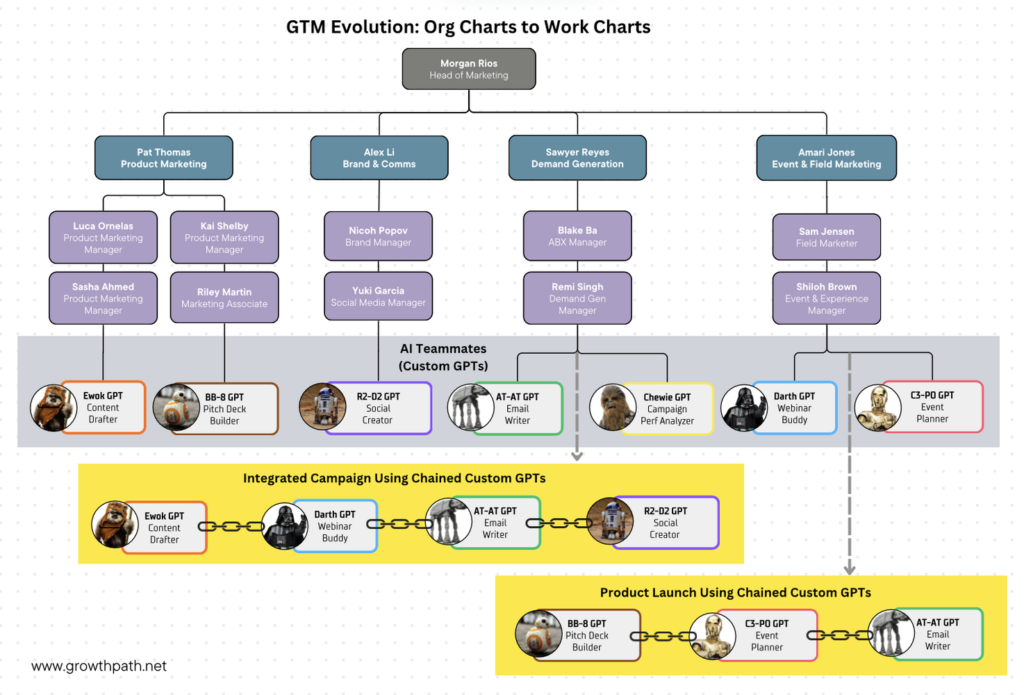
How chaining works varies by platform. ChatGPT supports @mentions to invoke multiple teammates in the same conversation. Others require switching between chats or configuring orchestration behind the scenes. The mechanics are evolving fast.
We covered the mechanics of chaining in The End of Handoffs: How AI Teammates Work Together. The core principle: design teammates for connection from the start. If they can’t see each other’s work, you’re back to copying and pasting.
This only works when each AI teammate is well-trained. Weak links in the chain make problems worse, not better. It’s also essential that there’s a human checking and guiding the AI teammates’ work along the way.
One team chained GPTs to automate their product launch process. On paper, it looked efficient. In practice, the output was a mess. The VP of Marketing realized they were automating a broken process.
The original workflow had content briefs created before positioning was finalized, assets built in silos and “aligned” at the end, and three review cycles that kept catching the same issues. The AI just made those problems faster and more visible.
They scrapped the chain and reimagined the workflow: positioning locked → content + assets in parallel → compliance review → launch. The AI teammates stayed the same. The workflow around them changed completely.
Joe Sturgess, Director of Performance Marketing at Katalon, has been building AI teammates with his team.

“We’ve been building AI teammates that slot right into our daily workflows, from campaign planning to content optimization to performance analysis. We treat AI like a colleague you’re still getting to know. It needs context, feedback, and a bit of patience. But once it clicks, it becomes a force multiplier. The goal isn’t just automation. It’s freeing up space for higher-value thinking and testing bold ideas faster.”
Question 3: Where Does This Workflow Add Value?
The best workflow opportunities hide in the gaps between teams, where handoffs break and context gets lost.
Two Types of Workflows
- Internal workflows connect teams within your organization. The handoffs between product marketing and demand gen, between sales and customer success, between brand and field marketing. The friction lives in the gaps between functions.
- External workflows face the market. Campaign execution, lead nurture sequences, customer onboarding, sales enablement. The friction shows up in the customer experience.
Both are worth pursuing. Start where you see the biggest gap between what teams think they deliver and what actually happens. Map what the customer (internal or external) actually experiences versus what each team thinks they deliver. That gap is your workflow opportunity.
Two Approaches to Workflow Design
Once you’ve identified the gap, you have two approaches.
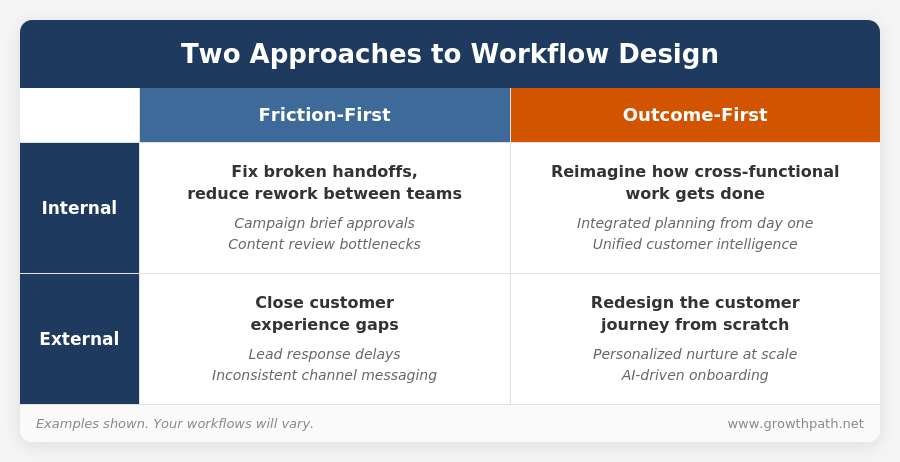
Friction-First: Start with your current workflow and find what’s broken.
- Where does work get stuck or delayed?
- Where do handoffs create rework?
- Where does the customer experience break down?
- Where can AI accelerate steps, smooth handoffs, or improve consistency?
This approach works when the workflow is fundamentally sound but has friction worth removing.
Outcome-First: Start with the outcome. Design backward.
- What’s the primary outcome? What does good look like?
- What are the constraints (compliance, brand, legal, trust)?
- What steps actually drive that outcome? Who should own each: human, AI, or hybrid?
- What’s the simplest version of this workflow?
This approach prevents “faster horse” thinking. Don’t automate a broken process. Reimagine it.
Check out a global cybersecurity company’s outbound account research workflow and enterprise content creation workflow built using chained AI teammates here.
Hackathons as a Discovery Tool
Some teams use hackathons to surface workflow opportunities. People showcase what they’ve built. The strongest entries are reimagined workflows with connected human and AI teammates working across functions.
Hackathons help you see what teammates already exist, evaluate which ones deliver real value, identify gaps, and inspire others to think in workflows rather than tools. The winning entries often become templates for how work gets done.
Rhiannon Naslund, CMO at Origami Risk, used a leadership applied AI strategic workshop to prepare her team for a companywide hackathon.

“We started with a leadership session to align on how AI teammates could work together across our marketing workflows. When the company held a hackathon a few weeks later, our team was ready. They’d been building and refining their AI teammates since the workshop. The hackathon gave them a stage to show what connected workflows could do — and inspired other teams to think the same way.”
Question 4: Who Builds and Who Enables?
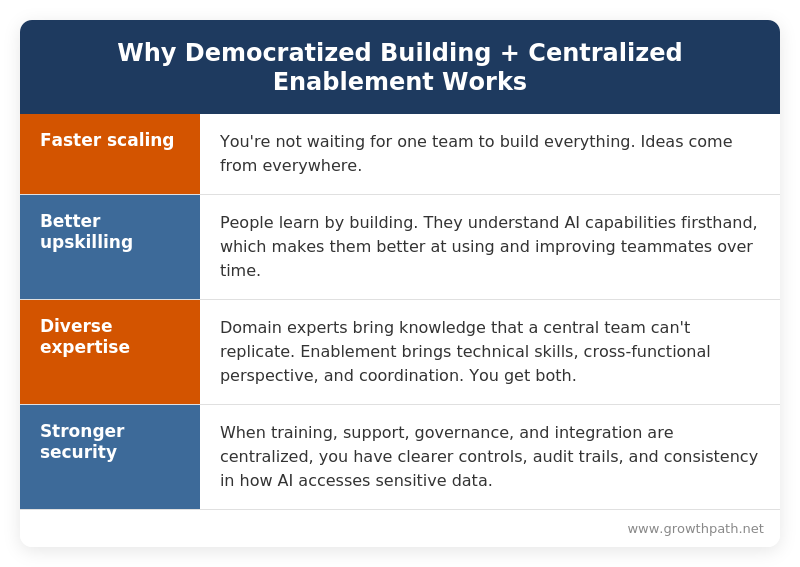
Organizations handle this differently based on size, risk tolerance, and technical capacity. Here’s an approach that works well for teams that want to scale quickly, upskill their people, and maintain security controls.
Democratized Building, Centralized Enablement
Let people across the organization build AI teammates. That’s where experimentation happens. A product marketer knows what a positioning teammate should do. A field marketer knows what an event planning teammate needs. Don’t bottleneck this creativity.
But building is just the start. Training, support, governance, and integration are centralized functions, whether that’s one team (like Marketing Ops, Rev Ops, or an AI enablement function) or several working together.
Enablement includes:
- Training – helping people build well from the start
- Support – unblocking teams when they get stuck
- Governance – policies, security reviews, and working with Legal and IT
- Integration – connecting AI teammates to business systems
Some organizations centralize all four in one team. Others split them across Ops, IT, and L&D. The key is that these functions are coordinated, not scattered.
Chaining vs. Connecting to Systems
Chaining (covered in Question 2) is something anyone can do. You control what gets shared.
Connecting to systems is different. When AI starts reading from or writing to CRM, marketing automation, or customer data, the rules change. Some organizations allow direct connections. Others put a buffer layer in between using tools like Zapier, Make, n8n, or Glean. Others route everything through a centralized team.
Think of it like building security. Direct connection is like giving visitors a key. A buffer layer is like having a front desk that makes sure the right people get to the right places.
Know your company’s approach before you build something that needs system access.
When You’re Ready to Scale
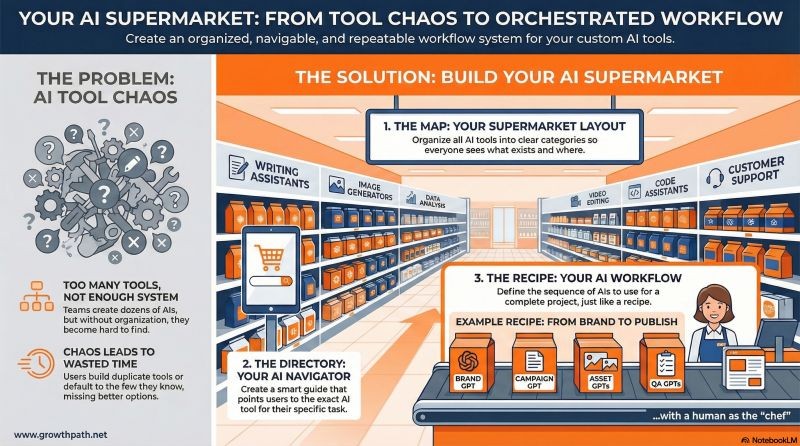
As your workflows grow, you’ll need infrastructure: tracking what teammates exist, helping people find the right ones, governing who can connect to business systems.
We covered that scaling playbook in the case study about a leading cybersecurity company, including how they organized teammates into layers and built systems for tracking, navigation, and governance (see infographic below). If scaling is your challenge, start there.
For now, focus on connecting your first workflow.
The Bottom Line
Building AI teammates is Stage 2. Connecting them into workflows is Stage 3. That’s where AI moves from productivity tool to growth driver.
Not everything needs to be Stage 3. But sitting in meetings debating handoffs that AI could handle isn’t a great alternative.
Your next step: Pick one workflow that crosses teams or involves handoffs. Map what the customer (internal or external) actually experiences versus what each team thinks they deliver. That gap is your starting point.
New to AI teammates? Start with Part 1: Designing AI Teammates That Get Used.
If you’re experimenting with workflows, I’d love to hear what’s working. Reply to this email or share on LinkedIn.
The Practical AI in Go-to-Market newsletter shares learnings and insights in using AI responsibly. Subscribe today and let’s learn together on this AI journey.
For applied learning: Explore our applied AI workshops, offering both strategic sessions (use cases and roadmaps) or hands-on building (create AI teammates during the workshop). You’ll leave with either a clear plan or working solutions.
For team transformation: See real examples—a lean GTM team’s step-by-step playbook and a global cybersecurity leader scaling to 150+ marketers with 57 AI teammates integrated into daily workflows.
For speaking: Here are virtual and in-person events where I’ve covered a variety of AI topics. I’ve also keynoted at many organization and corporate-wide events.
Whether through the newsletter, multimedia content, or in-person events, I hope to connect with you soon.