• Skip to primary navigation
  • Skip to main content
GrowthPath Partners LLC

GrowthPath Partners LLC

Empowering Purpose-Driven Growth

  • Engagements
  • Speaking
  • Newsletters
  • About
  • Contact
  • Show Search
Hide Search

Newsletters

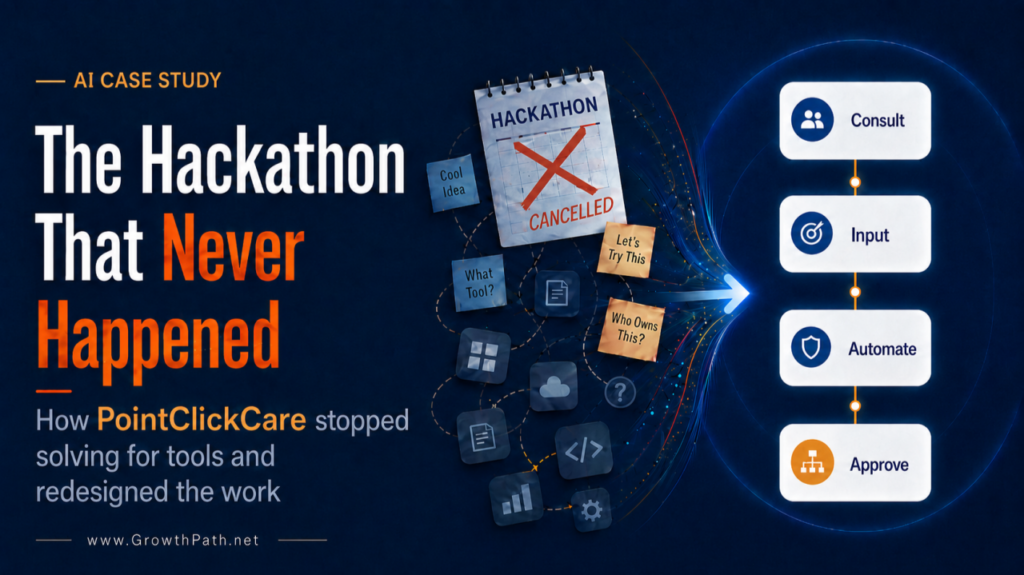
The Hackathon That Never Happened: How PointClickCare Stopped Solving for Tools and Redesigned the Work

Liza Adams · August 6, 2026 ·

The Hackathon That Never Happened: how PointClickCare stopped solving for tools and redesigned the work

The hackathon we planned with PointClickCare’s marketing team never happened.

We had the format, the workflows, and people ready to build. Then AI got more agentic, and the platform questions came up. Which tool would the company standardize on? Which connectors would security enable? What would meet legal guidelines? The hackathon slipped, then slipped again, and we let it go.

A hackathon, the way I run one, is a multi-week build window that ends in a showcase day, where the team sees what’s been built and works out what’s worth keeping. It’s the turning point, where a team stops building in pockets and starts building together.

I’m opening with the failure on purpose. You’ve read AI transformation stories that run in a straight line from kickoff to results. This one didn’t, and the zigs and zags are where the learnings are.

PointClickCare, a leading health tech company supporting over 30,000 provider organizations and every major U.S. health plan, is now running one of the most thoughtful marketing redesigns I’ve seen. They got there through stalled plans, platform changes, and governance debates, and they kept going anyway.

The context is what makes this one worth studying: healthcare data, three AI platforms in play, a skill that everyone in the company now uses with customers, and IT, security, legal, and finance involved from the start.

Renée Gapen, CMO of PointClickCare, agreed to share the good, the bad, and the messy version of the story. Her reason was simple: nobody is an expert at this yet. Her team got further because other companies were open about what worked and what didn’t, and she wants to do the same for the next team.

Quick Take

Just starting gets you further than waiting for the perfect plan. Every detour this team took taught them something they used in the next step.

  • Asset development went from months to weeks, sometimes days. Specialists no longer create every asset. They started building the systems that produce them, encoding brand rules, templates, and product context into skills, which are instructions that tell AI how the company does a specific kind of work. The business owner gets a first draft in minutes, and nothing goes out until a specialist approves it.
  • Marketing built a skill about 2,000 people across the company now use. A redesign that started in one function now changes what customers see, so PointClickCare shows up as one company rather than several.
  • A governance question answered the platform question, and it wasn’t the question the team started with. Security went from the checkpoint that slowed things down to the group that helped test and deploy the first company-wide skill.
  • The four problems driving the redesign have nothing to do with tools. They are about where knowledge lives, how fast work happens, who touches it along the way, and what the team learns from what it launches.
  • Before FY27 planning, the team pulled five people out of their day jobs for 90 days to redesign the workflows first. Roles and org design follow the work, and I’d argue that’s the right order.

Watch or Listen Instead

To cater to different learning styles and time constraints, this newsletter is also available as a 4-min cinematic AI video explainer and a 16-min AI podcast with two AI hosts. Both were made with Google’s Gemini Notebook and personally reviewed for accuracy and responsible AI use.

Where They Started

When we began working together in late 2025, PointClickCare’s marketing organization of about 80 people was already using generative AI in real ways. Roughly 60% of marketing content was already being accelerated by AI-assisted first drafts. The energy was there. How work got from one person to the next was the problem.

Work ran on briefs and handoffs. A business owner who understood the product, the customer, and the market wrote a brief, handed it to a specialist, waited, reviewed, revised, and waited again. Each handoff added delay and interpretation risk. The people closest to the problem weren’t generating the output. And the business was speeding up, especially around new product launches, faster than the process could keep up.

This is the marketing model many of us grew up in, built for a world where production capacity was the constraint. That constraint changed.

Our engagement ran over several months: an in-person leadership and strategy workshop, virtual sessions for the full marketing organization, function-specific hands-on workshops, and a technical session for the ops and builder group with my automation business partner Justin Parnell. Weekly office hours and syncs with the internal program champion kept it going.
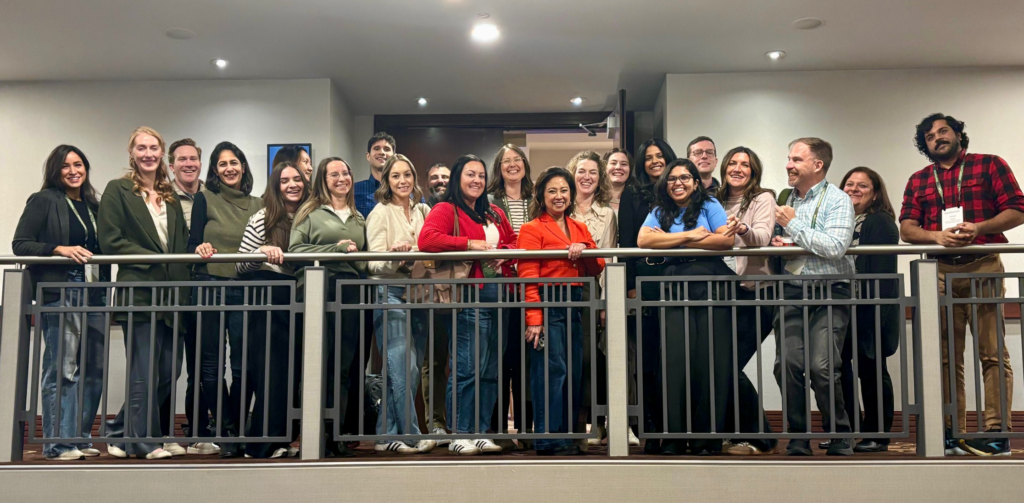
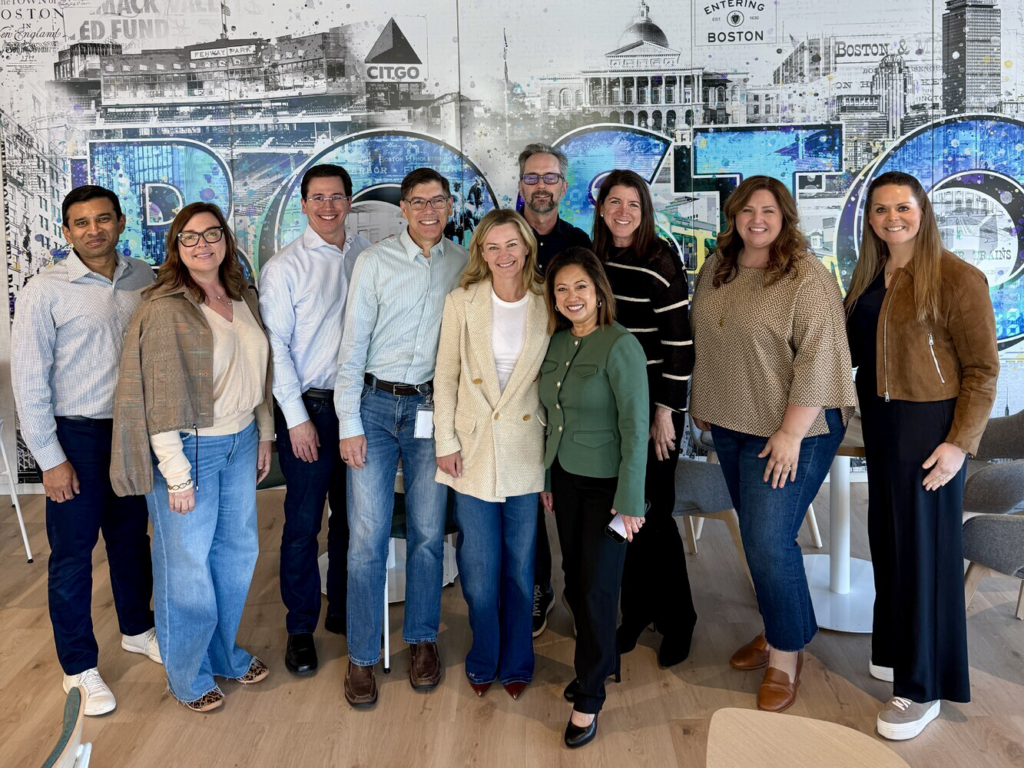
PointClickCare marketing leaders and AI trailblazers at a workshop in Niagara Falls
PointClickCare marketing leaders and AI trailblazers at our workshop in Niagara Falls. As Renée put it, ironically our first step away from decades-old waterfall processes.

The Messy Middle

This is the part that doesn’t usually get covered in case studies.
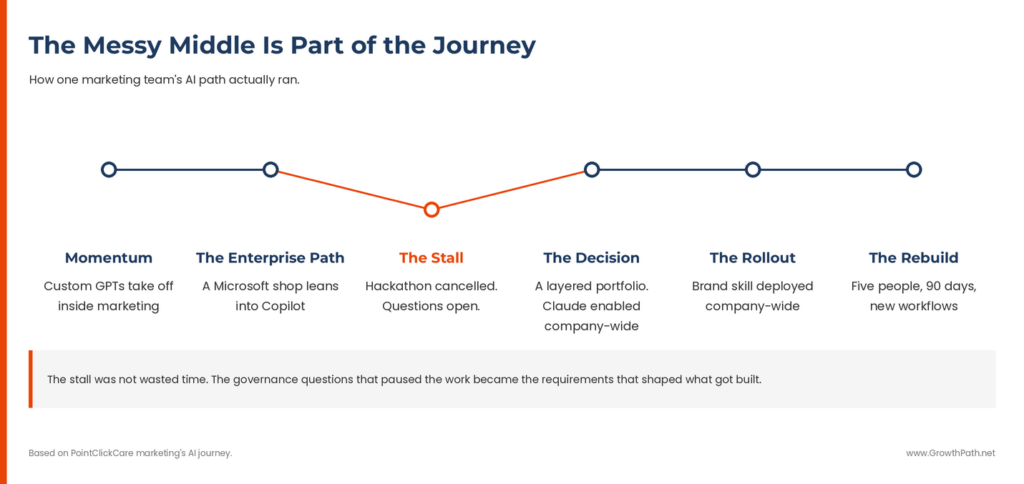
The messy middle: timeline of one marketing team's AI path from momentum to rebuild

The team’s early momentum ran on ChatGPT and custom GPTs. People liked them, built with them, and learned fast what good looked like. But that adoption stayed inside marketing.

PointClickCare runs on Microsoft. Teams, SharePoint, the tools everyone lives in all day. So Copilot was the natural enterprise path, and the company leaned in. The timing was the hard part. The agentic capabilities marketing wanted were early across the whole category in that window, and the security reviews for connectors and access were still being worked out. Those reviews were doing their job. This is healthcare, and the guardrails exist for good reasons.

That’s when the hackathon died. It wasn’t lack of interest. It was honest uncertainty about which platform to build on and what the rules would be.

The hypothesis going in was that everyone should be building, and what they found refined it. Plenty of work is self-contained, and the person closest to it should start. But workflows that need connectors, system access, and coordination with IT, legal, and finance require technical depth and alignment work that sits outside a marketer’s day job. More of their work turned out to be that second kind than the plan assumed.

Headshot of Renée Gapen, CMO of PointClickCare
Renée Gapen, CMO of PointClickCare.

“We tried to be overly efficient out of the gate. We tried to find the perfect platform first, with everyone building, and it stalled us. What moved us forward was being honest about where we were: experimenting in silos, with thin governance and rising expectations, especially as AI-enabled innovation halved product development cycle time. Once we understood that, we could design the operating model we actually needed.”

When Security Became a Partner

Here is my favorite part of this story. The same governance questions that contributed to stalling the hackathon ended up answering the platform question.

When the team looked at where their first company-wide skill should live, one they would build, test, and govern centrally, the deciding question became governance: which platform lets us push a skill to everyone, manage it centrally, and keep quality and compliance in one place. Working with their security team, they found their answer. Their IT organization then enabled Claude across the company, which gave marketing the technical orchestration that had been out of reach when the journey started.

The answer was a layered portfolio, with each tool doing the job it does best.

  • Microsoft 365 is the foundation, running the collaboration and productivity backbone the whole company works in, with Copilot woven into those tools.
  • Claude became the home for marketing’s centrally governed skills and agentic workflows, with more of their systems connected to it every couple of weeks.
  • ChatGPT gets credit too, because it’s where the team learned what they wanted AI to do in the first place.

The brand skill itself tells you how the relationship with security grew. Marketing built it with brand guidelines, sample assets, and rounds of human testing with the teams that live in presentations every day. Security helped test and deploy it, and the skill now works as a brand governance layer, so work starts on brand instead of getting fixed after the fact.

None of this is theoretical in healthcare. Every skill launched to the entire company has to hold up under the same scrutiny the product does.

Read that again. Security went from one of the reasons plans stalled to the group that helped get the first skill into everyone’s hands. When you treat governance requirements as part of the design, the people who own those requirements build with you instead of reviewing your work at the end.

Willow Terry, VP of Market, Competitor and Customer Insights, led this work, coordinating across marketing leaders and partner teams.

Headshot of Willow Terry, VP of Market, Competitor and Customer Insights at PointClickCare
Willow Terry, VP of Market, Competitor and Customer Insights at PointClickCare.

“What felt like a stall was actually a turning point. The pause gave us the opportunity to bring together marketing leaders, each with a deep understanding of their function’s workflows and pain points, alongside experts from IT, Security, Legal, and Finance.

Together, we shifted from experimenting with AI tools to designing the capabilities, governance, and ways of working needed to scale AI across the company.”

About 2,000 people across PointClickCare now use a skill that marketing built. Whatever an employee puts in front of a provider or a health plan starts on brand, so PointClickCare shows up to the market as one company rather than several.

Reimagine the Workflows First

The people closest to the work kept bringing up the same underlying problems, whatever function they sat in. So instead of starting with tools, the team stepped back and redesigned the work itself. They pulled five people out of their day jobs for 90 days to rethink how marketing operated and find the root causes limiting speed, scale, and effectiveness.

Ninety days of five people is what it took at their scale. Yours might be different. What counts is that the time is protected, because transformation doesn’t happen on the hamster wheel. That sprint is where the four-stage workflow, the skill-building playbook, and the hub-and-spoke operating model came from.

Here are the four problems they were solving.
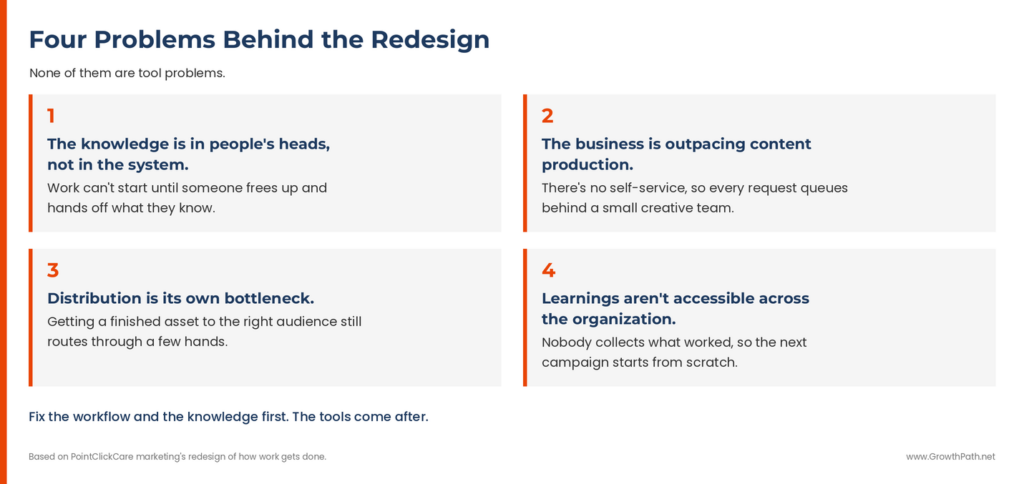
Four problems behind the redesign, none of them tool problems

Notice that none of these are tool problems. They are workflow and knowledge problems, which is why a tool-first approach kept stalling.

Nobody at PointClickCare was collecting what worked, because an all-human team could only do so much and that work got skipped for years. Still hard, or just historically hard? For this one, the reason is gone. Check out 5 Reimagined Workflows: Work We Skipped That AI Now Does to learn more.

Dena Stewart, one of the marketing team’s 90-day orchestrators, put it this way: “The big move was about how do we move from experimenting as individuals to performing as a team.”

What They’re Building

The business owner still says what they need. What changed is who answers. Specialists encoded the brand rules, the templates, and the product context into skills, so AI produces the first draft in minutes and the specialist reviews it instead of building it from nothing. The brief didn’t disappear either. It gets produced automatically, downstream, at the point the work enters production.
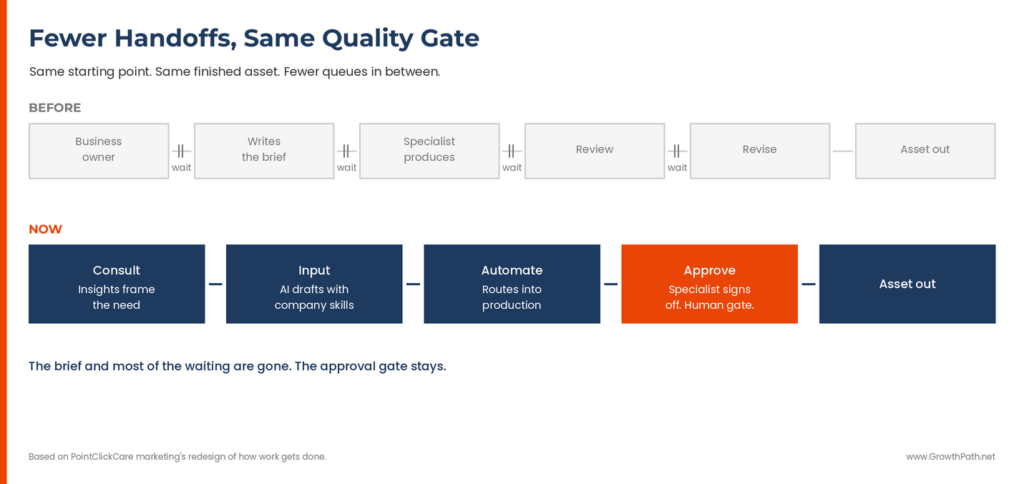
Fewer handoffs, same quality gate: the old asset workflow vs. the new one

The draft routes into production through Adobe Workfront’s AI briefing assistant, which fills in the project details, so the work is ready for execution. Humans still approve. Functional experts check the work instead of producing it, and quality is still their call.

The specialists’ work changed. They own the skills now, test them, and keep them current, and knowledge that used to live in their heads is written down where everyone can use it.

Cameron Ingrum, Director of Product Marketing at PointClickCare, is on the business owner side of that change.

Headshot of Cameron Ingrum, Director of Product Marketing at PointClickCare
Cameron Ingrum, Director of Product Marketing at PointClickCare.

“We used to measure asset development in months. Now it’s weeks, sometimes days. That didn’t come from the tool. It came from two things working together: the context we gave Claude about how we position and who we’re selling to, and the templates and brand rules our creative team encoded for each type of asset.

Together they get a product marketing manager to a v1 that’s 80% complete before a creative project even starts. Our designers spend their time at the top of their license now, refining instead of producing from scratch.”

What They Built to Keep It Going

Two other things came out of this work, and both are built to keep running after the 90 days end.

A playbook for building skills

Every skill goes through the same process. It takes longer than turning on a tool, and that’s the point.

  • Define the job the skill is doing.
  • Gather the source of truth: the actual brand guide, the real templates, the examples the team would point to as gold standard.
  • Encode all of it into instructions the AI can follow.
  • Run three structured QA rounds where the AI generates real artifacts and employees pick them apart, first for structure, then for edge cases, then for polish.
  • Hand it to the teams who own the work to run on their real projects. Creative and Brand stress-tested the PowerPoint skill. Content put the copy guide through its paces.
  • Only after those teams sign off, and legal and security have had their look, does IT validate the finished package and turn it on for the whole company.

Not every skill goes through all of that. One thing decides which ones do: how many people will use it.
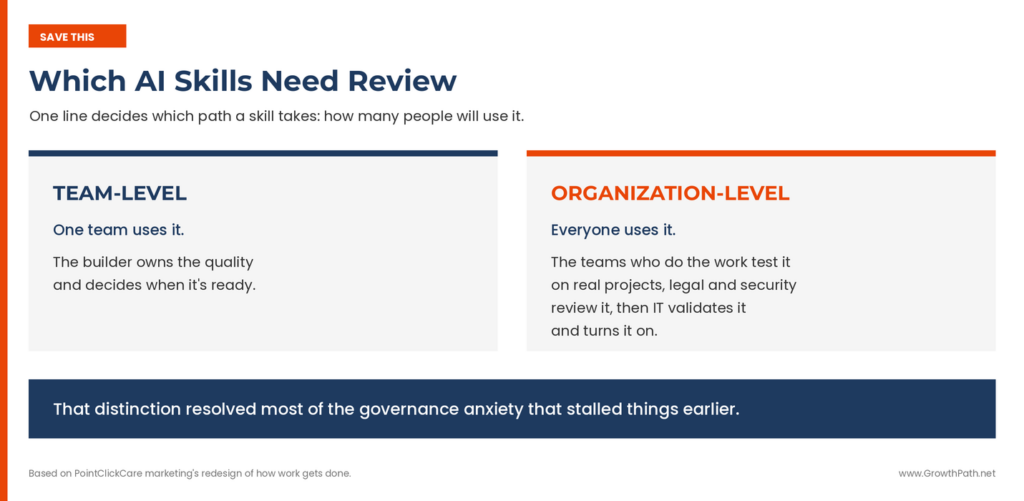
Which AI skills need review: team-level vs. organization-level skills

An org design decision

The team looked at the three ways to organize AI in marketing: one central team that builds everything, every function building on its own, or a hub and spoke mix. They were already decentralized informally, which in healthcare is exactly the tool sprawl and compliance risk you’d worry about. They’re going to hub and spoke.

They landed on some version of democratized building with centralized enablement, which is where the lesson from the stall ended up. Their version puts the playbook, the quality gates, and the relationship with IT in the hub, while each function builds on that foundation and owns its outputs. How the pieces get divided will keep changing, and the part worth borrowing is the decision itself: the hub owns the system and the standard, and deliberately does not own every build.

Early Indications

The brand skill is in production across the organization, and it’s speeding up the new product introduction workflows. That skill was about brand consistency, and it was also about proving that a governed skill could be built, reviewed, and released across the business.

They haven’t re-measured the 60%. What changed in nine months is who produces the first draft and how many hands it passes through.

Most of what’s in production today is the same work happening faster, and faster is the floor. The work that couldn’t be done before, the learning loops and the insight repository, is next. That’s an honest place to be nine months in, and it’s the part I’d watch, because innovation is where the growth comes from.

Think big, start small, move fast. Proving one skill company-wide is what makes the next set faster to build.
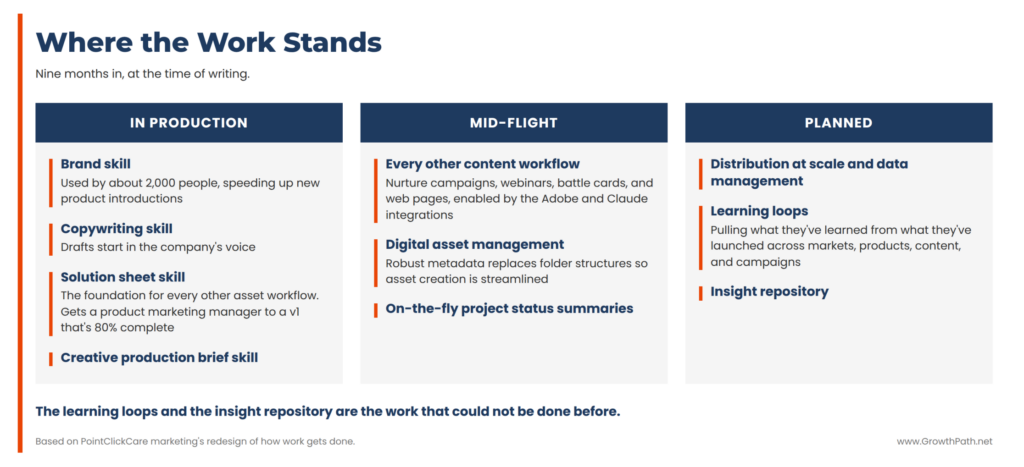
Where the work stands: skills in production, mid-flight and planned

As Jake Campbell, PMP, another of the marketing team’s 90-day orchestrators, says, “It’s not a build once and you’re done. We’re going to learn as we go.”

What to Take From This

Reimagine the work first, and the roles, the governance, and the org design follow. Three things from this team’s journey apply, whatever your industry.

  • When a platform decision stalls you, the platform usually isn’t the problem. Look at the workflow and knowledge problems underneath it. Bring security, IT, legal, and finance in early and treat their requirements as part of the design. The team that slows you down at the gate can become the team that builds with you.
  • Build the shared context before you scale the outputs. If the brand, audience, and product knowledge are in people’s heads, AI makes the handoff problem worse. If it sits in files your tools can reach, the handoff goes away.
  • Start before you’re sure. This team brought in new platforms, cancelled a hackathon, and rebuilt their approach more than once. Every detour informed the next decision.

Each of those three is a reframe in practice. If you want the full set, I covered the eight reframes that change how GTM teams see AI in a recent issue.

Where to Start

Pick one workflow where a brief changes hands. For PointClickCare it was the new product introduction. Map where the knowledge for that work actually resides, whether that’s in someone’s head, in scattered documents, or somewhere your AI tools can reach. That map tells you what to build first.


The Practical AI in Go-to-Market newsletter shares learnings and insights in using AI responsibly. Subscribe today and let’s learn together on this AI journey.

For applied learning: Explore our applied AI workshops, offering both strategic sessions to shift mindsets through practical AI uses and hands-on sessions to build human+AI workflows. You’ll leave with either a clear plan or working solutions. Office hours provide follow-on support to keep momentum going.

For ongoing advisory: I work with leaders as a strategic advisor through their AI transformation, providing guidance, frameworks, and a sounding board as they build. If that’s what you need, let’s talk.

For team transformation: I partner with GTM leaders to move from scattered AI adoption to an operating model where human and AI teammates work together across workflows. See real examples: a lean GTM team’s step-by-step playbook and a global cybersecurity leader scaling to 150+ marketers with 57 AI teammates integrated into daily workflows.

For speaking: Here are virtual and in-person events where I’ve covered a variety of AI topics. I’ve also keynoted at many conferences and corporate events.

If any of this resonated, I’d love to hear from you. Reply to this email, find me on LinkedIn, or come say hi at an event.
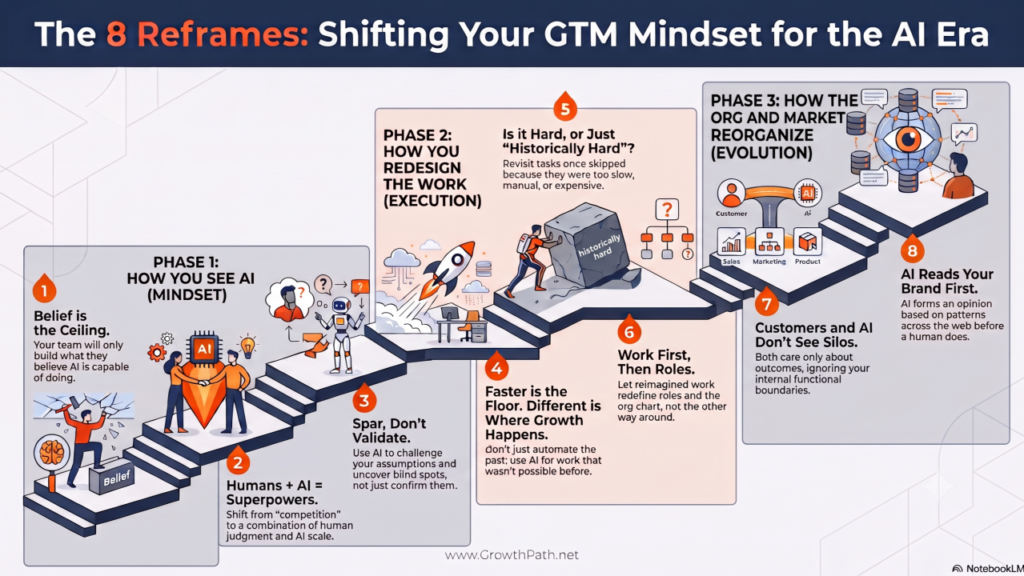
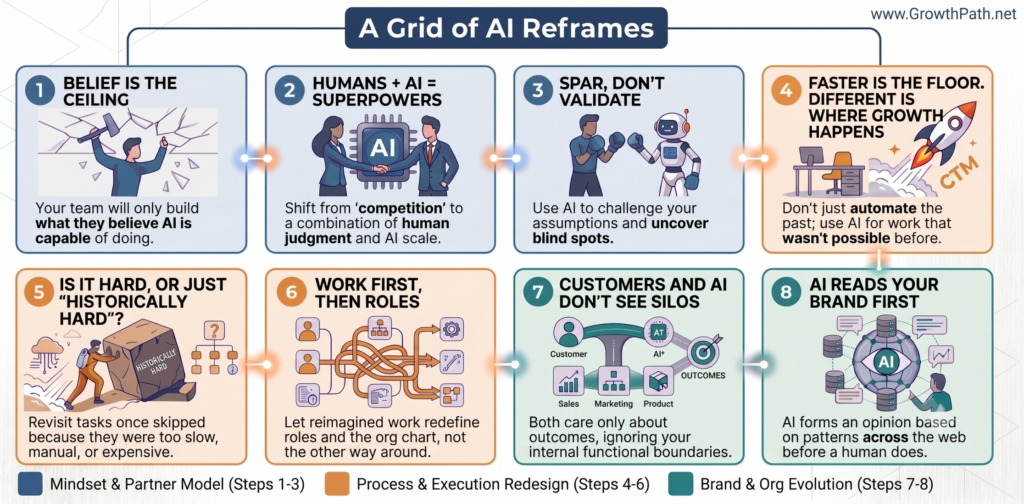
The 8 Reframes that Change How GTM Teams See AI, and What They Build

Liza Adams · July 23, 2026 ·

The 8 Reframes: shifting your GTM mindset for the AI era, shown as a staircase in three phases

Sometimes you hear one line, and you can’t unhear it. Your work didn’t change, but how you see it did.

That’s a reframe, and it’s one of the most underrated tools in AI transformation. What you can build is limited by what you believe AI is capable of, and belief changes when the frame changes.

A grid of the eight AI reframes, grouped into mindset, process and org evolution

Quick Take

These eight aren’t separate lightbulb moments. One holds up the rest. Your team only builds what they believe AI can do, so belief comes first. The others tend to build on each other, but you don’t have to take them in order. Start where your problem is.

  • How you see AI – Your team builds only what they believe AI can do. That belief is the foundation for everything else.
  • How you redesign the work – Once you see things differently, you point AI at growth, find work that was historically hard for humans to do, and rethink the roles.
  • How the org and market reorganize – When the workflows change, the functional org silos stop making sense, and the way AI sees your brand influences how the market finds you.

If you reorganize the org chart before your team believes AI can do more or do work differently, then you’re just relabeling boxes. These are the eight reframes that keep coming up in my work with GTM teams. Read them in any order. If two or three land, you have something to bring into your next planning meeting. The body does what the mind believes.

Watch Or Listen Instead

To cater to different learning styles and time constraints, this newsletter is also available as a 5-min cinematic AI video explainer and a 20-min AI podcast with two AI hosts. Both were made with Gemini Notebook (aka NotebookLM) and personally reviewed for accuracy and responsible AI use.

The eight reframes come from the last year of this newsletter and the work behind it, from workshops to office hours to full transformations. There are more, but these are the ones that changed how teams saw the work, and then what they built.

Start Here: How You See AI

Start here. This first group is about how you see AI, and it’s the floor the rest stand on.

1. Your team will only build what they believe AI can do.

Old thinking: Our people have the tools. Why aren’t they building orchestrated workflows?

New thinking: What you can build is limited by what you believe AI is capable of.

If your team’s experience with AI is mostly faster drafts and summarized reports, that’s the ceiling they’ll build to. They can’t picture a workflow that reads every Gong call, customer review, win/loss note, and analyst report from the quarter and tells them the top buyer objections that are beginning to impact pipeline. They’ve never seen one.

A team that sees AI as a search engine uses it for search. But every reframe after it depends on believing AI can do more than answer questions.

Go Deeper: Four Mindset Shifts to Move Them Forward

2. It’s not humans vs AI. It’s humans + AI, each with superpowers the other doesn’t.

Old thinking: AI is going to replace humans. It’s a competition.

New thinking: Some work gets automated. The lasting advantage is humans and AI together, with each one overcoming the other’s limitations.

The versus framing sets up the wrong fight, but it’s not wrong because jobs are safe. AI will do some work on its own, and pretending otherwise helps no one. The point is that the highest-value work comes from the combination of humans and AI working together.

AI does things at scale no person can match. Unlike us, it doesn’t have off days. It works the same way on the day you’re running on 40% after a rough night on product launch week. On the other hand, you bring judgment, gut feel, and lived experience. Put them together and you get work neither can do alone.

So the real question is whether you use the time AI frees to do work that grows the business, because that determines if your team shrinks or grows.

Go Deeper: AI Made Me More Human (This is one of my favorite newsletters I’ve written. And truly, AI has made me more human and I explained why and how.)

3. Use AI to confirm what you think and you do worse. Use it to challenge you and you perform at the highest level.

Old thinking: Using AI to check my thinking makes me better.

New thinking: AI is an amplifier of what’s already there. Ask it to validate your beliefs and you risk confirmation bias. Use it to challenge your assumptions and you uncover blind spots and make ideas better.

This one has data behind it. Vivienne Ming, an American neuroscientist, ran an experiment with real-world prediction teams and found the 5 to 10 percent who outperformed everyone, including professional prediction-market experts, were the ones who pushed back, demanded evidence, and challenged their own assumptions. The two traits that set them apart were perspective-taking and intellectual humility. She recently wrote about her experiment and results in the Wall Street Journal.

Change happens when you stop accepting AI’s first answer and start asking it to evaluate, challenge, and pressure-test your thinking. You make the final call and you’re ultimately accountable.

Jeff Phillips, Head of Marketing at Authentic8, runs marketing at a company built on investigations, where challenging your own conclusions is the whole discipline.

Headshot of Jeff Phillips, Head of Marketing at Authentic8
Jeff Phillips, Head of Marketing at Authentic8

“In investigations, the fastest way to get burned is looking for evidence that confirms what you already believe. We train analysts to do the opposite: try to disprove your own theory. My team uses AI the same way. We don’t ask it to agree with us. We ask it to poke holes, argue the other side, show us what we missed. The teams using AI as a yes-machine are the ones getting fooled.”

Go Deeper: Cox Automotive Case Study – 60 Marketers, 60 AI Sparring Partners, and the Work They Reimagined

Next: How You Redesign the Work

4. Faster is the floor. Different is where growth happens.

Old thinking: AI helps us do our work faster.

New thinking: Faster speeds up the work you’re already doing. Different is work that wasn’t possible before.

If we simply train AI to do old work faster, we unintentionally build the case for automating humans out. When we use AI to do work that wasn’t possible before, work that drives growth, humans become more essential.

Most of us tend to think in incremental improvements based on what we know today. Given unreliable taxis, the natural conclusion was more taxis. Uber and Lyft reframed the problem as trust plus access to vehicles and built something different. We can’t reimagine the future by automating the past.

Sara Ramlo Larsen, VP of Marketing and Communications at Wolters Kluwer Health, saw this in her own team’s adoption.

Headshot of Sara Ramlo Larsen, VP of Marketing & Communications at Wolters Kluwer Health
Sara Ramlo Larsen, VP of Marketing & Communications at Wolters Kluwer Health

“The hardest part of AI wasn’t the technology. It was getting people to believe it could do more than speed up their existing tasks. Once a few people on the team saw it could change how they worked, not just how fast, the rest started building things I hadn’t imagined. We now have over 100 AI use cases in action!”

Go Deeper: Stop Telling People to Reimagine Work With AI. Show Them.

5. Is the work still hard, or just historically hard?

Old thinking: This has always been too slow, manual, or expensive to do by hand, so we skipped it.

New thinking: For a lot of this work, the reason you don’t do it is gone.

There’s a whole category of work your team isn’t doing. Reading every sales call. Refreshing battlecards every week. Tailoring the message to each deal. You skipped it because an all-human team could only do so much. That made sense before AI. The question worth asking about any task you skipped: is it still hard, or just historically hard? Once you believe AI can do more, this question uncovers work you can finally take on.

Go Deeper: 5 Reimagined Workflows: Work We Skipped That AI Now Does

6. Reimagine the work first. Roles follow, then the org.

Old thinking: We need to restructure for AI. Let’s redraw the org chart.

New thinking: Reimagined work leads to reimagined roles, and reimagined roles change the org chart.

The instinct is to start with the org chart, because that’s the lever leaders are used to pulling. It’s backwards. When the work changes, the time AI frees up moves to work the team couldn’t take on before, and the roles change around it. The org follows the roles. Start with the work, not the chart.

Go Deeper: The New GTM Roles and Org Chart

Then: How the Org and Market Reorganize

7. AI doesn’t care about your siloed org chart, and neither do your customers.

Old thinking: We’re organized by function, each team with its own goals and numbers.

New thinking: Customers see one company, not separate departments. AI doesn’t care about the silos either. Both customers and AI only care about outcomes.

Your customers want to experience one company. They don’t care about your org chart, and certainly don’t want to feel like they’re dealing with different companies as they move across departments.

AI is good at exactly the work that falls between functions, because it ignores functional boundaries. When AI can see the whole customer journey, the cost of slow handoffs shows up in dollars. Now you can put a number on what the gaps between teams cost.

Drew Neisser, CEO of CMO Huddles, watches this shift unfold across hundreds of CMOs.

Headshot of Drew Neisser, CEO of CMO Huddles
Drew Neisser, CEO of CMO Huddles

“Across our Leader Huddles and our task force on the future of marketing org design, I keep hearing the same thing from CMOs. AI isn’t changing marketing, it’s changing how marketing gets done. The ones winning with it won’t have better prompts. They’ll have better organizational design, redesigning the work around the outcomes they’re chasing instead of the functional boxes. Faster handoffs are still handoffs.”

Go Deeper: No Daylight: How AI Is Reorganizing GTM Teams Around Customers

8. AI forms an opinion about your brand before humans do.

Old thinking: Our brand is based on how customers perceive us.

New thinking: AI looks for consistent patterns across many sources, and it draws its own conclusions when there aren’t clear signals.

AI systems are already analyzing your brand, deciding who you serve best, and recommending you or not, whether you guide them or not. And here’s what makes this harder than SEO: it’s not just what you say about yourself. AI looks everywhere, at what customers, analysts, and communities say about you across the web, and the consistent pattern becomes the signal. If what you say and what others say don’t match, AI notices the gap. So it’s less what we say and more what we do, because that’s what others end up talking about.

Perception has always been reality. Moving forward, the AI response becomes reality, because people won’t check the 43 sources it pulled from. As Wil Reynolds (CEO of Seer Interactive) puts it, you need to be seen, believed, and chosen in AI search.

Go Deeper: When AI Judges Your Brand Before Humans Do

Table of the eight reframes: old thinking vs. new thinking

AI handles collection, synthesis, analysis, and execution at scale. You keep judgment, taste, and the final call. The reframes don’t hand the work to AI. They change what you see clearly enough to decide what’s worth building. The body does what the mind believes.

Pick one this week. Bring it to your next planning meeting and see how the conversation changes when you say it.


The Practical AI in Go-to-Market newsletter shares learnings and insights in using AI responsibly. Subscribe today and let’s learn together on this AI journey.

For applied learning: Explore our applied AI workshops, offering both strategic sessions to shift mindsets through practical AI uses and hands-on sessions to build human+AI workflows. You’ll leave with either a clear plan or working solutions. Office hours provide follow-on support to keep momentum going.

For ongoing advisory: I work with leaders as a strategic advisor through their AI transformation, providing guidance, frameworks, and a sounding board as they build. If that’s what you need, let’s talk.

For team transformation: I partner with GTM leaders to move from scattered AI adoption to an operating model where human and AI teammates work together across workflows. See real examples: a lean GTM team’s step-by-step playbook and a global cybersecurity leader scaling to 150+ marketers with 57 AI teammates integrated into daily workflows.

For speaking: Here are virtual and in-person events where I’ve covered a variety of AI topics. I’ve also keynoted at many conferences and corporate events.

If any of this resonated, I’d love to hear from you. Reply to this email, find me on LinkedIn, or come say hi at an event.
5 Reimagined Workflows: Work We Skipped That AI Agents Now Do

Liza Adams · July 9, 2026 ·

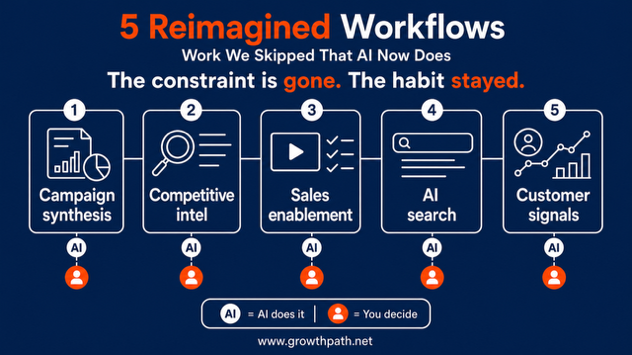
5 Reimagined Workflows: campaign synthesis, competitive intel, sales enablement, AI search, customer signals

There’s a whole category of work your team’s not doing. Reading every sales call. Refreshing battlecards every week. Tailoring the message to each deal. You skipped it because it was slow, manual, or expensive to do by hand.

Some of the most important work also needed you to look outward and keep looking, at the whole market, at each account’s world, at what buyers say across hundreds of calls. Your team looks at what it can see, which is its own data. Not from a lack of effort, but because one team can only do so much. AI can look outward, and do it continuously.

That made sense before AI. For a lot of this work, the reason you skipped it is gone. The question worth asking about any task you skipped: is it still hard, or just historically hard?

Quick Take

The GTM workflows I see being reimagined aren’t revolutionary. They’re practical, teams are running them today, and they’re changing how the work gets done. They’re the work we always wanted to do, but it was more than an all-human team could handle.

What I share here comes from working with teams just a few months into agentic workflows becoming more real and accessible for GTM teams. These teams lean AI-forward, so take it as early signal, not a perspective on the whole market. And the point is never AI. It’s the work AI makes possible.

Key takeaways:

  • AI now makes more work doable. But we have to fix the habit of not doing this work.
  • The best inputs are already in your systems: your calls, usage data, support tickets, win/loss notes.
  • Human teams look at what they can see, which is their own data. But AI can look outward too, at the market, at each customer’s world, at industries adjacent to yours, and bring back ideas with the reasoning.
  • Five agentic workflow examples: build one plan from insights across all signals, watch the market and inform strategy, tailor the proof and practice to each deal, see how you show up when buyers ask AI, and understand how your customers are changing inside and out.
  • AI handles what it does well: collection, synthesis, analysis, and execution at scale. Humans keep judgment and the final call.

Watch Or Listen Instead

To cater to different learning styles and time constraints, this newsletter is also available as a 6-min cinematic AI video explainer and a 15-min AI podcast with two AI hosts. Both were made with Google’s NotebookLM and personally reviewed for accuracy and responsible AI use.

5 Most Reimagined GTM Workflows

Each one runs as an agentic workflow. It moves through the steps on its own, pauses where your judgment is needed, uses other AI and tools to handle parts of the work, and delivers finished files you can use. You guide it, make the key decisions, and review the output.

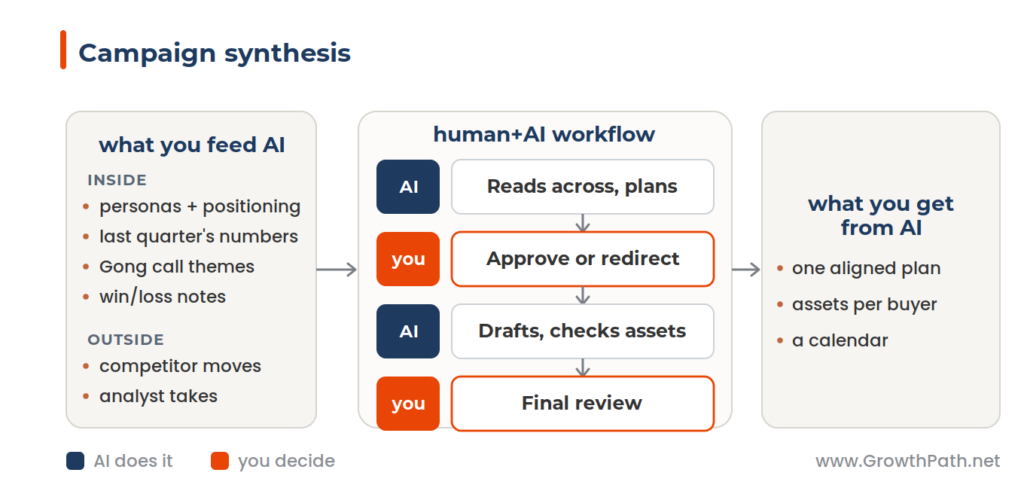
1. Build one plan from every signal (campaign synthesis)

Today, with an all-human team:

  • Teams coordinate in meetings and alignment calls, but something still gets missed.
  • When the plan changes, it’s hard to reflect those changes wherever needed.
  • The plan leans on one or two sources and misses what cuts across all of them, including what’s shifting in the market and in your buyers’ world.
Campaign synthesis workflow: what you feed AI, the human+AI workflow, and what you get

With human+AI:

  • The plan is built from every source at once, internal signals and the market, and stays current when inputs change.
  • Positioning applies across the buying committee because it reflects all of it
  • The buyer gets one consistent story across every touchpoint, which builds trust earlier in the cycle.

The value is the synthesis, not just the drafts. A change made in the plan stage is one fix, not multiple ones, that gets applied throughout quickly.

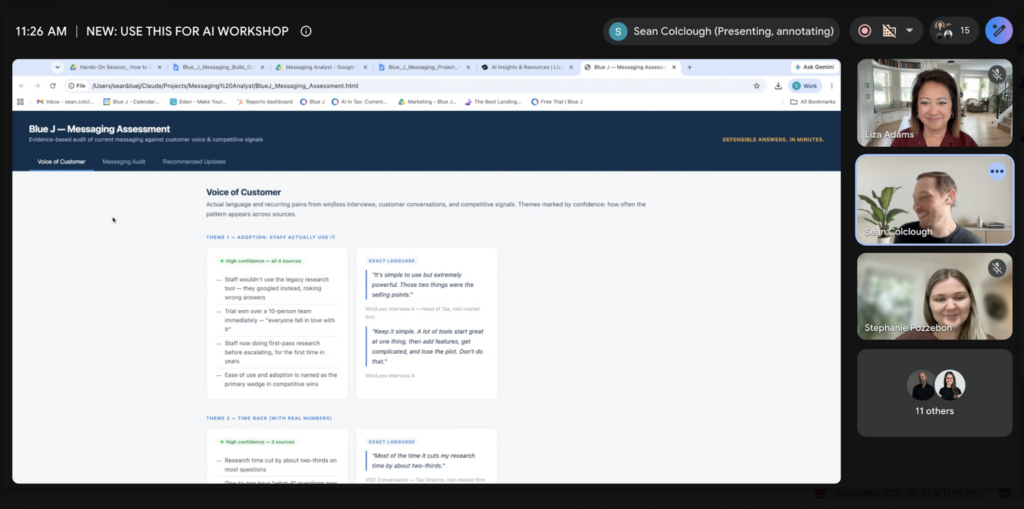
Christine Matu, VP of Product Marketing at Blue J, shared her thoughts after a team hands-on AI workshop.

Headshot of Christine Matu, VP of Product Marketing at Blue J
Christine Matu, VP of Product Marketing at Blue J

“We used to pull personas, messaging, customer call transcripts and win/loss interviews from various sources and stitch them together every campaign. We want to ensure we’re always build from what customers actually say instead of the loudest opinion in the room, and that was challenging to do manually. Now it’s within reach. I’m looking forward to campaigns that resonate and reflect what our customers care about most, in real time.”

Blue J hands-on AI workshop: messaging assessment output from Claude Cowork
Blue J Hands-On AI Workshop – Messaging Assessment Output from Claude Cowork

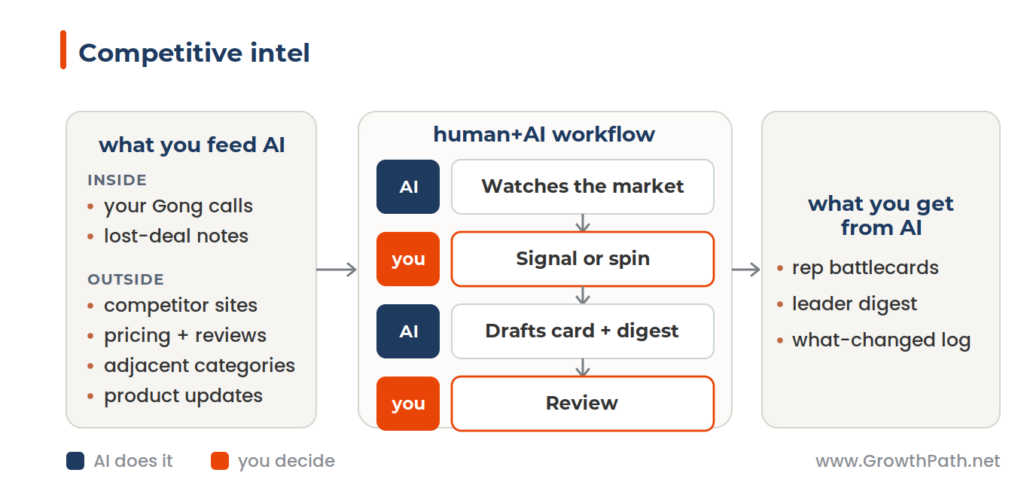
2. Watch the market and turn it into strategy (competitive intel)

Today, with an all-human team:

  • Someone owns competitive intel, but watching every competitor’s site, pricing, reviews, and your own win/loss data is more than one person can keep up with, so it happens in bursts.
  • Battlecards get built once and then go out of date. By the time a competitor’s new claim reaches your reps, a few deals are already lost to it.
Competitive intel workflow: what you feed AI, the human+AI workflow, and what you get

With human+AI:

  • AI watches continuously across the market, adjacent categories, and your own calls.
  • Reps get current battlecards with both sides, offense and defense, tied to the objections buyers are raising now.
  • Leaders see the change early. When a competitor repositions or a new objection spreads across calls, you can adjust messaging and packaging before it impacts pipeline.

The most insightful input is your own call recordings and customer reviews. What a buyer says about a competitor is more honest than what the competitor says about itself.

3. Tailor the proof and practice to each deal (sales enablement)

Today, with an all-human team:

  • Enablement builds one deck and one pitch for everyone, because tailoring the proof to each deal takes more time than any team has. So reps get generic material and adapt it on their own.
  • The buyer’s own costs and savings sit in a spreadsheet a rep may or may not build well under deal pressure.
  • Reps practice on live prospects. The hard objection gets worked out in a real deal and they learn too late, typically in the loss review.
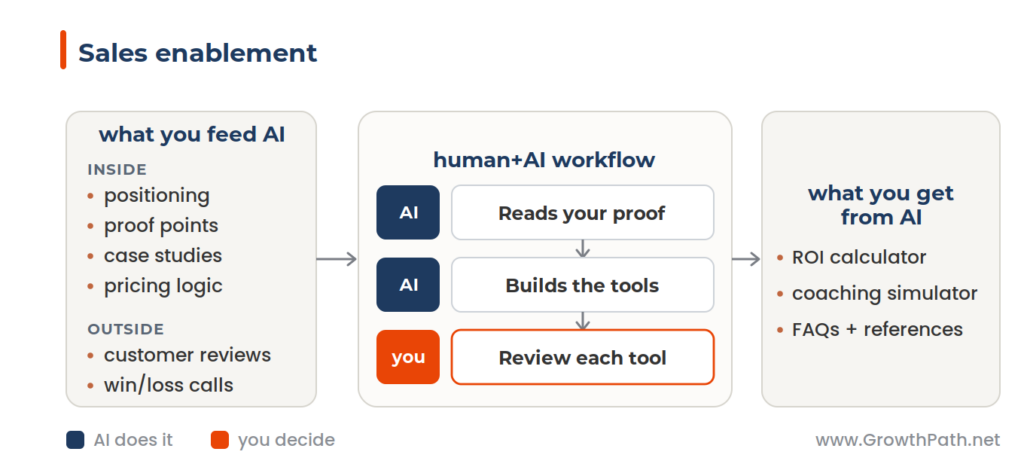
Sales enablement workflow: what you feed AI, the human+AI workflow, and what you get

With human+AI:

  • Reps get proof built for the deal they’re working, an ROI case using the buyer’s own numbers, and messaging informed by what buyers in your category actually struggle with, not just your own talking points.
  • The tools are self-serve and always current, so every rep gets the same quality of prep, whether it’s the day before a big call or ten minutes before.
  • Reps practice the hard conversation before the call, against a simulated buyer who pushes back, so the first real objection isn’t the first time they’ve answered it.

The simulator isn’t scripted. Each run is a live conversation, so the rep faces a different buyer and/or situation every time.

4. See how you show up when buyers ask AI (AI search)

Today, with old habits:

  • We optimized for keywords and rankings. That still helps AI find us, but ranking for a term and being the one AI recommends are not the same thing.
  • We led with features and capabilities. AI can’t tell from a feature list who we serve best or which problems we’re the right choice for, so it fills the gap by guessing, and you may not like the guess.
  • We treated our own website as the source of truth. AI also reads review sites, communities, and third parties, and leans on what others say about us, not only what we say about ourselves.
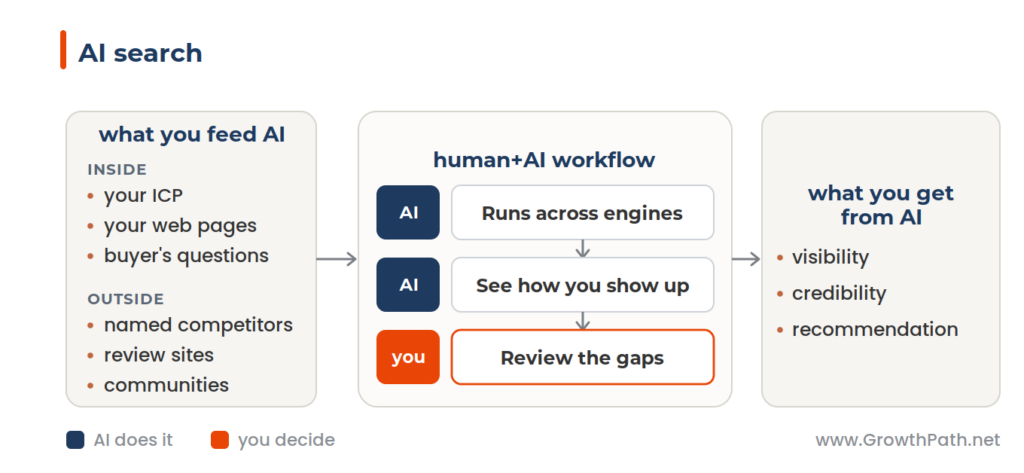
AI search workflow: what you feed AI, the human+AI workflow, and what you get

With human+AI:

  • You see how AI describes and recommends you across the major engines, whether you show up, how you’re framed, whether you’re on the short list, and which sources were cited.
  • You find the gaps that lose deals like a wrong description, a missing proof point, a competitor recommended over you, before more buyers form the same impression.
  • The fix is clarity. When you say plainly who you serve best and where you’re not a fit, AI routes the right buyers to you and steers the wrong-fit ones elsewhere. You win more of the deals you should win, and spend less time on the ones you can’t serve well.

One run is a snapshot but it’s not the full picture. Reliable signal takes many runs over time, and for some teams an AEO/GEO tool built for scale might be the better solution. I go deeper in When AI Judges Your Brand Before Humans Do.

5. Understand how customers are changing, inside and out (customer signals)

Today, with an all-human team:

  • The signs that an account is growing or at risk are split across your own systems, usage, tickets, engagement, call notes, and the customer’s own world, funding, acquisitions, leadership changes. No one watches across all of it.
  • CS has too many accounts to watch closely, so the quiet ones get noticed only near renewal or after a problem shows up.
  • The signal that matters most is often external and easy to miss. A customer being acquired is a churn risk. A customer acquiring is potentially an expansion opportunity. You usually find out too late to act on it.
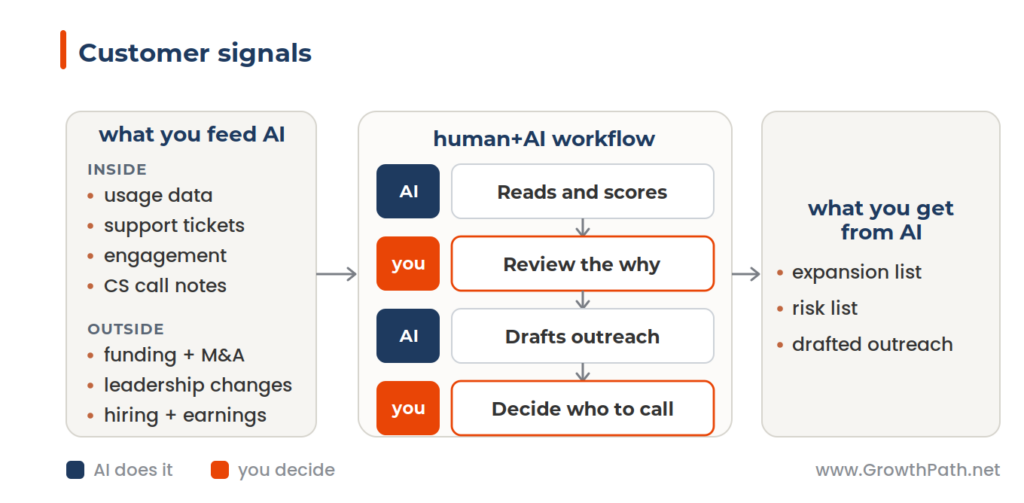
Customer signals workflow: what you feed AI, the human+AI workflow, and what you get

With human+AI:

  • The workflow reads your internal signals and watches each account’s public external world, then scores the account for expansion or risk with the reasons behind it.
  • Your team sees which accounts need attention and why, early enough to act. That includes changes in the customer’s business you’d never see in your own data.
  • The customer gets the right support at the right moment, a check-in when they’re stuck, a conversation when their business is changing, an offer that fits where they actually are.

The insight that matters most is often outside your data. A customer being acquired can tell you more about churn risk than any usage trend.

This is also where silos cost you: the signal one team sees that another needs. AI reading across all of it is how fewer things fall through the handoffs. More on that in No Daylight.

The Outside-In Advantage

All five workflows share the outside-in advantage. The campaign reads the market alongside your own numbers. Competitive intel watches adjacent categories, where substitutes and new entrants tend to appear first. AI search shows you how the market already sees you. Customer signals look at public events in your customer’s world that usage data alone would miss. Even enablement gets better when it pulls in what buyers across the market struggle with.

A human still judges whether an outside idea applies. Some are useful, some aren’t. What changes is you have options you didn’t have before.

What’s Common Across Workflows

One thing was true of every workflow: A human makes the final call and is accountable.

The best workflows use human gates. You approve the plan before it goes forward. You review the output before it goes out. Quality checks run at key points.

At each gate, we instruct AI to show its work, not just hand over an answer: options with tradeoffs, confidence levels, risks flagged, what’s likely to land and what isn’t. That’s critical thinking built into the workflow. More on that in AI Is Only as Sharp as Your Questions.

Some workflows earn more autonomy over time. Once one proves itself, you can check the output instead of every step. Keep the gates where a mistake is costly or hard to fix. Let it run where the work is low-stakes and easy to undo.

It’s Only as Good as What You Feed It

These workflows are only as good as what you feed them and how you guide them. They need clean data from a single source of truth, clear instructions and context, the right access and permissions, human oversight on the judgment calls, and governance for safety, compliance, and cost. Someone has to own each one. And the outside-in research uses public signals only, news, filings, and announcements, not private surveillance.

But those are not reasons to wait. You don’t need all of it perfect to start. Pick one workflow, get the data and guardrails right for that one, and learn. A simple way to start: upload company-approved documents and data rather than connecting systems directly to AI.

Think big, start small, move fast.

Faster is the Floor

If your AI strategy is focused on efficiency alone, you’re building a case for fewer people. If it’s focused on reimagining work to grow the business, you’re building a case for why humans are essential.

Growing companies keep adding humans. Stagnant ones start asking why they need so many.

The difference is whether you use AI only to do old work faster, or also to do new work that wasn’t possible before.

Laura Heisman, Chief Marketing Officer of Dynatrace, got hands on keyboard with her leadership team instead of just directing the work.

Headshot of Laura Heisman, CMO of Dynatrace
Laura Heisman, CMO of Dynatrace

“This isn’t about using AI to write a better email. It’s about rethinking how we actually do things. The leaders who win this chapter are the ones who translate AI into better ways of working for their customers and teams.”

Dynatrace marketing leadership team
Dynatrace Marketing Leadership Team

There’s a timing piece to this. Today, reimagined work is an advantage. Over time, it becomes what customers expect, and the advantage fades. So the question is when you do this work, and who decides. The teams that move now get ahead of it. Wait, and you’re matching a standard someone else set.

You can build these in whatever AI tools your team already uses. They all run agentic workflows now.

If you want the system for deciding what to hand to AI and how much, I offer some guidance in Think Before You Build.

Digital twins help here too, used as thinking partners more than task-doers. I’ve gone deep on those lately. A Cox Automotive team and a Morningstar team each built their own.

Where to Start

Pick one task your team stopped doing because it was too hard, too slow, or too expensive to do at scale. Ask whether it’s still hard, or just historically hard. Most of the time now, it’s the second one. That’s your first workflow.

Reimagining from a blank page is hard. It gets easier once you’ve seen a few examples, because you stop asking “what could AI do” and start asking “what did we stop doing that’s worth another look.”

What’s the one task your team stopped doing that might be worth another look?

The Practical AI in Go-to-Market newsletter shares learnings and insights in using AI responsibly. Subscribe today and let’s learn together on this AI journey.

For applied learning: Explore our applied AI workshops, offering both strategic sessions to shift mindsets through practical AI uses and hands-on sessions to build human+AI workflows. You’ll leave with either a clear plan or working solutions. Office hours provide follow-on support to keep momentum going.

For ongoing advisory: I work with leaders as a strategic advisor through their AI transformation, providing guidance, frameworks, and a sounding board as they build. If that’s what you need, let’s talk.

For team transformation: I partner with GTM leaders to move from scattered AI adoption to an operating model where human and AI teammates work together across workflows. See real examples: a lean GTM team’s step-by-step playbook and a global cybersecurity leader scaling to 150+ marketers with 57 AI teammates integrated into daily workflows.

For speaking: Here are virtual and in-person events where I’ve covered a variety of AI topics. I’ve also keynoted at many conferences and corporate events.

If any of this resonated, I’d love to hear from you. Reply to this email, find me on LinkedIn, or come say hi at an event.

Cox Automotive: 60 Marketers, 60 AI Sparring Partners, and the Work They Reimagined

Liza Adams · June 25, 2026 ·

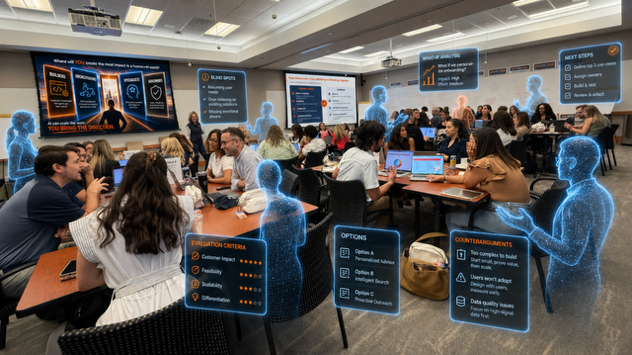
Marketers at a workshop with AI sparring partners illustrated alongside them

I spent a full day in Atlanta with 60 marketers, and the whole morning went by before anyone used an AI tool. That was the plan.

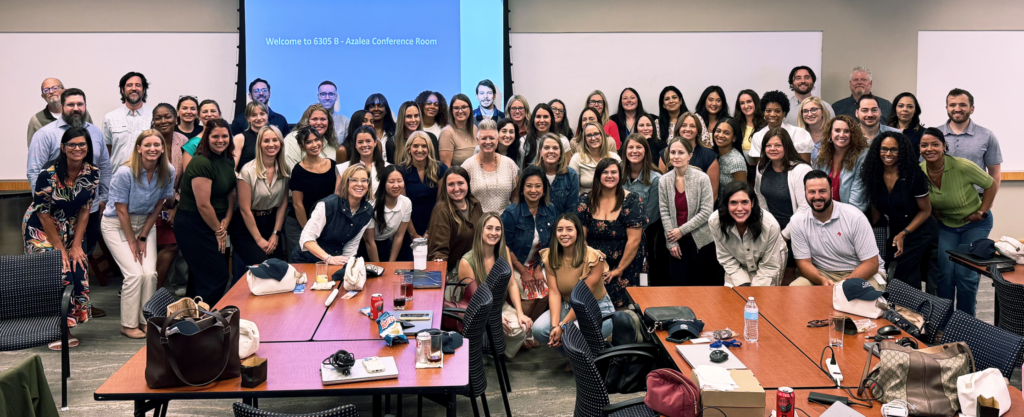
Cox Automotive marketing and communications team at the Atlanta AI workshop

The Cox Automotive Inc. marketing and comms team across Inventory Solutions, NextGear Capital, EV Battery Solutions, and Cox Automotive Europe focused that morning on themselves, being honest about how each person thinks and where they fall short. Many AI workshops start with the tool. This started with the people.

(Cox Automotive is a 29,000-person B2B company serving 40,000+ auto dealers and most major automakers, with brands like Manheim, Kelley Blue Book, and Autotrader.)

They used AI after lunch, once they knew what they were working with. Each person built a digital twin, a custom AI partner made from their own profile, thinking style, and writing. A twin doesn’t do your work. It challenges it, asking where your thinking is weak and who would push back.

Starting with the people before the tools is rare. It’s also why the AI work landed. When you know your own blind spots first, you build AI that covers that. Otherwise, you build AI that just agrees with you.

Quick Take

AI training usually starts with the tool. This team started with the human. They learned their own thinking styles and gaps first, then built AI partners to find blind spots and push their thinking.

  • Your strongest thinking style is usually your AI blind spot.
  • AI is a people pleaser. Used only to confirm what you already believe, it leaves you worse off than AI working alone.
  • Faster is just the floor. The big benefits come from reimagined work that wasn’t impossible before.
  • A twin has memory, so it knows more the longer you use it. This is not a one-day build.
  • Reimagined work leads to reimagined roles, but only when a leader reorganizes around the new work.

Watch Or Listen Instead

To cater to different learning styles and time constraints, this newsletter is also available as a 5-min cinematic AI video explainer and a 20-min AI podcast with two AI hosts. Both were made with Google’s NotebookLM and personally reviewed for accuracy and responsible AI use.

Started With No AI

Jessica Lanier, VP of Marketing and Communications across several Cox Automotive divisions, including its Europe business, opened by being honest about her own gaps.

This started with Jessica. Her work got better once she used AI for the things she doesn’t naturally do, and she quickly saw how that could raise the whole team’s value. So she asked her team to do the same: be honest about how they think and where they fall short.

Headshot of Jessica Lanier, VP of Marketing & Communications at Cox Automotive
Jessica Lanier, VP of Marketing & Communications Inventory, NextGear Capital, EV Battery Solutions and Europe at Cox Automotive Inc.

“When I started using AI for the parts of the work I usually avoid, the analysis and the second opinions, my thinking got better, not just faster. I saw new possibilities, became aware of different perspectives, found angles I wouldn’t think to check, and better aligned with others.

That shift in thinking changed my behavior in using AI. My work changed. It’s more strategic, efficient, and impactful. I wanted that for the whole team.”

Then Kevin Waits, Chief Facilitator and Coach at Talent Won’t Wait, LLC, took them through two self-assessments: HBDI maps how a person prefers to think across four styles: analytical, structured, relational, and experimental. CliftonStrengths ranks your natural strengths from a list of 34.

Headshot of Kevin Waits, Chief Facilitator and Coach at Talent Won't Wait
Kevin Waits, Chief Facilitator and Coach at Talent Won’t Wait, LLC

Kevin ran practical exercises with warmth and a light, funny touch. One line was a mic drop:

“Do not give your power to an assessment.”

A low score points to a default. It doesn’t mean you can’t grow there. Kevin even suggested having a teddy bear in the color of your weakest quadrant as a reminder to lean into the mode you don’t naturally use.

Your Strength is Your AI Blind Spot

How you think tends to decide how you use AI, often without your noticing. It’s just a habit, and once you see yours, you can overcome it.

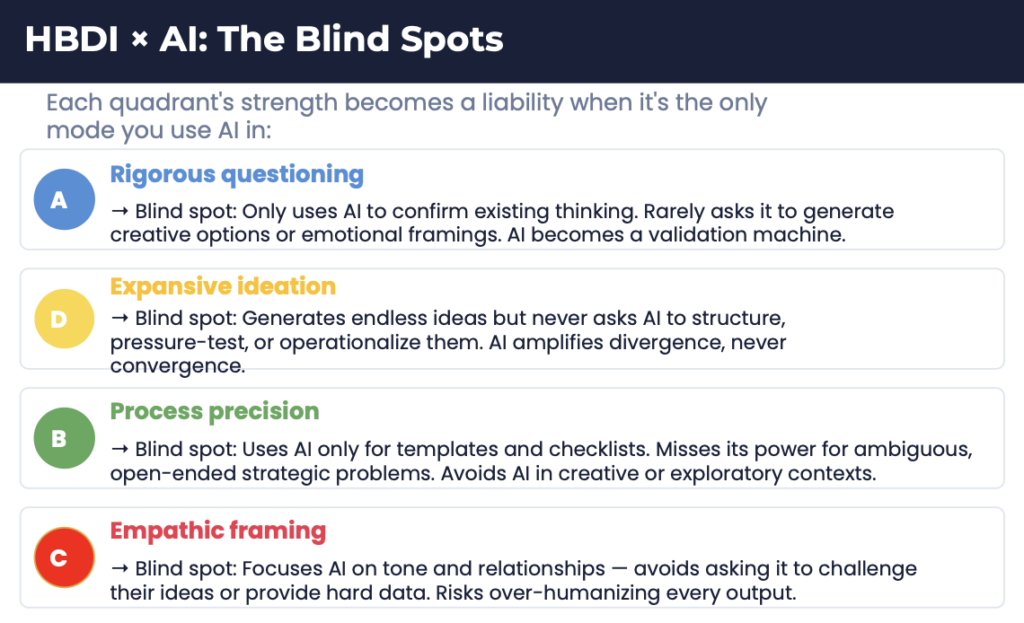
HBDI x AI: the blind spots for each thinking style

Each style has its own gotcha. The analytical thinker uses AI to confirm what they already believe, and it becomes a validation machine. The big-picture thinker cranks out endless ideas and never asks AI to narrow them. The process- minded keep it as a checklist tool. The relationship-driven focus on tone and rarely push for hard data. Whatever you’re best at is usually where your AI use is weakest.

Try This Today (8 Minutes)

The team audited their own AI use. It works on anyone, and it’s worth a try before reading on.

Look back at your last five AI prompts. Which thinking style did most of them come from? Which style is almost missing?

Pick one project this week and try a prompt from that missing mode. A few to start:

  • Analytical – “Give me five data points that challenge this plan.”
  • Experimental – “What if we approached this completely differently?”
  • Relational – “Help me see this from the other person’s point of view before a hard conversation.”
  • Structured – “Turn this plan into a step-by-step checklist with owners and deadlines.”

Make AI Disagree With You

Finding your blind spot is the first problem. Getting AI to push back, instead of agreeing with you, is the second, because AI is trained to be agreeable.

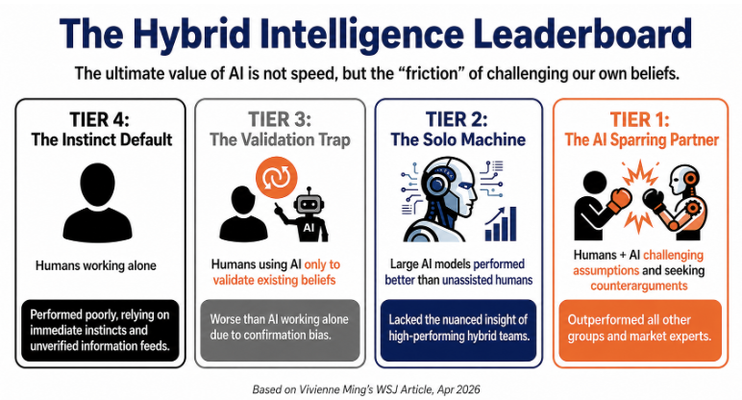
Vivienne Ming, a neuroscientist writing in the Wall Street Journal, found that only 5 to 10% of people use AI to challenge their thinking. Most use it to confirm what they already believe. In a Business Insider interview, she shared her instruction to AI: don’t tell me why I’m right, tell me why I’m wrong.

The Hybrid Intelligence Leaderboard: four tiers of humans working with AI

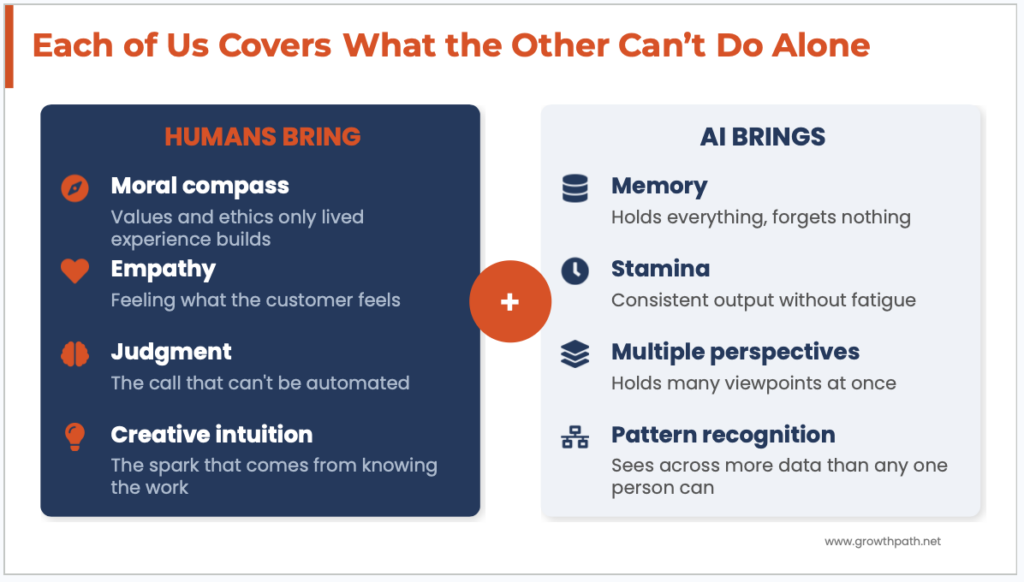
It works because people and AI are good at different things. AI brings scale, speed, and memory no person can match. It’s unaffected by what’s happening around it, while you can’t be at your best every single day. You bring judgment, gut feel, and lived experience. Put them together and you come out more open- minded, quicker to see how others think, and more confident going into tough conversations. I wrote about that in AI Made Me More Human.

What humans bring and what AI brings

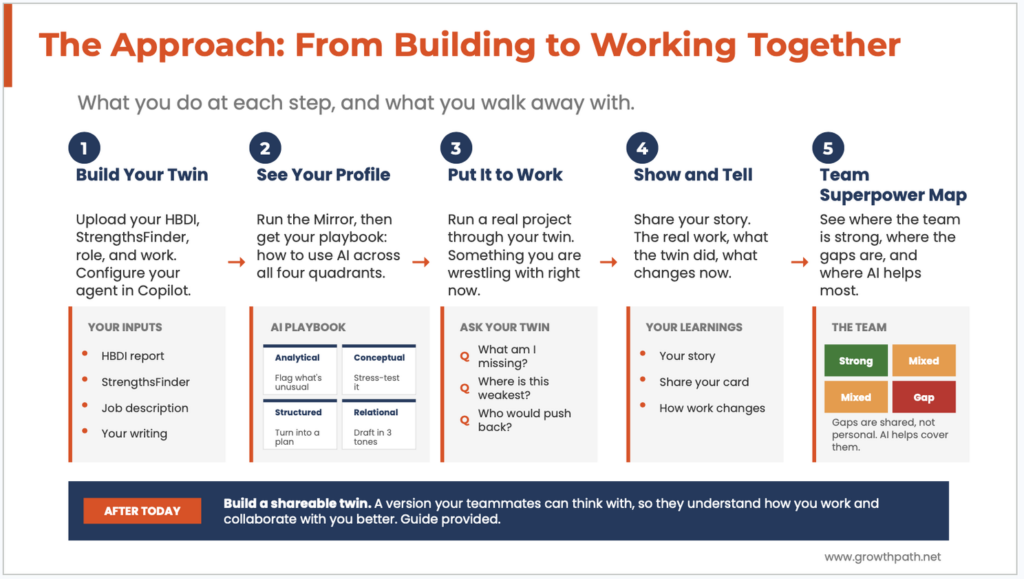
The Cox Automotive team built their twins to push. They asked them things like:

  • Where is this weakest?
  • Who would push back, and why?
  • What am I missing?

More on building that habit and sample sparring questions and questions in How to Think Critically with AI.

How They Built It

After lunch, all 60 people built their twin, each one made from their own profile, so no two were alike. Everyone came with pre-work: their HBDI and CliftonStrengths results, plus a deep-research AI report on themselves, their role, frameworks, processes, and writing samples.

The core of any twin is the deep-research report and the instructions that make it challenge you. I walked through both, with a demo, in The Smartest AI Teammate You’ll Ever Build.

The build instructions told each twin to:

  • challenge assumptions
  • provide assessments with rationale
  • show what-if scenarios with the drawbacks,
  • offer counterarguments, and
  • test ideas against different situations and personas.

They battle-tested their twin using a real project and refined them as needed.

The real value was visibility. Each person could see their own thinking style, where it’s strong, and where it falls short. That made the work actionable because you can’t fix a gap you can’t see.

The approach: from building a digital twin to working together as a team

Jessica shared her digital twin with her team so anyone could pressure-test their work against her thinking any time. Two people have already used it. Brittany Curl, AVP of Marketing, ran her plan past it.

Headshot of Brittany Curl, AVP of Marketing at Cox Automotive
Brittany Curl, AVP of Marketing at Cox Automotive Inc.

“I ran my plan past Jessica’s twin and the feedback was spot on. It told me the things I could hear Jessica saying, so I got her perspective without taking her time. I can get access to Jessica’s expertise whenever I need it.”

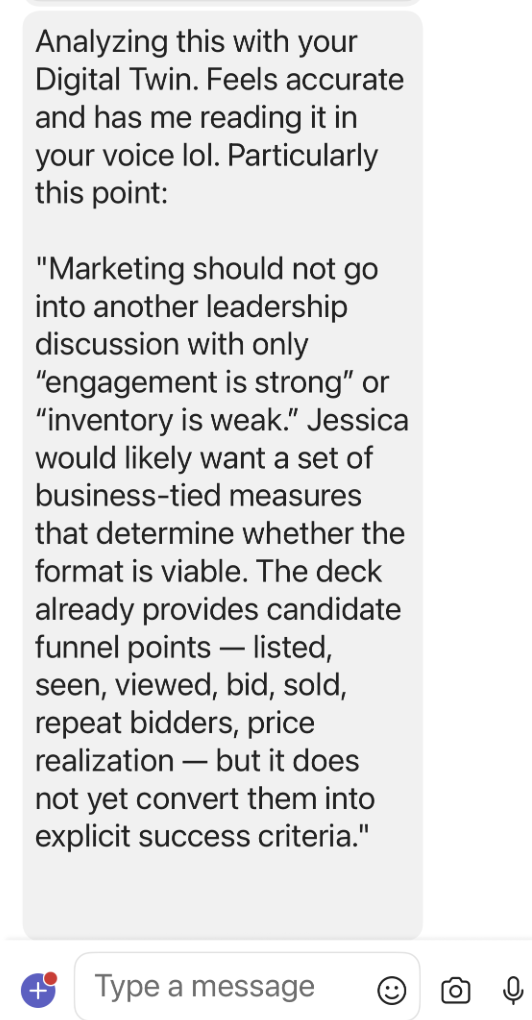
Another team member used it on a leadership deck and the twin pushed back, flagging that marketing shouldn’t walk into a review with “engagement is strong” and no business-tied success criteria.

A team member's text to Jessica after using her digital twin
A team member’s text to Jessica after using her twin.

Jessica confirmed the AI’s response. She agreed with what her twin said, the same feedback she’d have given in person.

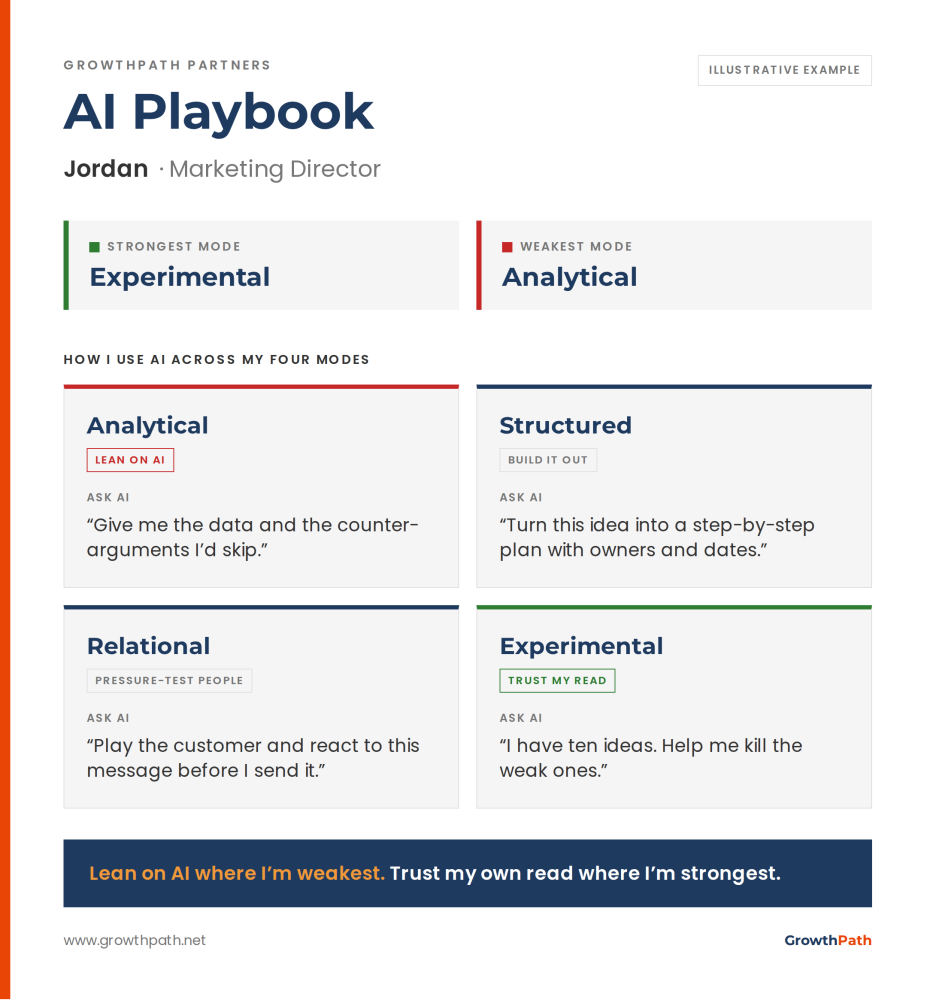
Each person also built a one-page AI Playbook card: their strongest and weakest thinking mode, and a go-to prompt for each of the four. It turns the blind-spot insight into something you can use: ask AI to help with what you don’t do naturally, and have it challenge you where you’re strong. (A sample is below.)

Sample AI Playbook for a marketing director

Where AI Changes What’s Possible

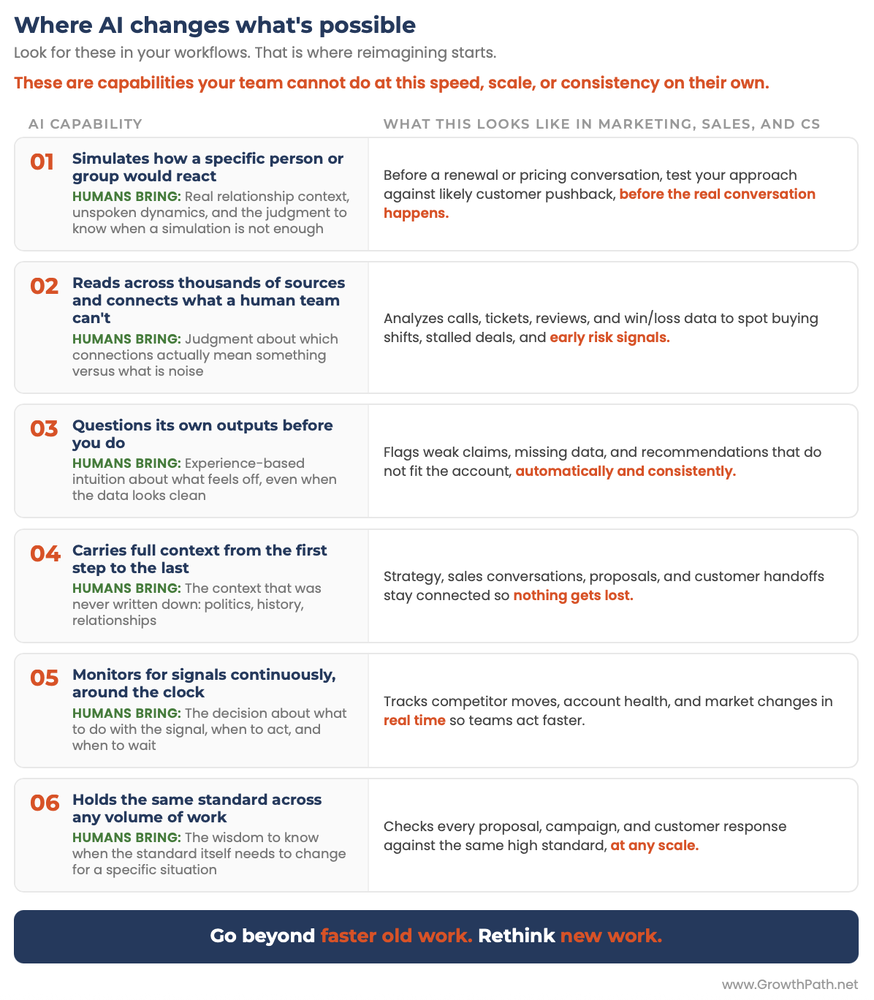
Reimagining the work starts with the differences between people and AI. New work happens when AI does something a person can’t match in speed, scale, and consistency. The team started rethinking workflows around those capabilities, and they’ll find more. (A few examples are below.)

Where AI changes what's possible: six capabilities your team couldn't do at speed or scale

There’s a bigger payoff here. Once you know your own blind spots and how to make AI challenge you, you can design where human judgment belongs as AI runs more of the work. The same instructions they built into their twins, challenge my assumptions, show the tradeoffs, give me the rationale, become the checkpoints in a workflow. That’s the skill that lets a team guide AI as it speeds up and scales the work, instead of handing off the thinking.

More on reimagining workflows in Think Before You Build.

A CMO’s Conviction

Ken Kraft, Cox Automotive’s Chief Marketing and Sales Officer, spoke about transforming the workforce, starting with how work and roles change.

He pointed to Jessica’s seat at the leadership table as both a marketing and business leader, and how that spread across her organization. Five years ago the function was seen as transactional. Today it’s strategic, bringing insight across customers and the business.

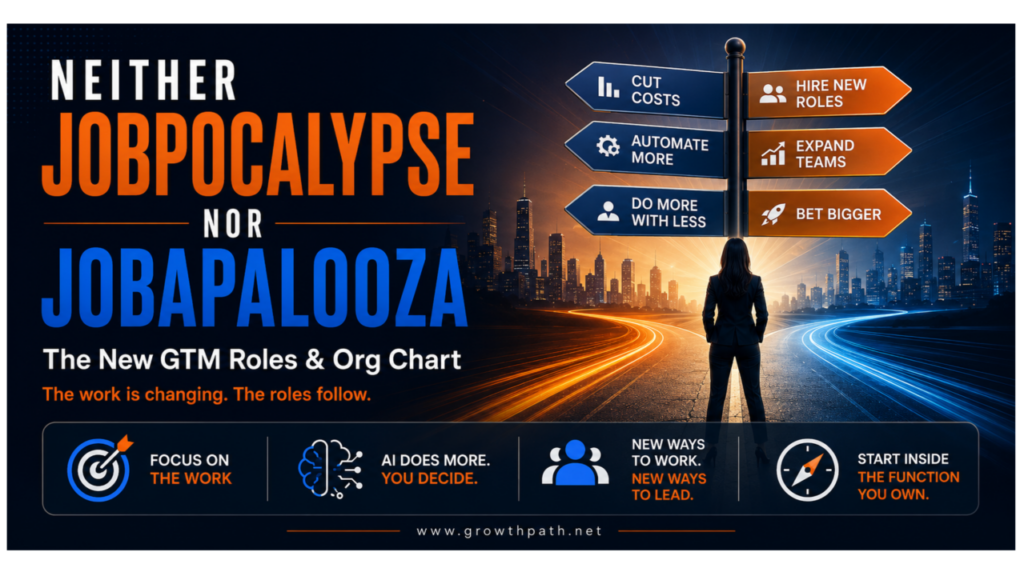
AI didn’t make this team strategic. Ken and Jessica built that over years. AI gives them on-ramps to do more of it. (More on the four kinds of work this creates, as well as how GTM roles and orgs are changing in Neither Jobpocalypse Nor Jobapalooza.)

The Team Map

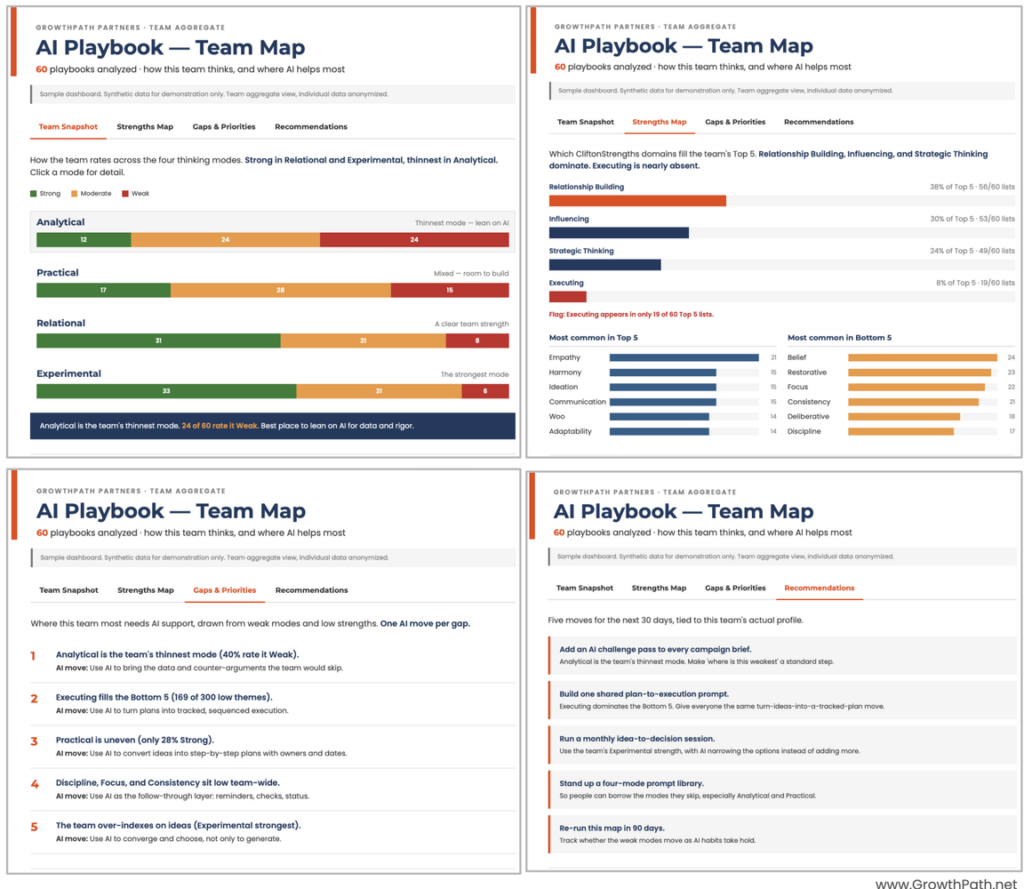
At the end, every Playbook card came together in one view, and Jessica built a team dashboard on the spot, in Claude. It showed where the team is strong, where the gaps cluster, and where AI helps most.

Looking at the map, Jessica made the point herself: the gaps belong to the whole team, and AI can help close them. None of them is a personal failing.

That’s the change. Sixty private blind spots became one shared map the team can act on together.

The map didn’t stop at the diagnosis. It recommended specific next steps, so the team walked out with a starting plan.

(The sample team map below is for illustration only. Here’s an interactive version to play with. It is not Cox Automotive’s actual map.)

Sample team map from the AI Playbook
Sample Team Map

Why This is Personal

I’ve worked with this team on several initiatives for a year, from changing how they think about AI, to showing what is possible, to hands-on workshops, to using AI to bridge their gaps, and to reimagining work.

Two things I care about run through this story. One is the strategic value of marketing, a function too often treated as the people who make things look good instead of the people who help run the business. This team is the opposite.

The other is people first, AI forward. Every AI decision gets a people lens, and the goal is work that wasn’t possible before. It’s also why I care about upskilling. When you invest in people, they can thrive in more places, in a new role, on another team, wherever they go next.

This team applies a growth mindset and has a lot of fun learning together. I’m super proud of them. Brittany said it better than I could in her LinkedIn post:

“There’s a version of a team meeting where you check the boxes and go home. This week wasn’t that. That’s not a given. That’s a culture. And this team built it.”

You can start where they did. Try the eight-minute audit above, find the mode you never use AI in, and test one prompt from it this week. That is the first step toward reimagining the work. What Cox built from there is a bigger lift: 60 twins, a team map, and continuously reworking how the work gets done.

What’s one thing your team could do differently if everyone knew their strengths and gaps before they use AI?


The Practical AI in Go-to-Market newsletter shares learnings and insights in using AI responsibly. Subscribe today and let’s learn together on this AI journey.

For applied learning: Explore our applied AI workshops, offering both strategic sessions to shift mindsets through practical AI uses and hands-on sessions to build human+AI workflows. You’ll leave with either a clear plan or working solutions. Office hours provide follow-on support to keep momentum going.

For ongoing advisory: I work with leaders as a strategic advisor through their AI transformation, providing guidance, frameworks, and a sounding board as they build. If that’s what you need, let’s talk.

For team transformation: I partner with GTM leaders to move from scattered AI adoption to an operating model where human and AI teammates work together across workflows. See real examples: a lean GTM team’s step-by-step playbook and a global cybersecurity leader scaling to 150+ marketers with 57 AI teammates integrated into daily workflows.

For speaking: Here are virtual and in-person events where I’ve covered a variety of AI topics. I’ve also keynoted at many conferences and corporate events.

If any of this resonated, I’d love to hear from you. Reply to this email, find me on LinkedIn, or come say hi at an event.
Neither Jobpocalypse Nor Jobapalooza: The New GTM Roles and Org Chart

Liza Adams · June 11, 2026 ·

Neither Jobpocalypse Nor Jobapalooza: the new GTM roles and org chart

At a GTM leadership dinner recently, three leaders described three different plans. One had been told to use AI to cut his team by 30%. One was weighing whether to hire a GTM engineer, and what other new roles to plan for. One was redesigning workflows and restructuring her org.

The headlines keep swinging between jobpocalypse and jobapalooza. We didn’t debate that much. We talked through the questions most have not figured out yet. If you run a GTM team, you know this conversation.

None of the three said it this way, but all three were asking the same thing: What’s happening to the work? Answer that first, and the roles and the org follow.

Putting AI in the old org chart just makes old work faster. That gets you efficiency, not growth. Reimagining the work to do what wasn’t possible before is how you grow the business. New work creates new roles, and the new roles redraw the org chart.

Quick Take

AI is already changing what one person can do. Reimagined work leads to reimagined roles, and reimagined roles change the org chart.

Key takeaways:

  • Put the jobs debate aside. The key question is what happens to the work, because the work is changing and the roles follow.
  • AI does the repetitive work and acts as a thinking partner. People keep judgment, taste, and accountability.
  • In some workflows, one person with AI can do what used to take three. Whether you’ll have a smaller or bigger team is your choice, not AI’s.
  • Combining roles is not the same as cutting people. The time AI frees up can go to work that grows the business, and a growing business needs more good people, not fewer.
  • Four kinds of work take on more judgment: builders, orchestrators, specialists, and governors. The people who grow their judgment and range step into the wider roles, and those who stay only in the tactical work are the most exposed, so that’s where to put support and time.
  • Specialists keep the deep expertise the whole team draws on, even as the work combines. The orchestrator relies on them and doesn’t have to know everything.
  • The org chart starts to organize around the customer’s goals, not departments. Start inside the function you own.

Watch Or Listen Instead

To cater to different learning styles and time constraints, this newsletter is also available as a 5-min AI video explainer and a 16-min AI podcast with two AI hosts. Both were made with Google’s NotebookLM and personally reviewed for accuracy and responsible AI use.

Even the loudest voices have moved toward the middle. Sam Altman (CEO of OpenAI) said in May that he was “pretty wrong” about the white-collar job losses he expected. Dario Amodei (CEO of Anthropic), who had warned AI could erase half of entry-level white-collar jobs, now frames it as a multiplier: automate 90% of a job, and the last 10%, the part only people do, expands to fill the role. Andrew Ng (founder of DeepLearning.AI) calls it a jobapalooza, a wave of new work.

Read it with some skepticism. Both OpenAI and Anthropic are heading for IPOs, and a more market-friendly story helps. The job numbers are mixed. The headlines and the CEOs will likely keep changing the narrative, but the change to the work is real. So plan around the work.

Product Teams Went Through This First

Building software used to take three roles: a product manager to decide what to build, a designer to figure out the interface and experience, and an engineer to write the code.

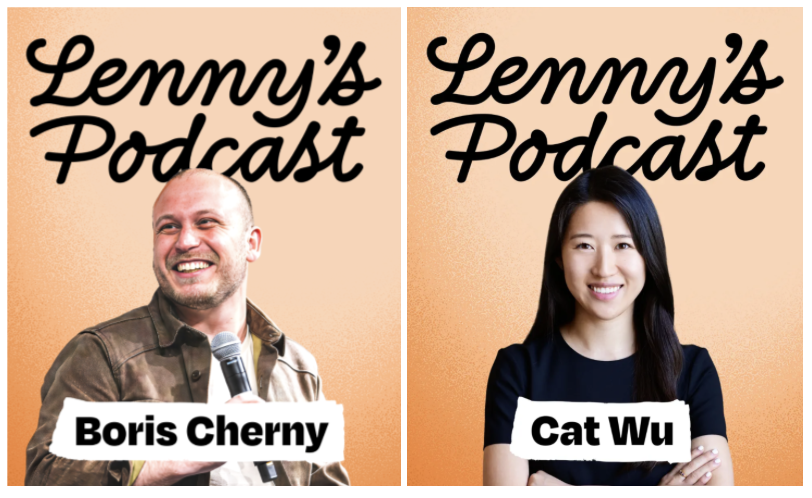
Boris Cherny and Cat Wu of Anthropic as guests on Lenny's Podcast
Anthropic Guests on Lenny’s Podcast

On Lenny’s Podcast, Boris Cherny (who built Claude Code) said the title “software engineer” is turning into something simpler, “builder.” Catherine Wu (head of product at Anthropic) said the scarce skill now is knowing what to build, because building it got easy.

On their teams the back-and-forth goes away. Designers write code, engineers make product calls, and one person with AI owns what used to take three.

Go-to-market is heading the same way. Product marketing, content, and campaigns became separate jobs partly because no one person had all three skill sets, and partly because they call for different kinds of judgment. AI closes the skill gap, so one person with good judgment can do the same. The deeper judgment stays with people. The same is happening across sales development, ops, and enablement.

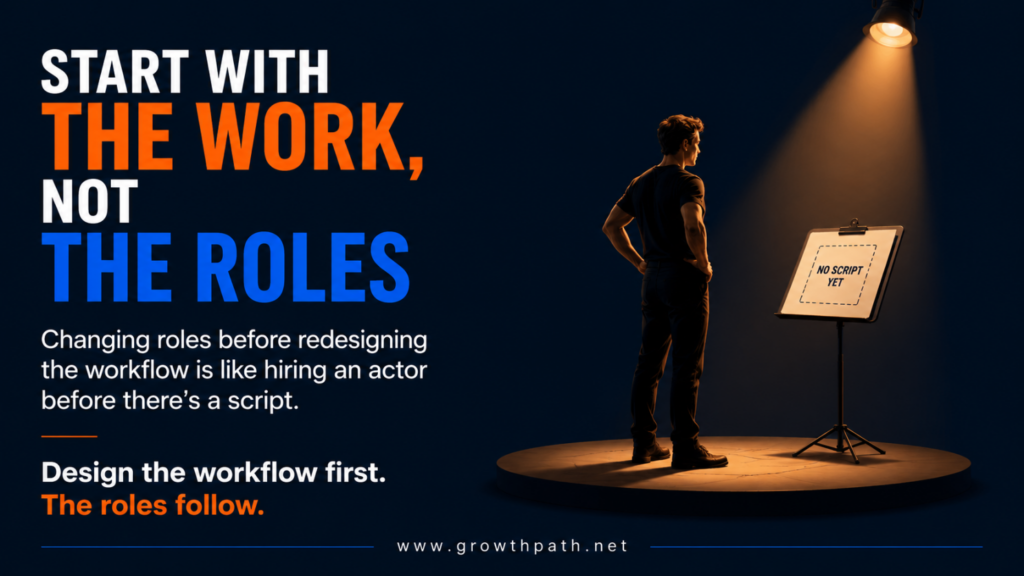
Start With The Work, Not The Roles

It’s tempting to jump to “what new roles do we need” before looking at the work. The roles change because the work changes, not the reverse.

There’s one exception: You might add new roles up front with people whose job is to drive the change itself, people you hire or outside help you bring in. You don’t redesign everyone else’s roles first. Those change as the work does.

Start with the work, not the roles: design the workflow first and the roles follow

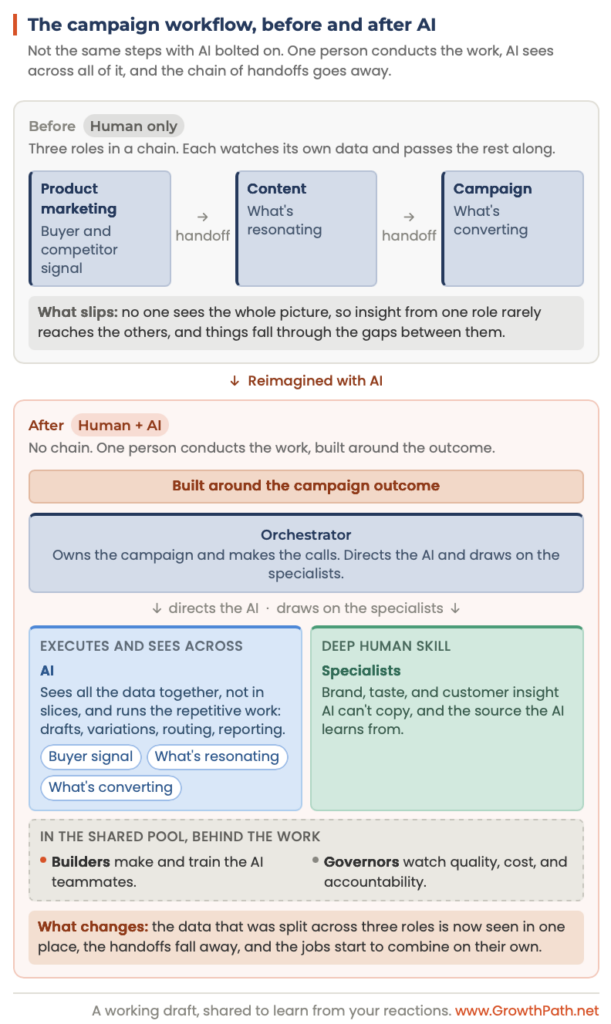
So start with the work. Walk a workflow step by step, like building and running a campaign, and you’ll see which steps are repetitive and which need judgment.

AI takes the repetitive steps and runs them faster. The bigger change is what AI can see across the whole workflow and connect, which is hard for people to do.

In a campaign, product marketing tracks the buyer and competitor signal, content watches what’s resonating, and the campaign team follows what’s converting. Each acts on its own slice and passes the rest along, so what one learns can get missed by the others.

AI can read across all of it at once and catch what no single team would see. The workflow gets simpler, and no longer needs handoffs because the reason you split the work is gone. The jobs start to combine on their own.

Megan Cabrera, my operations strategy business partner, and I guide and collaborate with GTM teams to sort each workflow by what it needs from AI, decide how much to let AI run on its own, then recommend redesigned workflows and orgs. I wrote about how to do that here, Has the Ground Shifted? Think Before You Build.

What Happens To The Roles

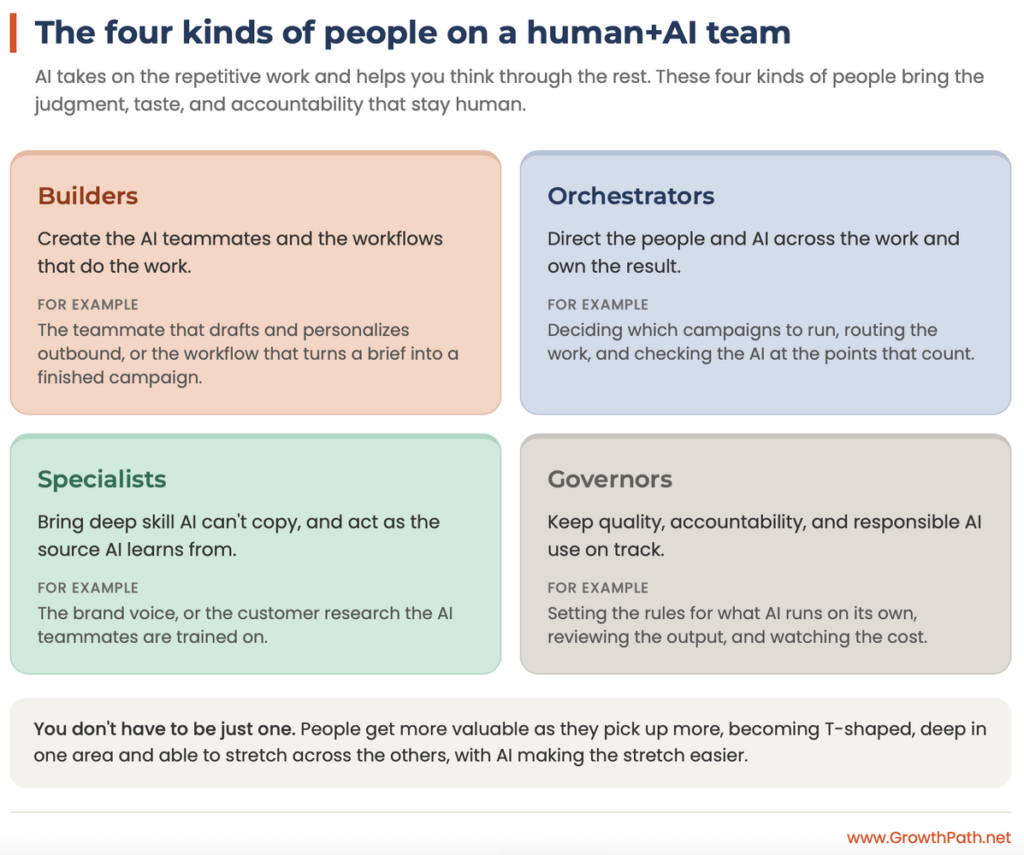
Roles don’t disappear. They get rebuilt around the judgment that stays with people. That work comes in four kinds. Builders create the AI teammates and workflows. Orchestrators direct people and AI together toward an outcome. Specialists bring the deep expertise the rest of the team relies on. Governors set the rules and own the guardrails.

The four kinds of people on a human+AI team: builders, orchestrators, specialists, governors

You don’t have to be just one. People get more valuable as they pick up more, growing T-shaped, deep in one area and able to stretch across the others. This can start inside one function and grow across the whole team over time. AI makes growing into more areas easier.

The risk is combining the work into a generalist too thin to be good at anything. The model guards against that two ways: people grow T-shaped rather than shallow, and the deepest expertise stays with specialists the whole team draws on. The orchestrator runs the combined work and leans on them rather than mastering all of it alone.

One person running the combined work has another risk when the AIs fail affecting the entire workflow. The four roles protect against that. Governors set how much the AI runs on its own, builders put a human checkpoint into the critical steps, and the orchestrator checks the AI’s work.

I’ll use marketing as the example. The same logic runs through sales and customer success, and the walls between those teams are already coming down.

Inside marketing, you can see it in everyday roles:

  • A content marketer hands first drafts to AI, and grows into directing it on brand and deciding final content strategy.
  • A campaign manager uses AI for scheduling and reporting, and expands into running the whole campaign across people and AI.
  • Marketing ops guides AI through data cleanup and routine reports, then moves into building the AI teammates and setting the rules.

It looks the same outside marketing. An SDR hands the first-pass outreach to AI and grows into working the accounts that need a person, with AI prepping every touch.

A campaign workflow before and after AI

Tricia Gellman, CMO of Box, observes this from inside a company built on content and AI.

Headshot of Tricia Gellman, Chief Marketing Officer at Box
Tricia Gellman, Chief Marketing Officer at Box

“Treating AI as a tooling project is the mistake. So much of the work involves content and knowledge moving between people, and once AI handles that, the old lines between roles blur, and people move to the work AI can’t do.

The teams who taught their people to direct AI well will have an edge over the ones just buying tools.”

We’re seeing the same across the GTM teams we work with.

Step back and you can see roles changing in more than one direction. Three examples:

1. GTM Strategist and Architect

Some evolve. Megan Ratcliff (formerly of Dice, a tech career marketplace) went far. She started as a Campaign Director and grew into a GTM Strategist and Architect working across marketing, sales, and customer success. I shared Megan’s story here.

The cross-department version takes time and the right partners. You can start on the single-function version now.

2. GTM Engineer

Others are brand new. A GTM engineer sits between marketing ops and sales ops and owns the work that used to get missed between the two teams: turning buying signals into plays sales actually runs, and the lead handoff each side assumed the other had. The old chart didn’t have that role. One person owns it now.

3. Forward Deployed Engineer

And the market is already paying for it. One of the most sought-after hires in tech right now is the forward deployed engineer (FDE), someone an AI company places inside a customer’s team to build AI into their work. We see more postings and the pay runs well into six figures.

It’s the same capability you’ll want to have on your own team, whether you assign someone internally or bring in some outside help. Their job is rebuilding how the work gets done.

Does This Mean Layoffs?

When AI lets one person do what took three, the first instinct is to cut to one and keep the savings. That’s the easy move but loses sight of the bigger gain.

Two things to consider:

1. Reimagined Work Grows the Business

The same AI that lets one person do more can be redirected at work you could never staff before: customer journeys that feel like one experience instead of three handoffs, offers that are relevant and hit the key pain, testing at a scale no team could do by hand.

Reimagined work with humans and AI working together has a better shot at growing the business than speeding up the old work does. A growing business needs more good people, not fewer.

This is already working. Lean teams have run close to this for a while. With fewer people, they had to combine the roles and organize around the customer, some of it before AI. They got here first out of necessity. AI makes it easier now, and open to everyone by choice.

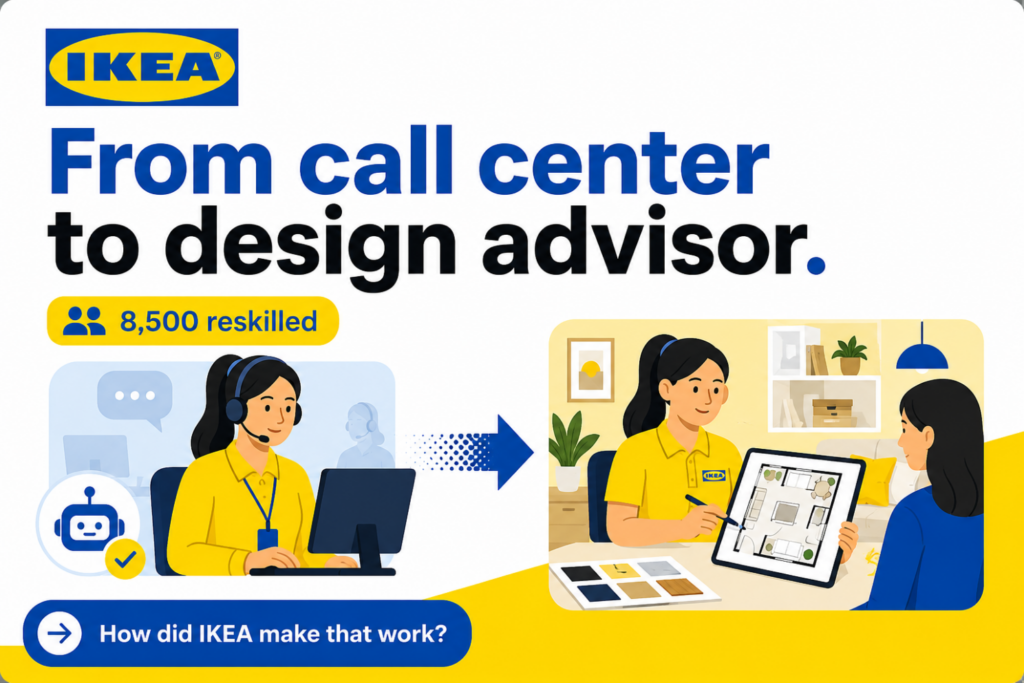
IKEA: from call center to design advisor, 8,500 people reskilled

IKEA showed the approach before ChatGPT even launched. Starting in 2021, as its Billie chatbot took on about 47% of customer queries, the company reskilled 8,500 call center workers into remote interior design advisers rather than cutting them. Design takes taste and a feel for the customer. AI is bad at that, so it’s exactly the work IKEA moved people into.

The remote design channel brought in about 1.3 billion euros, and IKEA says headcount didn’t drop. The tools are more advanced now. The choice is the same.

2. The Savings Are Smaller Than They Look

AI isn’t free, and the bill keeps going up with how much you run it, how much you let it run on its own, and how capable a model the work needs. Charlie Treadwell, CMO at Elisity, told me his team got more productive while some workflows got more expensive and harder to predict. It isn’t one team’s quirk. Uber ran through its entire 2026 AI budget in four months, then capped how much AI its engineers could use.

This State of AI article covers other companies like Microsoft, Amazon, and Walmart experiencing the same.

I dug into why the cost keeps climbing here: You’re Building AI Teammates and Workflows. Do You Know What They Cost?

So AI doesn’t decide whether you cut or grow. You do. A cut is a cut, and reimagining the work won’t put everyone back.

Then The Org Chart Changes

Once the work and the roles change, the org chart does too. The old org chart is built by function: marketing, sales, customer success, partnerships, and operations, each chasing its own numbers.

  1. Allison Munro, Chief Marketing and Ecosystem Officer at Vena Solutions,

puts it this way:

Headshot of Allison Munro, Chief Marketing and Ecosystem Officer at Vena Solutions
Allison Munro, Chief Marketing and Ecosystem Officer at Vena Solutions

“Every team is being asked to use AI, so every team comes back with its own plan. But activity comes at a cost. Outcomes drive business impact, and that takes redesigning how the business works, not just what each team does.”

The customer doesn’t experience the org chart. They experience the seams between functions. They want someone to help them understand their problem, make the case to their boss, and get value quickly.

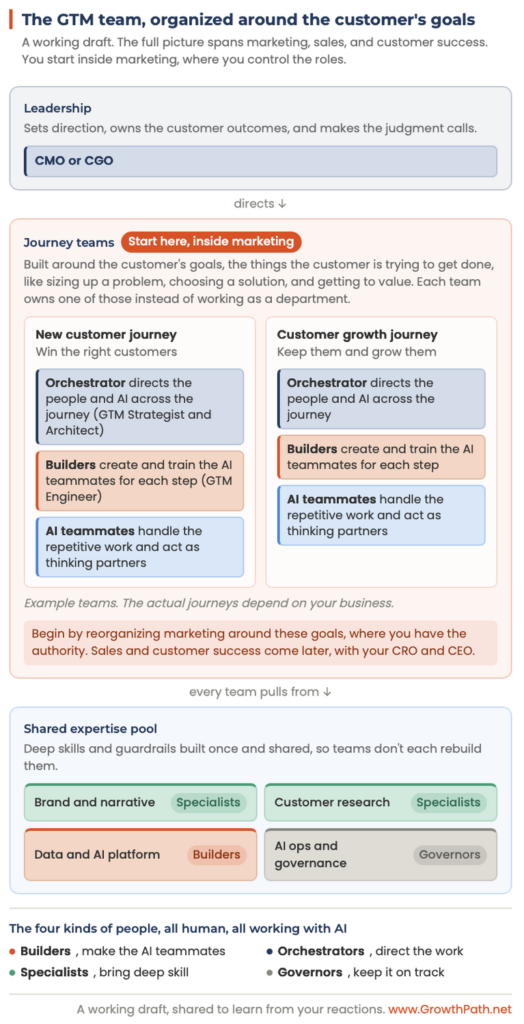
The team starts to organize around the customer’s goals instead of departments, with the four kinds of people on each team and a shared group of specialists they all pull from.

A GTM team organized around the customer's goals

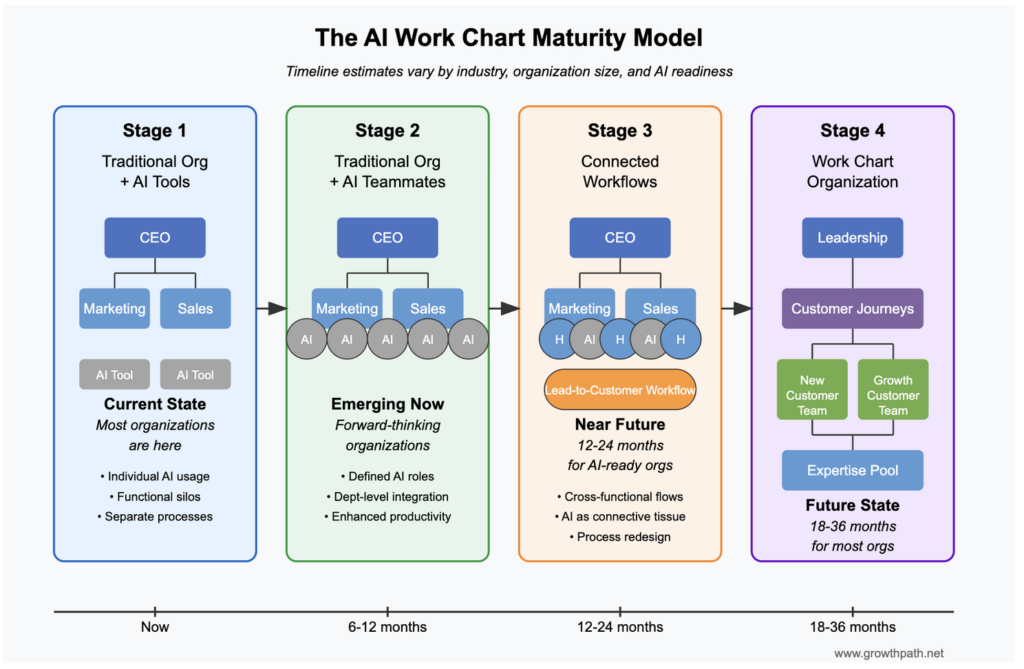
I went deeper on this structure, journey teams plus a shared expertise pool, in an earlier piece, No Daylight: How AI is Reorganizing GTM Teams Around Customers, Not Departments. Here’s how it could evolve across GTM:

The AI Work Chart Maturity Model: four stages from traditional org to work chart organization

There’s one caution here. The full picture crosses marketing, sales, and customer success, so you can’t build all of it alone. It’s the vision. Your first move is inside the function you own, reorganized around the customer’s goals. If that’s marketing, start there. The cross-department version needs your CRO and CEO, and that’s a later conversation.

I’m not handing you a best practice model. It’s an informed starting point, built from working with GTM teams, comparing notes with others, and connecting what’s already happening. I’m still working it out, so poke holes in it and share your thinking.

Where To Start

You don’t need the final answer to begin. A few suggestions:

1. Map a real workflow and separate the repetitive steps from the judgment. Hand the repetitive steps to AI, then redesign what’s left around what AI can see across the whole workflow, rather than simply speeding up the old version.

2. Grow the judgment in every role, and grow people T-shaped, deep in one area and able to stretch across the others. That’s what upskilling means right now, and it’s the part you control.

The people who build that judgment and range get more opportunity and a wider role. The ones who stay in the tactical work are the most exposed. Not everyone moves at the same pace, so this needs real support and time.

If AI does the work that used to teach junior people, how do they develop judgment? That’s the open question, and we’re still working it out.

More on ways to upskill and drive change management here, Human Change Management: From Applied AI Workshops to Hackathon to New Operating Model.

3. Use the time AI frees up to serve customers better, build trust, and drive more growth.

The Choice

It comes back to this: reimagined work leads to reimagined roles, and reimagined roles change the org chart.

Think about the three leaders at that dinner. The one told to cut 30% may still have to. His real choice is what he does with the work that’s left, and whether the people who stay lean into judgment or just run the old job faster. The one weighing a GTM engineer is seeing the work between her teams change, and that’s where the new role comes from. The one redesigning her workflows is the furthest along, because she started with the work and let the roles and the org follow.

Whether AI grows your team or shrinks it comes down to one choice. You can use it to do the same work with fewer people, or to do more for your customers and grow. That second path is what I mean by people first, AI forward. AI handles what it’s good at, and people own the judgment.

If you reorganized your team around the customer’s goals, where would you start?


The Practical AI in Go-to-Market newsletter shares learnings and insights in using AI responsibly. Subscribe today and let’s learn together on this AI journey.

For applied learning: Explore our applied AI workshops, offering both strategic sessions to shift mindsets through practical AI uses and hands-on sessions to build human+AI workflows. You’ll leave with either a clear plan or working solutions. Office hours provide follow-on support to keep momentum going.

For ongoing advisory: I work with leaders as a strategic advisor through their AI transformation, providing guidance, frameworks, and a sounding board as they build. If that’s what you need, let’s talk.

For team transformation: I partner with GTM leaders to move from scattered AI adoption to an operating model where human and AI teammates work together across workflows. See real examples: a lean GTM team’s step-by-step playbook and a global cybersecurity leader scaling to 150+ marketers with 57 AI teammates integrated into daily workflows.

For speaking: Here are virtual and in-person events where I’ve covered a variety of AI topics. I’ve also keynoted at many organization and corporate-wide events.

If any of this resonated, I’d love to hear from you. Reply to this email, find me on LinkedIn, or come say hi at an event.
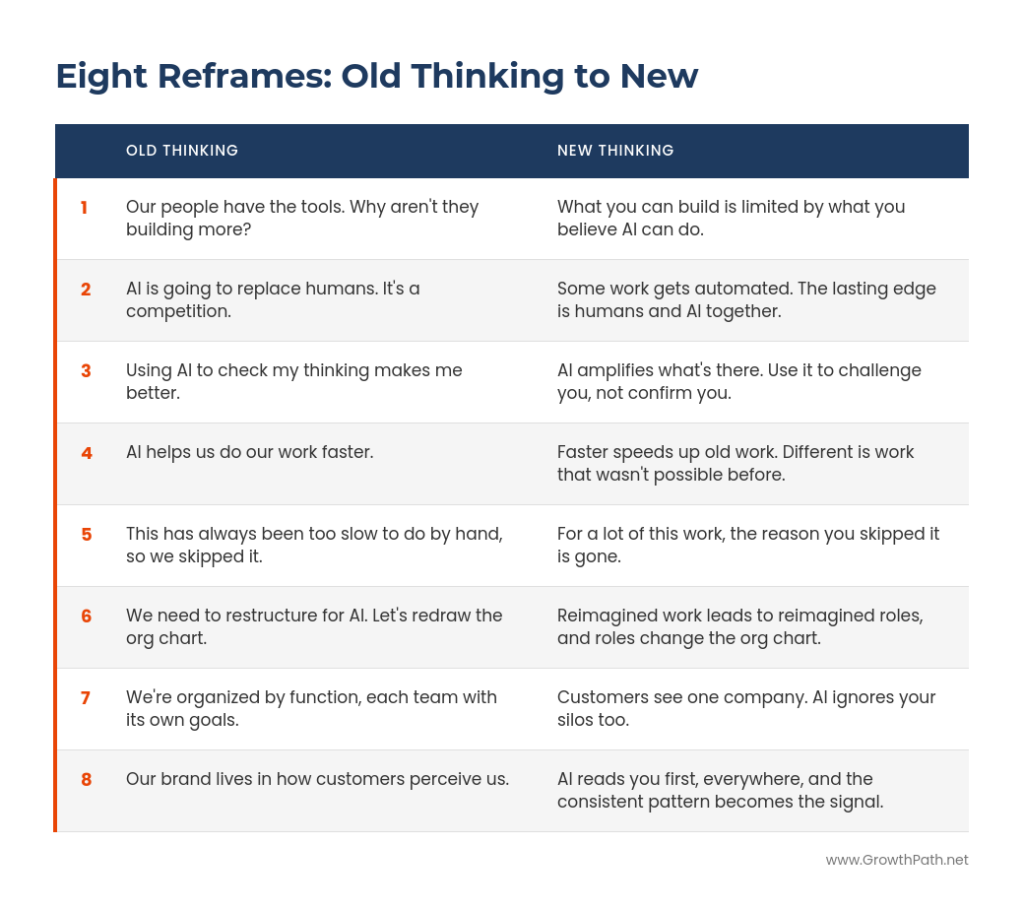
  • « Go to Previous Page
  • Page 1
  • Page 2
  • Page 3
  • Page 4
  • Interim pages omitted …
  • Page 16
  • Go to Next Page »

Copyright © 2026 · GrowthPath Partners LLC · Log in

  • LinkedIn