• Skip to primary navigation
  • Skip to main content
GrowthPath Partners LLC

GrowthPath Partners LLC

Empowering Purpose-Driven Growth

  • Engagements
  • Speaking
  • Resources
  • About
  • Contact
  • Show Search
Hide Search

Newsletters

The End of Handoffs: How AI Teammates Work Together

Liza Adams · August 2, 2025 ·

Practical AI in Go-to-Market
Get practical insights in using AI for go-to-market strategy, initiatives, workflows, and roles.

Hello go-to-market leaders, strategists, and innovators! 👋 Thank you for dropping by to learn practical AI applications and gain strategic insights to help you grow your business and elevate your team’s strategic value.

Quick Take

Work is reorganizing around what customers need, not what our org charts say. Most people use AI teammates one at a time. But you can connect them so they work together like a real team.

  • The gap between “who knows what” and “what needs to be done” disappears when AI doesn’t care about your org chart

  • Expertise flows across team boundaries, organizing work around outcomes instead of departments

  • More people can focus on strategic, big-picture work when AI handles the tactical execution and handoffs

  • Connected AI teammates show you what this new way of working looks like in practice

What you’ll discover in this edition: How to start your first chain, what this means for teamwork, and real examples of teams reimagining work around customer outcomes.

LIVE DEMO:

I’ll show a real GPT chain in action — no slides, just AI teammates working together in real-time. You’ll see how each one builds on the last, and how the GPT Navigator suggests which teammates to pull in for the job. This is where the lightbulb goes off.


Prefer to Listen? Try the AI-Generated Podcast

AI Podcast Version of this Newsletter

For those who prefer to consume information through audio, I’ve used Google’s NotebookLM to transform this newsletter into a short podcast episode, featuring a natural conversation between two AI hosts. You can listen to the 16-min podcast here while driving, walking the dog, or doing chores. Once you hit play, give it just a few seconds then it will start.


How Work Should Flow

Right now, work follows org charts. Marketing creates content, hands it to Sales. Sales qualifies leads, hands them to Customer Success. Product builds more features, hands specs to Marketing.

Each handoff loses context, slows momentum, and creates friction for customers.

But when you connect AI teammates, expertise starts flowing where it’s needed, when it’s needed. Department lines become less important than getting the job done.

You’re seeing early infrastructure for work organizing around customer outcomes instead of functional silos.

From Tools to Systems: Where Most Teams Get Stuck

AI teammates are specialized AI tools you build and train with your team’s knowledge. These could be Custom GPTs, Claude Projects, Gemini Gems, or other specialized AI tools designed to handle specific tasks with your best practices built in. Each one is built, trained, maintained and managed by humans with their unique expertise.

Most teams move through three phases with AI:

Phase 1: Using AI as Tools – You ask questions, get answers. Faster individual tasks.

Phase 2: Guiding AI as Teammates – You build specialized AI that knows your processes. Better results through ongoing collaboration.

Phase 3: Orchestrating AI Systems – You connect multiple AI teammates so they work together. Different types of expertise combine in new ways.

Most teams are stuck in Phase 1. Some are building Phase 2. Phase 3 is where competitive advantage lives because most teams will stay stuck coordinating individual AI tools while you’re orchestrating AI systems.

Angie Hill, Sr. Vice President of Growth and Integrated Marketing at Procore Technologies, is already thinking about this shift.

Angie Hill, Sr. Vice President of Growth and Integrated Marketing at Procore Technologies

“The companies that will make the biggest leaps are those that can reimagine how work flows when expertise can move freely across different internal teams and functions. More of our people need to think and work strategically and collectively at the outcome level. Connecting AI teammates begins to show us what that future looks like.”

How Chaining Works

Chaining means connecting AI teammates so they work together in sequence. Each one sees the full conversation and builds on what came before. Instead of briefing each AI teammate separately, you create workflows where expertise flows from one specialist to the next.

The image below shows how you “call” each GPT with the @mention function in the message box. It’s similar to how we tag people on LinkedIn. You can call GPTs one-by-one, as you need them, into the same conversation.

It’s a simple yet powerful feature. Probably one of the most underrated and underused features of ChatGPT despite being available since early 2024! Why has it flown under the radar? You need multiple Custom GPTs to make chaining valuable, and most people haven’t built them.

@Mention Function in ChatGPT

Here’s the difference in practice.

Without chaining (using each AI teammate individually) – You work with Content GPT to create an article → You take that output and start fresh with Webinar GPT → You summarize the webinar strategy for Email GPT → You give Social GPT a brief overview.

Each AI teammate starts from scratch. You spend time re-explaining context (e.g., target persona, key pain points, value props, stage in the buying journey). You upload or cut and paste outputs from one GPT into another. Details get lost.

With chained AI teammates – Content Drafter GPT (built by Sasha) creates messaging → @Webinar Buddy GPT (built by Shiloh) sees the full conversation and builds event strategy using that exact messaging → @Email Writer GPT (built by Remi) sees everything and creates sequences that support the webinar → @Social Creator GPT (built by Yuki) adapts it all for social platforms.

Every AI teammate sees the complete conversation. Nothing gets lost. Each specialist’s knowledge builds on the others. You get campaigns that combine everyone’s expertise from day one. This only works when each AI teammate is well-trained. Weak links in the chain amplify problems instead of solving them.

This is like assembling your dream team. Each GPT carries the knowledge of it’s human builder’s expertise in that area: Sasha’s content experience, Shiloh’s event strategy, Remi’s email best practices, Yuki’s social insights. Each builder is like a personal trainer who knows their athlete intimately and has trained them to peak performance. The team then works together with shared context toward the same goal.

When you connect the GPTs, you’re the coach. You set the strategy, guide the plays, and ensure responsible execution while your dream team delivers top-notch results.

Below is a sample marketing org chart showing the AI teammates and how humans can orchestrate jobs to be done by chaining the AI teammates together.

Connecting and Orchestrating AI Teammates to Work Together

View the short demo video to see chained AI teammates in action for a campaign: pitch deck creator GPT + webinar planner GPT + email buddy GPT

Today, only ChatGPT supports teammate chaining in one conversation. But the concept of orchestrated AI teammates is platform-agnostic. The future is about designing systems where expertise flows.

The Research Behind the Shift

When you experience chained AI teammates, you start seeing how work wants to flow across knowledge areas, not department lines.

This aligns with what researchers are discovering about AI and collaboration. Ethan Mollick, Associate Professor at the Wharton School, shared insights from a Harvard study with P&G professionals. Cross-functional teams working with AI experienced something remarkable:

“You stop caring as much about the normal boundaries of your job.”

When specialists from different functions used AI, the lines between expertise areas nearly disappeared. Traditional silos broke down as AI helped people think beyond their specialized training. When specialists could access each other’s expertise through AI, project timelines shortened and quality improved because context never got lost in translation.

This is happening now. AI teammates accelerate this shift because expertise flows freely across them. When your positioning expert’s AI teammate works smoothly with your content expert’s AI teammate, you see how knowledge wants to move – not through department channels, but directly to where it’s needed.

People start organizing around outcomes rather than job descriptions.

As Maggie Miller, Senior Director of Corporate Marketing at HackerOne, puts it:

Maggie Miller, Senior Director of Corporate Marketing at HackerOne

“What excites me most about chained GPTs is how they let us combine different perspectives smoothly. Instead of sequential handoffs where context gets lost, we get true collaboration where each expert builds on the others’ work. This is changing how we think about teamwork itself.”

If you viewed the demo above, Maggie’s quote will resonate. It changes how information flows, work gets done, and what becomes possible.

Start Your First Chain

Pick one workflow that typically involves multiple people and expertise areas:

  • Product launch campaign

  • Lead nurture sequence

  • Customer onboarding process

  • Event promotion workflow

Step 1: Map the expertise needed What different knowledge areas are required? Positioning, content, design, email, social, sales enablement?

Step 2: Check your current AI teammates Which ones do you already have? Which ones do you need to build? Each should capture one person’s expertise and best practices.

Step 3: Design the flow How should expertise move through the chain? What should each AI teammate see from the previous steps? Use @mentions to connect them in order.

Step 4: Test with human oversight Run your first chain with someone reviewing each handoff. You’re orchestrating expertise, not replacing judgment.
The goal is workflows where your team’s best practices combine every time, delivering results that no single person could create alone.

The GPT Navigator – Your Team’s AI Guide

As you build more AI teammates, keeping track of them becomes a challenge. Which GPT should you use for competitive analysis? How do you chain them for a product launch?

This is where the GPT Navigator comes in. Think of it as a Custom GPT that knows about all your team’s AI teammates and suggests which ones to use or how to chain them for any given project.

The Navigator asks a few questions about your project, then recommends the right AI teammate or suggests a chain sequence. It’s like having a smart assistant who knows everyone on your team and exactly what they’re good at. It helps teams reduce confusion and scale more easily.

Here’s a demo of how a GPT Navigator works:

Use this app to see examples of other workflows enabled by specific GPTs connected together.

Also check out a real-life GPT Navigator that the Dice marketing team uses. They call it AI Concierge.

Focusing on Jobs to Be Done

AI doesn’t care about org charts. It flows knowledge where it’s needed, when it’s needed. When your positioning expert’s AI teammate works smoothly with your content expert’s AI teammate, you see how expertise wants to flow across knowledge areas, not department lines.

What I’m observing with the GTM teams I work with aligns with broader trends. Microsoft’s 2025 Work Trend Index confirms that teams are forming around goals, not functions.

As I explored in my “AI is Breaking Department Silos: Moving from Org Charts to Work Charts” newsletter, chained GPTs give you early infrastructure for this shift toward outcome-driven work.

Once you experience this, you start asking different questions:

  • What if teams formed around specific workflows instead of departments?

  • What if expertise could flow to where it’s needed most, when it’s needed?

  • What if we organized around customer outcomes instead of functional silos?

Your marketing chains are just the beginning. Imagine when this connects to sales, customer success, product. When customer workflows run with fewer handoffs and stops. When the gap between “who knows what” and “what needs to be done” shrinks.

AI doesn’t care about our silos and neither do our customers.

Your Next Steps

Pick one workflow that typically involves multiple people. Map the expertise needed. Identify which AI teammates you have and which you need to build. Then design your first chain.

The infrastructure is here. So, will you keep briefing your AI teammates one by one or orchestrate a team that builds together?


New to AI teammates? Start with these two newsletters:

  • A Leader’s Human-AI Org Transformation Playbook – real case study of a team that grew from 20 to 100+ AI teammates today.

  • Build Your AI Inner Circle – how to think about and create your first AI teammates

Ready to connect your AI teammates so they work together? You’re in the right place.


The Practical AI in Go-to-Market newsletter is designed to share practical learnings and insights in using AI responsibly. Subscribe today and let’s learn together on this AI journey!

For those who prefer more interactive learning, explore our applied AI workshops, designed to inspire teams with real-life use cases tailored to specific go-to-market functions.

Also check out this team transformation case study and step-by playbook of how we helped transform a lean GTM team into a human-AI powerhouse with human and AI teammates.

Or, if audio-visual content is your style, here are virtual and in-person speaking events where I’ve covered a variety of AI topics. I’ve also keynoted at many organization and corporate-wide events. Whether through the newsletter, multimedia content, or in-person events, I hope to connect with you soon.

The End of Handoffs: How AI Teammates Work Together

Liza Adams · July 23, 2025 ·

Practical AI in Go-to-Market
Get practical insights in using AI for go-to-market strategy, initiatives, workflows, and roles.

Hello go-to-market leaders, strategists, and innovators! 👋 Thank you for dropping by to learn practical AI applications and gain strategic insights to help you grow your business and elevate your team’s strategic value.

Quick Take

Work is reorganizing around what customers need, not what our org charts say. Most people use AI teammates one at a time. But you can connect them so they work together like a real team.

  • The gap between “who knows what” and “what needs to be done” disappears when AI doesn’t care about your org chart

  • Expertise flows across team boundaries, organizing work around outcomes instead of departments

  • More people can focus on strategic, big-picture work when AI handles the tactical execution and handoffs

  • Connected AI teammates show you what this new way of working looks like in practice

What you’ll discover in this edition: How to start your first chain, what this means for teamwork, and real examples of teams reimagining work around customer outcomes.

LIVE DEMO:

I’ll show a real GPT chain in action — no slides, just AI teammates working together in real-time. You’ll see how each one builds on the last, and how the GPT Navigator suggests which teammates to pull in for the job. This is where the lightbulb goes off.


Prefer to Listen? Try the AI-Generated Podcast

AI Podcast Version of this Newsletter

For those who prefer to consume information through audio, I’ve used Google’s NotebookLM to transform this newsletter into a short podcast episode, featuring a natural conversation between two AI hosts. You can listen to the 16-min podcast here while driving, walking the dog, or doing chores. Once you hit play, give it just a few seconds then it will start.


How Work Should Flow

Right now, work follows org charts. Marketing creates content, hands it to Sales. Sales qualifies leads, hands them to Customer Success. Product builds more features, hands specs to Marketing.

Each handoff loses context, slows momentum, and creates friction for customers.

But when you connect AI teammates, expertise starts flowing where it’s needed, when it’s needed. Department lines become less important than getting the job done.

You’re seeing early infrastructure for work organizing around customer outcomes instead of functional silos.

From Tools to Systems: Where Most Teams Get Stuck

AI teammates are specialized AI tools you build and train with your team’s knowledge. These could be Custom GPTs, Claude Projects, Gemini Gems, or other specialized AI tools designed to handle specific tasks with your best practices built in. Each one is built, trained, maintained and managed by humans with their unique expertise.

Most teams move through three phases with AI:

Phase 1: Using AI as Tools – You ask questions, get answers. Faster individual tasks.

Phase 2: Guiding AI as Teammates – You build specialized AI that knows your processes. Better results through ongoing collaboration.

Phase 3: Orchestrating AI Systems – You connect multiple AI teammates so they work together. Different types of expertise combine in new ways.

Most teams are stuck in Phase 1. Some are building Phase 2. Phase 3 is where competitive advantage lives because most teams will stay stuck coordinating individual AI tools while you’re orchestrating AI systems.

Angie Hill, Sr. Vice President of Growth and Integrated Marketing at Procore Technologies, is already thinking about this shift.

Angie Hill, Sr. Vice President of Growth and Integrated Marketing at Procore Technologies

“The companies that will make the biggest leaps are those that can reimagine how work flows when expertise can move freely across different internal teams and functions. More of our people need to think and work strategically and collectively at the outcome level. Connecting AI teammates begins to show us what that future looks like.”

How Chaining Works

Chaining means connecting AI teammates so they work together in sequence. Each one sees the full conversation and builds on what came before. Instead of briefing each AI teammate separately, you create workflows where expertise flows from one specialist to the next.

The image below shows how you “call” each GPT with the @mention function in the message box. It’s similar to how we tag people on LinkedIn. You can call GPTs one-by-one, as you need them, into the same conversation.

It’s a simple yet powerful feature. Probably one of the most underrated and underused features of ChatGPT despite being available since early 2024! Why has it flown under the radar? You need multiple Custom GPTs to make chaining valuable, and most people haven’t built them.

@Mention Function in ChatGPT

Here’s the difference in practice.

Without chaining (using each AI teammate individually) – You work with Content GPT to create an article → You take that output and start fresh with Webinar GPT → You summarize the webinar strategy for Email GPT → You give Social GPT a brief overview.

Each AI teammate starts from scratch. You spend time re-explaining context (e.g., target persona, key pain points, value props, stage in the buying journey). You upload or cut and paste outputs from one GPT into another. Details get lost.

With chained AI teammates – Content Drafter GPT (built by Sasha) creates messaging → @Webinar Buddy GPT (built by Shiloh) sees the full conversation and builds event strategy using that exact messaging → @Email Writer GPT (built by Remi) sees everything and creates sequences that support the webinar → @Social Creator GPT (built by Yuki) adapts it all for social platforms.

Every AI teammate sees the complete conversation. Nothing gets lost. Each specialist’s knowledge builds on the others. You get campaigns that combine everyone’s expertise from day one. This only works when each AI teammate is well-trained. Weak links in the chain amplify problems instead of solving them.

This is like assembling your dream team. Each GPT carries the knowledge of it’s human builder’s expertise in that area: Sasha’s content experience, Shiloh’s event strategy, Remi’s email best practices, Yuki’s social insights. Each builder is like a personal trainer who knows their athlete intimately and has trained them to peak performance. The team then works together with shared context toward the same goal.

When you connect the GPTs, you’re the coach. You set the strategy, guide the plays, and ensure responsible execution while your dream team delivers top-notch results.

Below is a sample marketing org chart showing the AI teammates and how humans can orchestrate jobs to be done by chaining the AI teammates together.

Connecting and Orchestrating AI Teammates to Work Together

View the short demo video to see chained AI teammates in action for a campaign: pitch deck creator GPT + webinar planner GPT + email buddy GPT

Today, only ChatGPT supports teammate chaining in one conversation. But the concept of orchestrated AI teammates is platform-agnostic. The future is about designing systems where expertise flows.

The Research Behind the Shift

When you experience chained AI teammates, you start seeing how work wants to flow across knowledge areas, not department lines.

This aligns with what researchers are discovering about AI and collaboration. Ethan Mollick, Associate Professor at the Wharton School, shared insights from a Harvard study with P&G professionals. Cross-functional teams working with AI experienced something remarkable:

“You stop caring as much about the normal boundaries of your job.”

When specialists from different functions used AI, the lines between expertise areas nearly disappeared. Traditional silos broke down as AI helped people think beyond their specialized training. When specialists could access each other’s expertise through AI, project timelines shortened and quality improved because context never got lost in translation.

This is happening now. AI teammates accelerate this shift because expertise flows freely across them. When your positioning expert’s AI teammate works smoothly with your content expert’s AI teammate, you see how knowledge wants to move – not through department channels, but directly to where it’s needed.

People start organizing around outcomes rather than job descriptions.

As Maggie Miller, Senior Director of Corporate Marketing at HackerOne, puts it:

Maggie Miller, Senior Director of Corporate Marketing at HackerOne

“What excites me most about chained GPTs is how they let us combine different perspectives smoothly. Instead of sequential handoffs where context gets lost, we get true collaboration where each expert builds on the others’ work. This is changing how we think about teamwork itself.”

If you viewed the demo above, Maggie’s quote will resonate. It changes how information flows, work gets done, and what becomes possible.

Start Your First Chain

Pick one workflow that typically involves multiple people and expertise areas:

  • Product launch campaign

  • Lead nurture sequence

  • Customer onboarding process

  • Event promotion workflow

Step 1: Map the expertise needed What different knowledge areas are required? Positioning, content, design, email, social, sales enablement?

Step 2: Check your current AI teammates Which ones do you already have? Which ones do you need to build? Each should capture one person’s expertise and best practices.

Step 3: Design the flow How should expertise move through the chain? What should each AI teammate see from the previous steps? Use @mentions to connect them in order.

Step 4: Test with human oversight Run your first chain with someone reviewing each handoff. You’re orchestrating expertise, not replacing judgment.
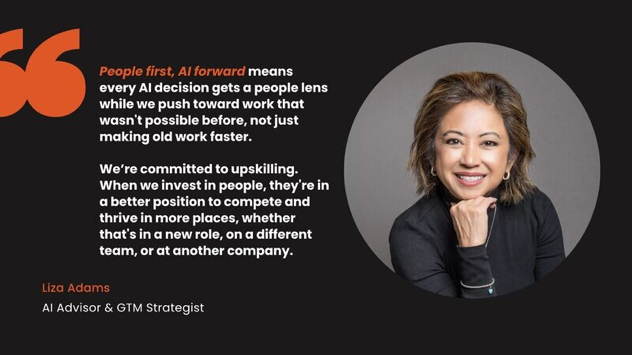
The goal is workflows where your team’s best practices combine every time, delivering results that no single person could create alone.

The GPT Navigator – Your Team’s AI Guide

As you build more AI teammates, keeping track of them becomes a challenge. Which GPT should you use for competitive analysis? How do you chain them for a product launch?

This is where the GPT Navigator comes in. Think of it as a Custom GPT that knows about all your team’s AI teammates and suggests which ones to use or how to chain them for any given project.
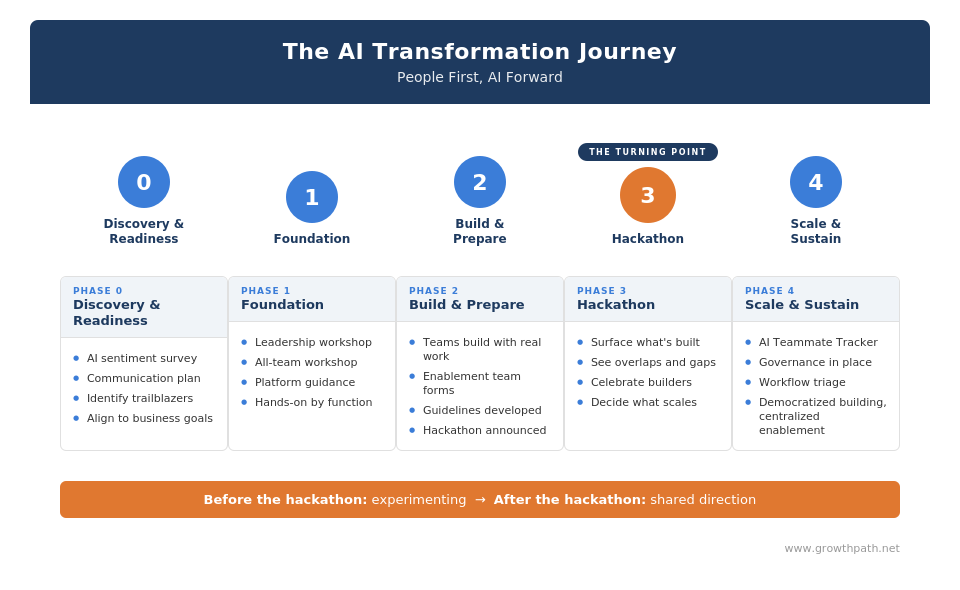
The Navigator asks a few questions about your project, then recommends the right AI teammate or suggests a chain sequence. It’s like having a smart assistant who knows everyone on your team and exactly what they’re good at. It helps teams reduce confusion and scale more easily.
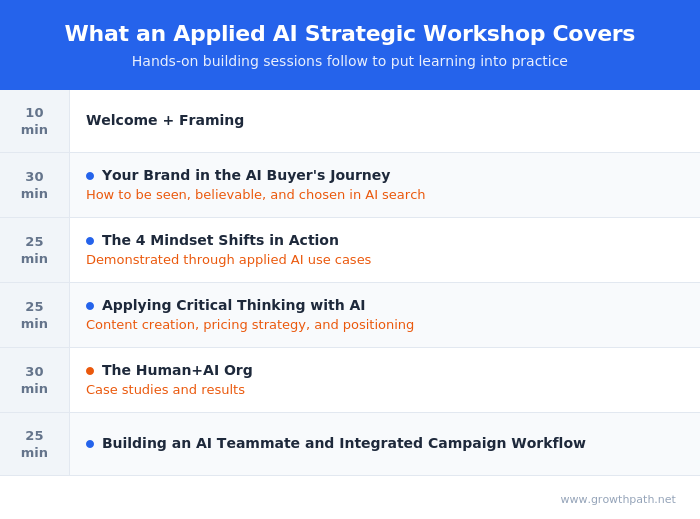
Here’s a demo of how a GPT Navigator works:

Use this app to see examples of other workflows enabled by specific GPTs connected together.

Also check out a real-life GPT Navigator that the Dice marketing team uses. They call it AI Concierge.

Focusing on Jobs to Be Done

AI doesn’t care about org charts. It flows knowledge where it’s needed, when it’s needed. When your positioning expert’s AI teammate works smoothly with your content expert’s AI teammate, you see how expertise wants to flow across knowledge areas, not department lines.

What I’m observing with the GTM teams I work with aligns with broader trends. Microsoft’s 2025 Work Trend Index confirms that teams are forming around goals, not functions.

As I explored in my “AI is Breaking Department Silos: Moving from Org Charts to Work Charts” newsletter, chained GPTs give you early infrastructure for this shift toward outcome-driven work.

Once you experience this, you start asking different questions:

  • What if teams formed around specific workflows instead of departments?

  • What if expertise could flow to where it’s needed most, when it’s needed?

  • What if we organized around customer outcomes instead of functional silos?

Your marketing chains are just the beginning. Imagine when this connects to sales, customer success, product. When customer workflows run with fewer handoffs and stops. When the gap between “who knows what” and “what needs to be done” shrinks.

AI doesn’t care about our silos and neither do our customers.

Your Next Steps

Pick one workflow that typically involves multiple people. Map the expertise needed. Identify which AI teammates you have and which you need to build. Then design your first chain.

The infrastructure is here. So, will you keep briefing your AI teammates one by one or orchestrate a team that builds together?


New to AI teammates? Start with these two newsletters:

  • A Leader’s Human-AI Org Transformation Playbook – real case study of a team that grew from 20 to 100+ AI teammates today.

  • Build Your AI Inner Circle – how to think about and create your first AI teammates

Ready to connect your AI teammates so they work together? You’re in the right place.


The Practical AI in Go-to-Market newsletter is designed to share practical learnings and insights in using AI responsibly. Subscribe today and let’s learn together on this AI journey!

For those who prefer more interactive learning, explore our applied AI workshops, designed to inspire teams with real-life use cases tailored to specific go-to-market functions.

Also check out this team transformation case study and step-by playbook of how we helped transform a lean GTM team into a human-AI powerhouse with human and AI teammates.

Or, if audio-visual content is your style, here are virtual and in-person speaking events where I’ve covered a variety of AI topics. I’ve also keynoted at many organization and corporate-wide events. Whether through the newsletter, multimedia content, or in-person events, I hope to connect with you soon.

When AI Judges Your Brand Before Humans Do

Liza Adams · July 9, 2025 ·

Practical AI in Go-to-Market
Get practical insights in using AI for go-to-market strategy, initiatives, workflows, and roles.

Hello go-to-market leaders, strategists, and innovators! 👋 Thank you for dropping by to learn practical AI applications and gain strategic insights to help you grow your business and elevate your team’s strategic value.

Quick Take

While most companies chase AI citations and search rankings, they’re missing something bigger. AI systems are already analyzing your brand, judging who you serve best, and recommending you (or not) — whether you guide them or not.

And they can only be as clear as you are. If you’re fuzzy on who you serve and what problems you solve best, AI will be too. This is about clarity, positioning, and knowing your customer deeply, so much more than just prompts or keywords.

Key takeaways:

  • AI references websites more than any other source when forming brand opinions

  • Vague positioning forces AI to piece together your value from scattered signals

  • Result: AI creates its own version of who you serve which may not match your intent

  • SEO tricks won’t cut it. Say clearly what you do and who you help.

  • Be explicit about your ideal fit instead of expecting AI to figure it out

Curious how your brand shows up to AI?

Take this quick 30-second quiz: Can AI Understand Your Website?

It scores how clearly your website communicates to AI and gives you practical tips to improve.


Prefer to Listen? Try the AI-Generated Podcast

For those who prefer to consume information through audio, I’ve used Google’s NotebookLM to transform this newsletter into a short podcast episode, featuring a natural conversation between two AI hosts. You can listen to the 13-min podcast here while driving, walking the dog, or doing chores. Once you hit play, give it just a few seconds then it will start.


What Happens When AI Evaluates Your Competitors

For example, I asked Google to profile project management platforms for a mid-sized company. Within seconds, Google’s AI-powered search results delivered a detailed analysis: which platform was “best for” specific scenarios, pros and cons for each, and clear recommendations with reasoning.

AI Search Prompt

The AI didn’t just find these companies. It judged them. See Perplexity and Google’s AI Overviews responses below.

• Asana – best for growing teams needing automation

• Trello – simplest for visual planners

• Monday – powerful for custom workflows, but complex

Perplexity Response
Google AI Overview Response

It was exactly the kind of guidance buyers want: clear use cases, honest trade-offs, and specific recommendations. But it had to piece this together from scattered information across websites, reviews, and comparisons.

Most companies never explicitly said “we’re ideal for X situation” or “competitor Y is better for Z use case.” The AI made those calls anyway, using whatever crumbs it could find.

When AI Gets It Wrong, You Still Pay the Price

AI forms impressions based on the signals it sees. If those signals are inconsistent or unclear, it will fill in the blanks. That’s not a malfunction. It’s how these systems work. They pattern-match and summarize. But when the patterns are vague or conflicting, AI produces flawed narratives. It might categorize your brand incorrectly, recommend you for the wrong use case, or overlook you entirely. Buyers won’t know it was an AI error. They’ll just assume your brand isn’t for them.

If you’re curious how to guide those signals and increase your odds of being cited directly, I wrote a deeper piece on how to make your brand sourced and a top result in AI search. It walks through how to identify buyer questions, track what AI says, and tune your content accordingly. Read it here.

Here’s why simply chasing citations backfires.

What Most Teams are Missing

A recent Semrush study found that AI systems reference websites more than any other source when forming brand opinions. But most companies still approach this backward.

We’ve been focused on getting AI to find our content. The real challenge is helping it understand and accurately represent our value.

We got away with vague positioning because humans could fill in the blanks.

“Industry-leading solution.” “Best-in-class features.” “Perfect for teams of any size.”

Humans can interpret those claims. They know when “scalable” means 25 users vs. 2,500. AI doesn’t. So it either makes wrong assumptions — or plays it safe with vague, generic recommendations.

Why This Matters More Than You Think

AI isn’t just finding information. It’s interpreting and compiling it. It’s turning scattered signals into structured buying guidance.

In the project management example, AI created decision frameworks that most of those companies didn’t offer themselves.

And the buyers coming from those frameworks are more ready to act. A SEMrush study found that AI search visitors convert at 4.4x the rate of traditional organic traffic. Why?

  • They’ve already compared options

  • They’ve learned your value

  • They arrive with real intent

That makes clarity even more critical. If you’re not clearly positioned, AI won’t know when to recommend you and high-intent buyers won’t know why to choose you.

That also means it’s getting harder to stand out with surface-level content. In Beyond AI-Generated Content, I share how to rise above the noise by telling stories AI can’t replicate and creating content that buyers (and AI) actually remember. Skim it here.

This creates a fundamental problem: if you don’t clearly communicate your ideal customer profile and use cases, AI will invent its own version.

And it won’t invent that version in a vacuum. It will pull from whatever signals it can find such as customer reviews, community posts, influencer roundups, and outdated buyer guides. If you’re vague, those voices will fill in the gaps for you. And their version of your story might not match your intent.

Your website is the one place you control. You can’t dictate what people say in forums or reviews, but you can shape the narrative on your own site.

The sharpest teams know this and they’ve stopped trying to be “best for everyone.” Instead, they’re clear about who they serve best and even point customers to a competitor that might be a better fit. That’s truly being helpful.

Five Changes That Help AI Understand You

Here are five areas where companies can stop making AI guess and start being direct:

1. Say Who You’re Not For

Be bold enough to draw the line. Instead of trying to appeal to everyone, make it clear who you serve best and who you don’t. AI picks up on patterns. If your case studies all feature 250+ employee companies, but your homepage says “great for small teams,” that’s a mismatch. AI will flag it. So will buyers.

The fastest way to build trust is to help people self-select out.

2. Describe the Outcome, Not the Feature

Buyers don’t care that your product is “AI-powered.” They care that it helps them do something specific like predict customer churn or personalize pricing in real time.

Instead of “AI-powered analytics provides better insights,” try: “Need to predict customer behavior with 90% accuracy? Use our Predictive AI module.”

The more clearly you describe the job your product helps someone do, the more accurately AI can match you to the buyer’s intent.

3. Organize by Buyer Goals, Not Product Tiers

Most websites are structured around how you think about your product. AI and buyers don’t care about your internal categories. They care about achieving a specific outcome.

Instead of “Products > Premium > For Experts,” try: “What are you trying to do? → Analyze Data → In Real Time → Live Dashboard.”

This kind of goal-based structure helps both AI and humans navigate directly from intent to solution — without needing a map.

4. Be Honest About Where You Win (and Don’t)

Buyers don’t just want to know who you serve. They want to know when your product is the right tool for the job.

Say: “Best for mid-sized teams with flexible workflows. Not ideal for large enterprises requiring strict compliance.”

This kind of clarity helps AI route the right buyers your way and helps humans trust you faster. You’re not trying to win every deal. You’re trying to win the right ones.

5. Use Structured Content, Not Just Storytelling

Narrative copy is great for humans but AI needs structure to understand and cite you accurately.

Use tables, FAQs, labeled specifications, comparison grids, and feature lists. These formats make it easy for AI to extract meaning and build summaries.

Bonus: humans love them too. Especially when they’re scanning for answers.

The Business Case for Transparency

This approach might challenge old-school marketing instincts, but it aligns with sound business fundamentals: not all customers are created equal.

Customers you can’t serve well drain resources, churn faster, and rarely become advocates.

In a world shifting toward sustained profitability, your goal isn’t more leads, it’s better-fit ones. The ones you can serve exceptionally well. The ones who stay longer, buy more, and refer others.

Transparency helps AI recommend you to those right-fit prospects and steer others toward better alternatives. You win the customers you can delight. Your competitors win the ones they serve best. Everyone benefits.

What This Looks Like in Practice

This shift is already playing out on forward-thinking websites.

Andy Crestodina, Co-Founder and CMO of Orbit Media Studios, sees it first-hand.

Andy Crestodina, Co-Founder and CMO of Orbit Media

“There is a true story in the life of your visitor. This is the reason they are on your page. The better you know that reason and provide the answers their looking for, the more likely you are to answer their questions and earn their trust.

Train AI on your audience and ask it for a gap analysis. Then fill those gaps and win the lead.”

This alignment matters just as much inside the org as it does on your website.

Megan Cabrera, VP of Marketing Operations at Sophos who is leading and driving human-AI org transformation, puts it this way:

Megan Cabrera, VP of Marketing Operations at Sophos

“The same challenge we face inside — teaching AI to make smart decisions — applies externally too. When AI research tools evaluate us, they need the same kind of structure and clarity we give our internal models.

If we don’t provide it, they’ll guess. And those guesses influence what buyers see.”

Your Next Steps

Start by seeing your brand the way AI does.

Prompt to try: “I’m looking for [your category] solutions for [your target market]. Please profile the top competitors and give me recommendations with pros, cons, and best-fit scenarios.”

Then assess the results:

  • How does AI describe your value?

  • Which scenarios does it say you’re best for?

  • When does it recommend a competitor?

Now audit what AI is learning from.

  1. Pick one piece of content your team uses often in sales or marketing.

  2. Ask: “If an AI had to recommend us based on this, would it have enough clarity to get it right?”

  3. If not, fix it. Make the connections obvious. Don’t make AI or buyers figure it out.

None of this works without clarity. If you don’t understand your customer or your value, you can’t guide AI or anyone else. The teams that get this right are clear on who they serve, what they solve, and why it matters. Their content works because their strategy is solid.

A confused buyer buys nothing.

And in today’s crowded markets, confusion is everywhere. When buyers feel overwhelmed, they don’t turn to you. They turn to community threads, peer reviews, buyer guides, and increasingly, AI to make sense of the madness. That’s why clarity is a competitive advantage.

The good news is that you don’t need to win the click to win the mind. If your site is clear, consistent, and grounded in truth, AI will carry your message forward in search results, summaries, and beyond. Your website becomes your most powerful amplifier, not just for buyers, but for the AI that increasingly guides them.

You can’t control the algorithms. But you can control the signals you send. So be the clearest signal in the noise.


The Practical AI in Go-to-Market newsletter is designed to share practical learnings and insights in using AI responsibly. Subscribe today and let’s learn together on this AI journey!

For those who prefer more interactive learning, explore our applied AI workshops, designed to inspire teams with real-life use cases tailored to specific go-to-market functions.

Also check out this team transformation case study and step-by playbook of how we helped transform a lean GTM team into a human-AI powerhouse with human and AI teammates.

Or, if audio-visual content is your style, here are virtual and in-person speaking events where I’ve covered a variety of AI topics. I’ve also keynoted at many organization and corporate-wide events. Whether through the newsletter, multimedia content, or in-person events, I hope to connect with you soon.

Don’t Sit on the Idea. Build It With AI.

Liza Adams · June 25, 2025 ·

Practical AI in Go-to-Market
Get practical insights in using AI for go-to-market strategy, initiatives, workflows, and roles.

Hello go-to-market leaders, strategists, and innovators! 👋 Thank you for dropping by to learn practical AI applications and gain strategic insights that help you grow your business, elevate your team’s strategic value and now, bring your best ideas to life.

Quick Take

Most teams still ask AI to help them write faster or summarize better. The best teams use AI to turn ideas they’ve been sitting on into working solutions — fast, interactive, and real.

The AI skills you’ve developed for building AI teammates are now also turning marketing concepts into working solutions. Here are some key takeaways:

  • While competitors describe competitive analysis, you build interactive comparisons where stakeholders can filter and gain real-time insights

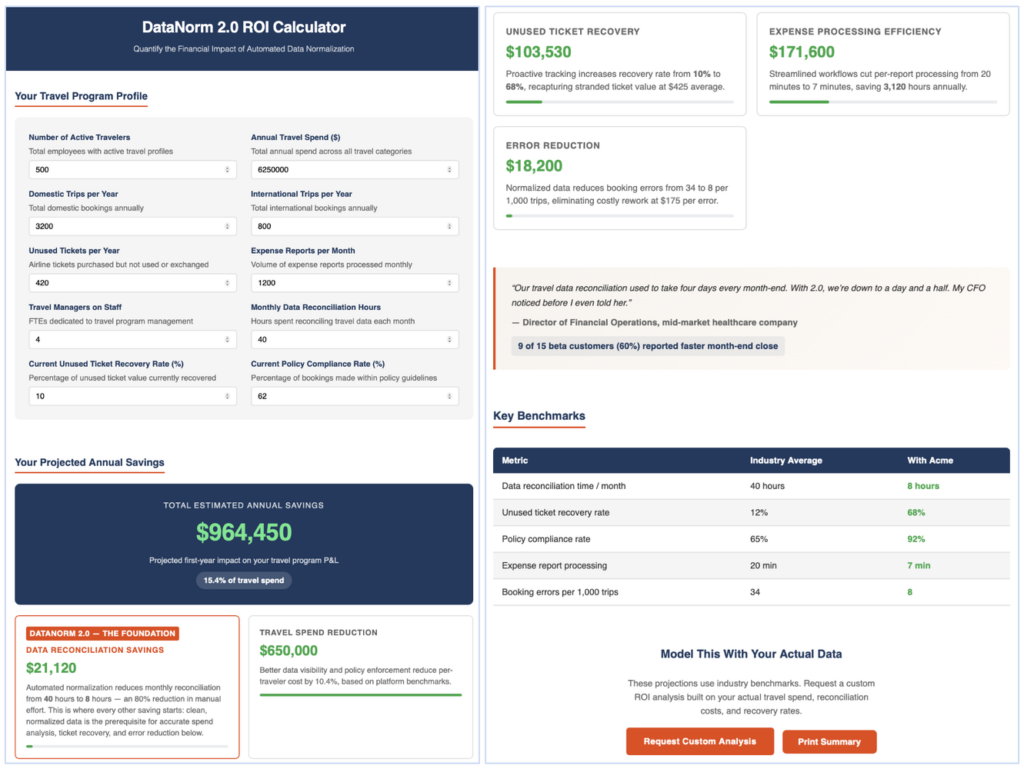
  • Instead of explaining ROI calculations in presentations, you create working calculators that generate personalized projections

  • Rather than outlining buyer journeys in documents, you prototype actual interactive experiences that qualify and educate prospects

  • The same strategic prompting skills used for AI teammates also help you build AI-powered apps with AI platforms (e.g., ChatGPT, Claude, and Gemini) you already have

  • These AI-powered apps serve both internal and external uses


Prefer to Listen? Try the AI-Generated Podcast

For those who prefer to consume information through audio, I’ve used Google’s NotebookLM to transform this newsletter into a short podcast episode, featuring a natural conversation between two AI hosts. You can listen to the 14-min podcast here while driving, walking the dog, or doing chores. Once you hit play, give it just a few seconds then it will start.


Why This Matters Now

A lot of AI talk still circles around speed. Faster content. Faster emails. Faster decks.

But speed isn’t the biggest gain. It’s finally having a way to get the ideas out of your head and into something others can explore. We all have brilliant concepts rattling around, but translating them into something others can understand and act on is hard.

AI democratizes software development. What used to require developers and weeks of back-and-forth now happens in one conversation. You can show your thinking instead of struggling to explain it.

We’re in a new go-to-market era where:

  • Buyers want to try, not just hear.

  • Execs need proof, not more pitch decks.

  • Teams move faster when they can align around something real.

Building with AI lets you skip the long explanation. You can show the thing. Test it. Iterate. Share it in the room, or let others explore it on their own time.

And the tools are ready but good enough to build something meaningful in an afternoon. That’s what this newsletter is about.

My Observations

I’m seeing a quiet shift.

Some teams still present slides packed with bullets and static comparisons. Others show up with interactive dashboards that let stakeholders filter by company size, explore use cases, and see real-time insights.

It’s the same research but one buries the findings and the other brings them to life.

From Concepts to Clickable Reality

You might have heard the new AI term: vibe coding.

It’s the ability to build software by describing what you want in plain language. No code and no waiting. Just an idea that becomes a working tool.

This lets go-to-market teams quickly launch things like quizzes, assessments, demos, or lead forms, without relying on other teams to get started.

The idea took off thanks to Andrej Karpathy, founding member of OpenAI and former Director of AI at Tesla, who called it a way to “just go with the flow.” You let the AI handle the technical work so you can focus on your ideas and keep moving forward.

You can start with AI platforms like ChatGPT, Claude, or Gemini. Or you can try specialized no-code builders like Lovable, Replit, or Bolt.

For most GTM professionals, the AI platforms are all you need. They handle interactive tools, calculators, assessments, and lead qualification well.

Specialized tools offer extras like drag-and-drop editors, automation, and connections to other business systems. But those features are typically needed by GTM ops teams working on complex integrations – where IT and legal usually get involved anyway.

You don’t need to find the perfect tool. Use what you already have. Focus on being clear about what you want to build. Let the AI do the heavy lifting.

You don’t need to become a developer. You just need to know how to describe what you want clearly. AI handles the rest.

What to Expect on Your First Build:

  • Plan for 2-3 iterations to get your vision right – AI rarely nails it on the first try

  • Start with simple functionality, then add complexity

  • Expect some back-and-forth as you refine your requirements

  • Your second and third projects will go much faster as you get the hang of it

Isar Meitis, CEO of Multiplai.ai and Host of Leveraging AI Podcast, puts it well:

“The #1 problem I hear from professionals isn’t that AI doesn’t work. It’s that they’re paralyzed by choice.

In our recent Ultimate AI Showdown podcast, Liza showed how to build apps with AI platforms like ChatGPT and Claude, while Marwan Kashef, MMAI showed what’s possible with specialized tools like Bolt, Lovable, and Replit.

It’s clear that you don’t need to solve the ‘perfect tool’ puzzle before you start. Begin with the AI platforms you likely already use. Learn the fundamentals of turning ideas into working solutions. Then, if you need more sophisticated features, you’ll know exactly what to look for in specialized platforms.”

Check out The Ultimate AI Showdown recording here.

Three Ideas That Became Reality

To inspire what’s possible, here are three project management challenges that transformed from concepts into working solutions.

Each one took roughly 30-90 minutes to build, depending on complexity (that includes research time). Pulling insights from a blog post to create an interactive FAQ might take 30 minutes or less, while sophisticated calculators can take 60-90 minutes. Your first few builds will likely be on the longer end as you learn the flow.

1. Dynamic Competitive Infographic

I used Gemini’s Deep Research to analyze Asana, Monday.com, and Smartsheet across vendor websites, analyst reports, customer reviews, and industry publications.

Note my Deep Research prompt and the research output from Gemini below. Here’s the full output.

Notice on the top-right corner that you can select what type of app or experience you want to create.

After the research, I selected “web page” as the output format. Gemini turned the report into an interactive infographic. You can now look at detailed profiles, compare ratings by metric, and see which solution fits different scenarios.

This is a new feature in Gemini. Currently, the interactive output isn’t shareable externally. Only the creator can access it. I expect that to change soon as other models already allow sharing.

Watch the process and see the infographic in action in this demo video.

What took weeks of manual research and design now happens in one conversation. The result transforms information into an experience that helps stakeholders make informed decisions.

2. Business Impact Calculator

I used Claude to research project management metrics and business value benchmarks, then had it build a working calculator. Claude’s research feature is still in beta, but it’s strong at building functional interfaces.

Users enter their company details and see projected productivity gains, cost savings, and payback periods based on industry data.

Below are my research prompts and here’s Claude’s output. Notice that Claude asked clarifying questions prior to doing the research. You’ll also see my responses.

I then asked Claude to create a simple interactive calculator using the benchmark data.

Try the interactive business impact calculator. I also walk through the full build process, how to use it, and how to remix it in this demo video.

3. Choose-Your-Own Adventure Web Experience

I used ChatGPT to research mid-market buying behaviors and best practices for web engagement. It handled the complexity well, pulling insights from multiple perspectives.

Here’s ChatGPT’s Deep Research output based on the prompt below. Similar to Claude in the previous use case, ChatGPT asked a few questions before starting the research.

Based on the research, I built a choose-your-own-adventure experience with AI. Visitors select their role and challenges, then follow personalized paths to relevant demos.

I created two versions to compare AI platform (ChatGPT vs Claude) strengths.

ChatGPT Version:

ChatGPT handled the research and built the web experience. It did a great job with the research.

However, rendering an interactive web experience is new for ChatGPT. So it’s not as good as Claude yet but the outputs are usable and shareable.

Try the ChatGPT choose-your-own-adventure web experience here.

Claude Version:

I used the same research from ChatGPT but built the experience with Claude. The design and interactivity are stronger, and the app is easier to share.

Try the Claude choose-your-own-adventure web experience here.

Both turn static buyer research into a dynamic experience that qualifies prospects and educates along the way. 

If you’re interested, here are the ChatGPT demo and Claude demo videos.

More Ideas Made Real

These three are just the beginning. Here are more working solutions that I built with Claude in the same way:

  • AI Working Style Assessment – Understand how you work with AI today and get personalized strategies to improve.

  • Brand Impact ROI Calculator – Quantify the value of brand investment with industry-backed data.

  • Interactive Sales Workflows Simulator– Models lead qualification, sales discovery & call prep, objection handling, proposal generation, and deal velocity analysis.

  • Interactive Starter Kits – Get ideas for custom GPTs by marketing function.

  • AI Jargon Translator – Test how well you understand AI jargon.

  • Mindful Moments – Take a refreshing break to reset and recharge during your day with this app.

  • Interactive Games – Pictionary, Battleship, Blackjack, and more. Built to help my kids learn AI. Still surprisingly useful for work for onboarding and offsite ice breakers.

  • Emoji Jeopardy – Holiday game where teams decode clues like 😱🏠1️⃣📌🦶. (What is Home Alone?)

Each one started as a simple idea, described clearly and built quickly.

Internal and External Impact

The competitive analysis becomes both a team alignment tool and a customer-facing resource. The ROI calculator supports internal planning and external sales conversations. The interactive journey helps product teams make better decisions and helps prospects self-qualify.

Some of these tools are final. Others are just version one. But all of them make your thinking tangible. They help others react, improve, and buy in.

The Skills That Transfer

The same prompting skills you’ve used to build AI teammates also apply here.

Clear context, specific requirements, and step-by-step refinement create functional apps/tools instead of conversations.

The shift is simple. Instead of asking, “Help me think through this,” you ask, “Help me build something others can use.”

Jessica Lanier, Vice President Marketing & Communications at Cox Automotive Inc., experienced this shift firsthand:

“Liza really got our strategic brains buzzing on how AI can revolutionize our marketing efforts. We moved well beyond tactical thinking into deep, strategic use cases that could be game changers for our organization.

The team left inspired with new knowledge about what’s possible when you stop just explaining concepts and start building them.

We’re still pondering the learnings — we just couldn’t stop talking about the possibilities days after the workshop. We look forward to continuing our AI journey with Liza. The passion this team brings to everything they do makes me excited to see what they’ll create with all this new inspiration.”

Cox Automotive Marketing & Communications Team and Liza Adams

Where Others See Limitations, You See Opportunities

While some teams wait for designers or developers, you’re already building. While others describe strategy, you create something people can use. While competitors talk about value, you build tools that prove it.

The competitive advantage comes from making ideas tangible instead of keeping them abstract.

Your Next Steps

Start Simple: Try this exact prompt and URL to see the transformation in action.

Use any of these AI platforms (paid versions recommended and I got the best results using these models):

  • Claude: Sonnet 4

  • ChatGPT: o4-Mini-High

  • Gemini: 2.5 Flash or 2.5 Pro

“Transform this article into an interactive ‘Pick Your Challenge, Get Your Solution’ tool. Ask users to select their main problem, then show them which solution from the article helps solve it, plus one action step to get started. Output the interactive app please. https://www.marketingprofs.com/articles/2023/50442/ai-use-cases-cmos“

See my results: Claude version and ChatGPT version. Compare the outputs and pick your preferred style. Gemini output apps are currently not shareable.

Once you see how it works, use your own blog post and adapt the prompt to fit your content. Each blog will need a slightly different approach depending on the topic and structure.

Congratulations, you’re officially a vibe coder! 🤪

Go Bigger: Pick one concept your team keeps talking about. Instead of explaining it again, build something interactive that brings it to life. Start with the AI platforms you already use. Keep it simple. Make it explorable.

What to Expect: Your first build might take 60-90 minutes as you learn the flow. Expect 2-3 iterations to get your vision right. Your second and third projects will go much faster.

The goal isn’t perfection. It’s progress. Getting from idea to first version. From abstract to actionable.

Your ideas don’t belong in just your head, slides, or long meetings. AI gives you the tools to make them real now.

Share Your Success: Let us know what you plan to build or share what you’ve already built to inspire others!


The Practical AI in Go-to-Market newsletter is designed to share practical learnings and insights in using AI responsibly. Subscribe today and let’s learn together on this AI journey!

For those who prefer more interactive learning, explore our applied AI workshops, designed to inspire teams with real-life use cases tailored to specific go-to-market functions.

Also check out this team transformation case study and step-by playbook of how we helped transform a lean GTM team into a human-AI powerhouse with human and AI teammates.

Or, if audio-visual content is your style, here are virtual and in-person speaking events where I’ve covered a variety of AI topics. I’ve also keynoted at many organization and corporate-wide events. Whether through the newsletter, multimedia content, or in-person events, I hope to connect with you soon.

Why Smart Teams Still Get Mediocre AI Results

Liza Adams · June 11, 2025 ·

Practical AI in Go-to-Market
Get practical insights in using AI for go-to-market strategy, initiatives, workflows, and roles.

Hello go-to-market leaders, strategists, and innovators! 👋 Thank you for dropping by to learn practical AI applications and gain strategic insights to help you grow your business and elevate your team’s strategic value.

Quick Take

Most AI teams are optimizing their prompts. The best are redesigning how they think.

If your AI work feels decent but underwhelming, you’re not alone. Most teams are spending time perfecting AI conversation mechanics while competitors gain real advantages by asking fundamentally different questions.

What you’ll discover:

  • Why teams with solid prompting skills still hit walls

  • The one shift that separates AI tools from AI thinking partners

  • Seven thinking moves that uncover insights your competitors miss

  • Why mastering strategic questioning now determines who wins with AI agents later

  • Real examples of teams turning AI limitations into breakthrough opportunities

The difference isn’t better prompts. It’s the courage to question what everyone else takes for granted.

How are you really using AI right now? Take 60 seconds for personalized insights and guidance on how to get more out of AI.

Take your AI Working Style Assessment here.


Prefer to Listen? Try the AI-Generated Podcast

For those who prefer to consume information through audio, I’ve used Google’s NotebookLM to transform this newsletter into a short podcast episode, featuring a natural conversation between two AI hosts. You can listen to the 15-min podcast here while driving, walking the dog, or doing chores. Once you hit play, give it just a few seconds then it will start.


What I Keep Seeing

A few months ago, I worked with two SaaS companies.

Company A had given up on AI for strategy work. “We tried it for competitive analysis and market research. The outputs were generic. AI just isn’t there yet for complex thinking.”

Company B was satisfied with their AI usage. “We use it for email drafts, call summaries, and content outlines. Saves us 5 hours a week. We’ve got this figured out.”

Both teams were using solid prompting techniques. Good structure, clear context, examples. But both were treating AI like a better search engine instead of a thinking partner.

But the problem isn’t AI’s capabilities. It’s the depth of your questions.

The Missing Piece in Every Prompting Framework

OpenAI, Anthropic, and Google have published excellent prompting guides covering structure, examples, and parameter tuning. I use a framework called GRACE – inspired by Christopher Penn‘s RACE framework, adding G for Goal because stating the objective upfront keeps both you and the AI focused.

Here’s what this looks like in practice:

Same mechanics. Completely different results.

Prompting techniques are getting easier. As AI advances with better memory, reasoning, and context understanding, the technical mechanics will become simpler.

The thinking layer – how deep your questions go, what assumptions you challenge – that’s the human advantage that matters more as AI advances. AI can’t push you to think deeper. It can only work within the cognitive framework you provide.

From AI Tool to AI Thinking Partner

Most teams ask AI: “Help me write a sales email.”

Strategic teams ask: “Challenge my assumptions about why prospects aren’t responding.”

This shift changes everything. Jason Cormier, Founder of AI Marketing Forum, sees this pattern across the marketing community.

Jason Cormier, Founder of AI Marketing Forum

“I see teams master the mechanics of prompting but still hit walls. They’re missing what I call “directive intelligence.” It’s the ability to guide AI toward what you don’t already know.

Most people use AI to confirm what they think. The best use it to discover what they’re missing. If you’re working through this, you’re not alone. We have hundreds of marketing leaders sharing what’s working in the AI Marketing Forum.”

More teams are starting to build AI teammates (using custom GPTs, Claude Projects, Gemini Gems, etc.) that work alongside them to do specific work. You can read more about a human-AI powerhouse team case study and step-by-step playbook here.

The quality of your AI teammate depends on how you guide their thinking. Give them tasks, get an assistant. Ask better questions, get a thinking partner.

7 Ways to Think Deeper

These seven thinking moves help you reframe problems before you even write a prompt. Each one helps you see the problem differently, often in ways your competitors haven’t considered.

1. Challenge Your Assumptions

Instead of: “How do we reduce churn?”

Try: “What if churn isn’t the problem? What if it’s showing us a product gap?”

Why it works: You pause before fixing and ask if you’re solving the right thing.

Potential outcome: A SaaS team discovers churned customers outgrew their product. Churn becomes upsell opportunities.

2. Borrow from Other Industries

Instead of: “How do we improve trial conversion?”

Try: “How do language learning apps keep people engaged daily?”

Why it works: You find new ideas by studying how others solve similar problems in different contexts.

Potential Outcome: A product team adds streaks and milestones to help users reach activation faster.

3. Try the Opposite

Instead of: “How do we shorten the sales cycle?”

Try: “What if making it longer helped us close bigger deals?”

Why it works: Sometimes the thing you’re trying to optimize is the thing getting in your way.

Potential Outcome: A B2B company adds business audit step, helping them close higher-ACV customers.

4. Find Hidden Connections

Instead of: “How do we improve pricing?”

Try: “What patterns show up when we compare churn reasons to our competitors’ ads?”

Why it works: Some of your best insights live in unlinked data.

Potential Outcome: A team repositions after discovering churned users match competitor’s target audience.

5. Find the Simplest Change

Instead of: “How do we drive more revenue?”

Try: “What’s one sentence in our demo that changes how people see the product?”

Why it works: Small shifts often create the biggest results.

Potential Outcome: A team moves their outcome statement to demo opening for better conversion.

6. Find the Excluded

Instead of: “How do we raise prices?”

Try: “Who are we unintentionally leaving out?”

Why it works: You expand opportunity by seeing who’s missing.

Potential Outcome: An analytics platform creates startup tier, opening new market segment.

7. Use Old + New

Instead of: “How do we improve email performance?”

Try: “What if we brought back personal touches using today’s tools?”

Why it works: Some tactics work no matter the decade.

Potential Outcome: A team adds timely check-ins and thank-yous based on user behavior.

Rhiannon Naslund, Chief Marketing Officer at Origami Risk is driving this shift in thinking and evolution in her team.

Rhiannon Naslund, CMO of Origami Risk

“This kind of shift in thinking doesn’t come naturally to everyone. That’s why we’re focused on giving people the space to learn and build confidence.

We’re showing what it looks like to guide AI with deeper thinking, using real examples that connect to their role. When someone sees how the way they structure a question changes what AI gives back, like refining messaging for a healthcare risk manager or pressure-testing a new idea, it clicks. They start to see how much impact they can have by pushing AI to think differently.”

The Bigger Picture

Whether you think you’ve mastered AI or you’re still struggling with it, you’re probably operating at 20% of what’s possible.

The biggest AI advantage doesn’t come from better tools or prompts. It comes from questioning what everyone else takes for granted.

This becomes critical as we move toward AI agents that work autonomously. Teams that can’t think strategically with AI now won’t be able to build agents that think strategically later.

Erin Mills, CMO of Quorum and co-host of FutureCraft GTM Podcast, sees this connection clearly as someone building both AI strategies and autonomous systems.

Erin Mills, Chief Marketing Officer at Quorum

“Organizations with strong fundamentals in strategic AI use are better positioned for what comes next. If your team struggles to frame the right problems or identify blind spots in their current approach, those same gaps will show up when you try to build AI agents that operate independently.

In our FutureCraft GTM conversations, we’re seeing a shift toward systems that make decisions on their own. What matters most now is having the judgment to guide them well. The teams that master strategic questioning now will be the ones successfully deploying autonomous AI later.”

Your next competitive advantage may be hiding in a question you haven’t asked yet.

Your Next Steps

Pick one challenge your team is working on this week. Before jumping into solutions, ask: “What assumptions are we making that might not be true?”

Then reframe it using one of the seven thinking moves above.

Want your team to think deeper? Forward this newsletter. The shift from good prompting to strategic thinking separates the winners from the optimizers.


The Practical AI in Go-to-Market newsletter is designed to share practical learnings and insights in using AI responsibly. Subscribe today and let’s learn together on this AI journey!

For those who prefer more interactive learning, explore our applied AI workshops, designed to inspire teams with real-life use cases tailored to specific go-to-market functions.

Also check out this team transformation case study and step-by playbook of how we helped transform a lean GTM team into a human-AI powerhouse with human and AI teammates.

Or, if audio-visual content is your style, here are virtual and in-person speaking events where I’ve covered a variety of AI topics. I’ve also keynoted at many organization and corporate-wide events. Whether through the newsletter, multimedia content, or in-person events, I hope to connect with you soon.

  • « Go to Previous Page
  • Page 1
  • Page 2
  • Page 3
  • Page 4
  • Page 5
  • Interim pages omitted …
  • Page 12
  • Go to Next Page »

Copyright © 2026 · GrowthPath Partners LLC · Log in

  • LinkedIn