• Skip to primary navigation
  • Skip to main content
GrowthPath Partners LLC

GrowthPath Partners LLC

Empowering Purpose-Driven Growth

  • Engagements
  • Speaking
  • Newsletters
  • About
  • Contact
  • Show Search
Hide Search

Liza Adams

Think Before You Build: A Practical System for Human+AI Teams

Liza Adams · May 28, 2026 ·

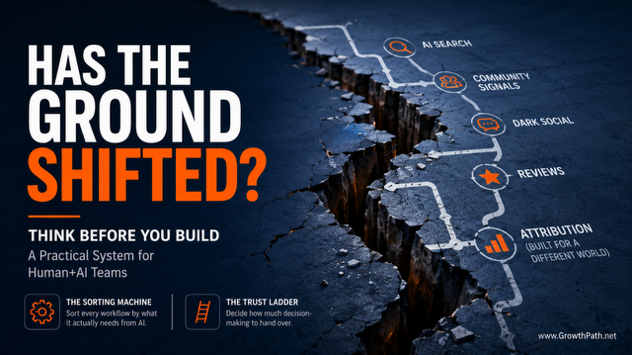
Has the ground shifted? Think Before You Build: a practical system for human+AI teams

GTM teams are automating workflows that were broken. Speed will not fix them. It will get you to failure faster.

Take channel attribution. A team automates the model that tracks which marketing channels lead to deals. It runs faster, processes more data, produces cleaner reports. The model is still measuring a linear funnel: ad impression to website visit to demo request to close.

That funnel does not reflect how their buyers find and evaluate them anymore. AI is creating shortlists before any human at the buyer’s company is in the loop. Buyers pull from signals attribution pixels cannot see: community conversations, peer recommendations, review sites, social posts.

The team has made a precise measurement of the wrong thing, faster.

Two frameworks have come out of helping GTM teams avoid this trap. They are not the definitive answer, but they give teams a structured way to have the conversation before they build. One sorts your workflows by what is needed from AI. The other helps you decide how much autonomy AI should have in each one.

Quick Take

This newsletter introduces two frameworks I use with GTM teams: the Sorting Machine and the Trust Ladder. Together they form a practical system for deciding what your workflows need from AI and how much decision-making to hand over.

  • The Sorting Machine uses one triage question and five paths to sort every workflow by what it needs from AI.
  • The triage question (“has the ground shifted?”) catches workflows built for a market or buyer that no longer exists. Channel attribution is a prime example.
  • The Trust Ladder has four levels of AI autonomy, from conversation to fully autonomous.
  • The tool you buy does not determine the level of trust you give it. The same platform can operate at any level.
  • Each sorting path maps to a natural starting level on the Trust Ladder.
  • Both frameworks can be run as a 30-minute team exercise.

AI Video Explainer and AI Podcast Versions of This Newsletter

To support different learning styles and time constraints, this newsletter is available as a 5-min AI cinematic video and a 20-min AI podcast with two AI hosts. I used Google’s NotebookLM to create these and personally reviewed them for accuracy and responsible AI use.

The Sorting Machine

Every workflow enters the Sorting Machine through one of two entries.

Entry 1: This workflow already exists and your team runs it today.

Entry 2: This capability does not exist yet, but it could.

The triage question: has the ground shifted?

Before tools and automation, you ask: was this workflow designed for the world we are operating in right now? Or was it built for a buyer, a market, or an operating model that has changed since?

I wrote about four AI-driven shifts in buyer behavior in a recent newsletter. If your workflow was built before any of those shifts, making it faster will not fix what is wrong with it. That workflow needs to be different.

The traditional channel attribution model measured a linear funnel. The buying process had become something else entirely. Faster was not going to help.
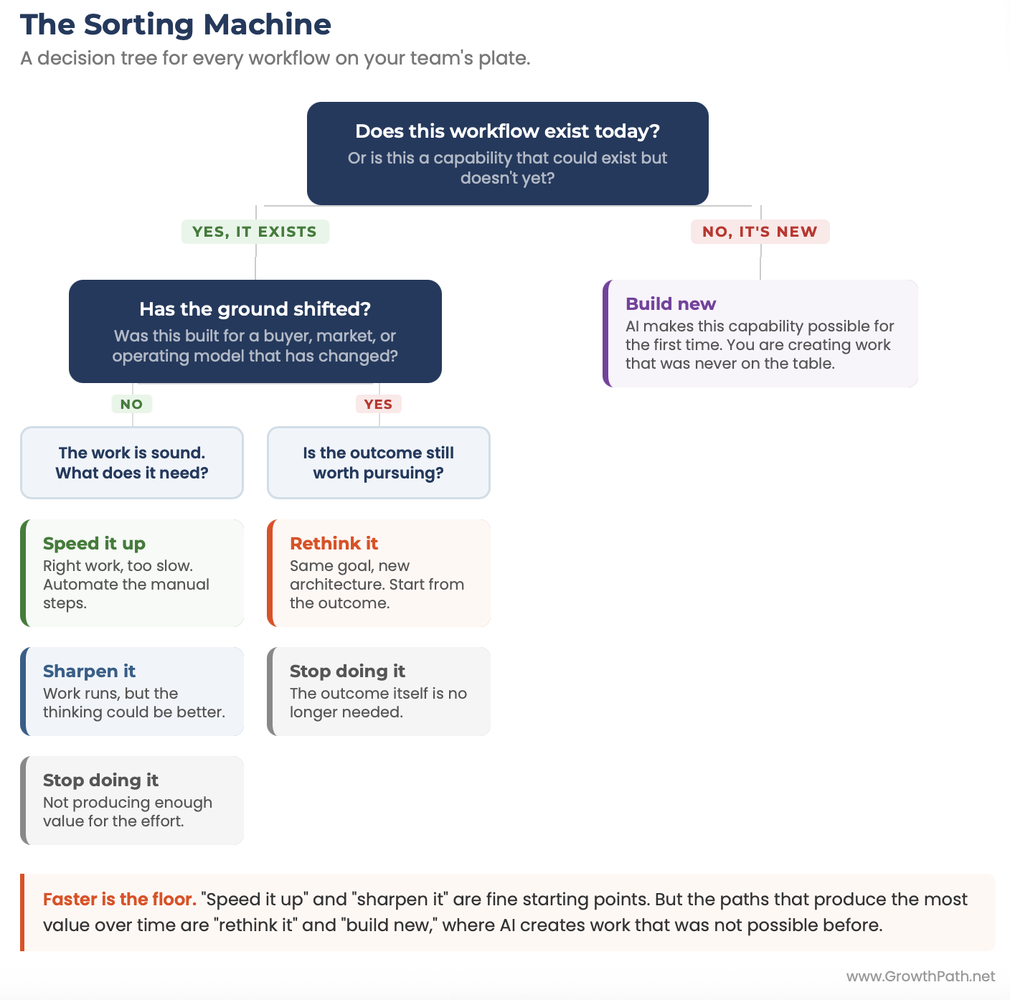
The Sorting Machine: a decision tree for every workflow on your team's plate

Five paths out

1. Speed it up

The work is right but it just takes too long. You are looking for manual steps that do not require human judgment: data entry, formatting, scheduling, first-draft generation.

An AI teammate that drafts meeting summaries from recorded calls is a “speed it up” example. The summary was always needed. AI gets it done in seconds instead of 30 minutes.

2. Sharpen it

The workflow runs, but the thinking could be better. AI becomes a thought and sparring partner for the judgment calls.

A product marketing team that pressure-tests a launch plan through three buyer lenses (the IT Director, Marketing Manager, and Procurement Manager) is improving the quality of the work.

Speed-it-up and sharpen-it are good starting points. But those should not be the ceiling of what we do with AI. The paths that produce the most value over time are rethink-it and build-new, where AI creates work that was not possible before. I will spend more time here.

Jamie Domenici, CMO at Klaviyo, put it this way when she reposted my last newsletter. She captured the spirit of the rethink-it path in her post:

Headshot of Jamie Domenici, Chief Marketing Officer at Klaviyo
Jamie Domenici, Chief Marketing Officer at Klaviyo

“We’re past ‘how do we do this faster’ with AI. The real work is rethinking how marketing grows the business… That’s the bar I’m holding my team to. Not just faster but different.”

3. Rethink it

The world this was built for has changed. You need to start from the outcome and work backward.

Take product launch content as an example. The old workflow runs like this: product marketing writes a brief, hands it to content, content writes a blog post, brand reviews, social writes captions, demand-gen builds the campaign. Each handoff loses context, and each persona on the buying committee ends up with a generic version of the same asset because the team does not have time to tailor for all of them.

Old workflow: Brief → Content → Brand review → Social → Demand-gen → Generic assets per persona

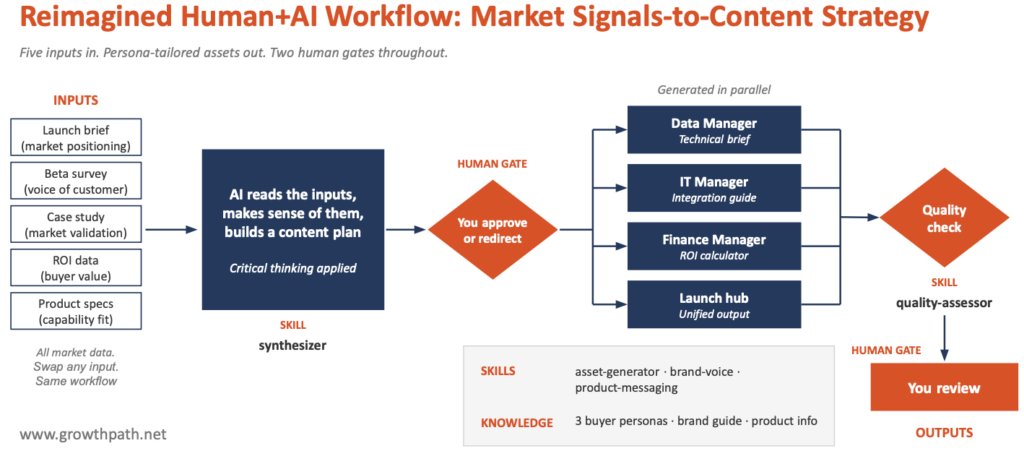
Rethought workflow: Shared market intelligence → Synthesis (human approval) → Specialist agents in parallel → Quality check → Persona-specific assets

The rethought version starts from the outcome. Each buying-committee persona gets an asset built for what they care about, generated from the same underlying market intelligence. I built one in Claude Cowork and walked through it in a previous newsletter, Stop Telling People to Reimagine Workflows. Show Them.

Five inputs go in (launch brief, beta survey, case study, ROI data, product specs). A synthesis step builds the content plan, you approve or redirect, and four specialist agents work in parallel to produce assets for the technical buyer, the IT buyer, the finance buyer, and a unified launch hub. A quality assessor checks the output. There were two human gates in the process.

Channel attribution is another rethink-it candidate. The outcome you need (understanding which activities influence pipeline) has not changed, but the inputs, the signals, and the buyer journey have. The rethought version combines traditional tracking with AI search visibility, community signal monitoring, and dark social (private channel conversations analytics tools can’t see).

4. Build new

With rethink-it, the outcome existed before in some form. With build-new, the outcome itself was not possible with humans only. The line is not always clean, and some workflows have elements of both. The question is which one dominates.

AI makes a capability possible for the first time. You are not improving old work. You are creating work your team has never done.

An AI mystery shopping workflow that walks through your entire buyer experience as a prospect, testing every chatbot, email sequence, and web page, then reporting back with a friction map, is a “build new” example. No team had the capacity to do that manually at scale.

5. Stop doing it

This work no longer produces enough value to justify the time it takes. GTM teams are notorious for hoarding legacy processes, and the biggest trap is using AI to automate reports or meetings nobody actually reads or needs anymore.

Derek E. Weeks, SVP of Marketing at Anaconda, has carried this philosophy across two marketing organizations.

Headshot of Derek E. Weeks, SVP of Marketing at Anaconda
Derek E. Weeks, SVP of Marketing at Anaconda

“I have brought this thinking to two marketing organizations. The instinct is always to speed up what exists. The breakthroughs came when we asked whether the workflow still made sense given how our buyers behave and how our teams are organized.

That pushes us to redesign how different functions work together instead of optimizing each team in its own lane. We rebuild the handoffs with AI handling the volume and context, and our people handle the judgment calls and relationships. That combination produces better work than anything we just make faster.”

Where AI Changes What’s Possible

When a workflow exits the Sorting Machine on “rethink it” or “build new,” the next question is: rethink it with what? Here are some capabilities that AI brings to workflows that your team cannot match at this speed, scale, or consistency on their own. Each one is paired with what humans bring, because reimagined work is built on both.
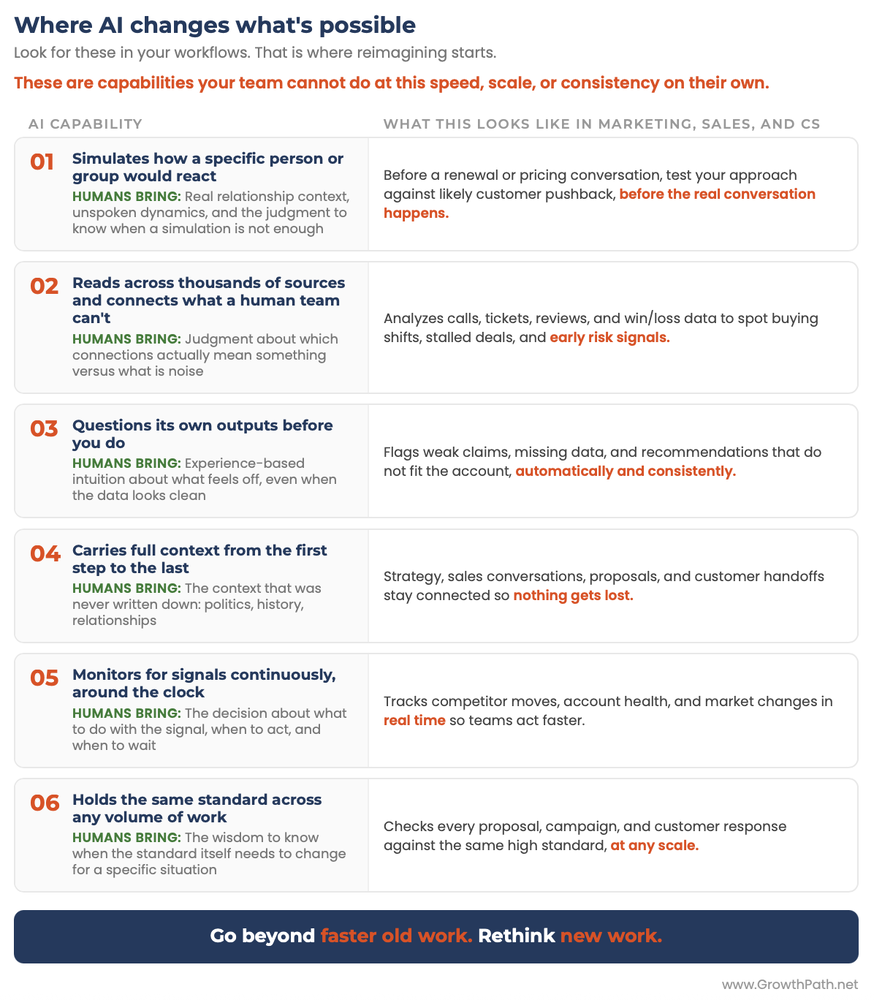
Where AI changes what's possible: six capabilities your team couldn't do at speed or scale

Once you can see where AI fits inside a workflow, the next question is how much decision-making to hand over. First, sort the work. Then, set the trust level.

The Trust Ladder

Once the Sorting Machine tells you what a workflow needs, the Trust Ladder helps you decide how much AI involvement is appropriate. It has four levels, each describing a different level of autonomy you give to AI.

Level 1: Conversation

You make every decision. AI responds without memory of past work or context about your situation. Use it for brainstorming, pressure-testing an idea, or getting a second opinion.

Level 2: Specialist

You still make every decision, but AI gives you better input because you have loaded it with deep context: brand voice, data, competitive landscape. Claude Projects, custom GPTs, and Gemini Gems operate here. My digital twin is a Level 2 example, loaded with my newsletters, frameworks, and writing style. When I ask it to challenge an idea, it pushes back like a colleague who has read everything I have written.

Level 3: Guided Workflow

AI executes multi-step work with human checkpoints built in. It does the heavy lifting. You review and approve at specific gates.

The rethought channel attribution system could operate at Level 3. AI analyzes signals across multiple sources (traditional tracking, AI search visibility, community mentions, review sites) and produces a draft attribution picture. A human reviews the analysis before any budget allocation decisions are made. AI does the work. Humans make the calls.

Level 4: Autonomous Workflow

AI runs end-to-end on a schedule with minimal human involvement. The work happens whether anyone is watching or not.

A competitive intelligence workflow that checks five competitor websites every morning and flags changes to Slack is Level 4. It runs, it reports. A human sets the goals, reviews the output, and redirects as needed.
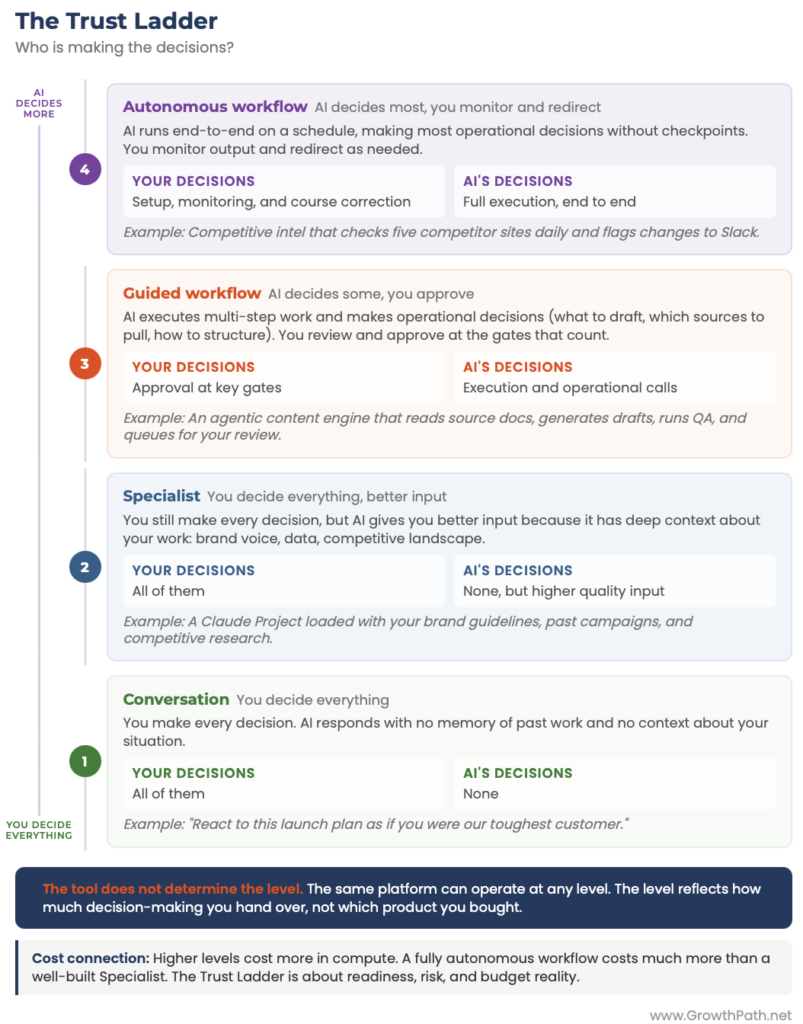
The Trust Ladder: four levels of AI autonomy, from conversation to autonomous workflow

The Tool Does Not Determine the Trust Level

The same platform can operate at any level. Claude can be a Level 1 conversation partner or a Level 3 workflow engine. ChatGPT can be a Level 2 specialist or a Level 4 autonomous agent. A team using Claude Cowork with human review at every gate is at Level 3. The same tool set up to run overnight without checkpoints is at Level 4. The level reflects how much decision-making you hand over, not which product you bought.

When teams map this in workshops, a gap becomes visible: the distance between where the tools can operate and where the team is actually using them. That gap is usually a bigger opportunity than buying new tools.

Three factors should influence where you start on the ladder.

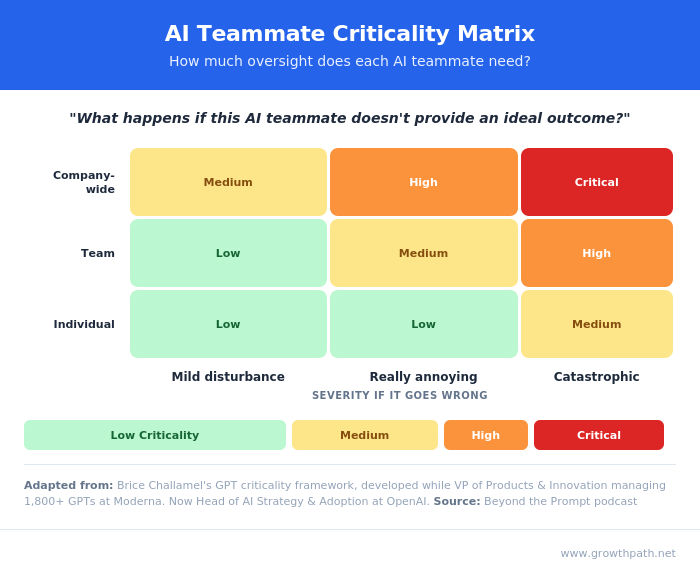
  1. Criticality – What happens if AI gets this wrong? Brice Challamel (former VP of Innovation at Moderna and now Head of AI Strategy and Adoption at OpenAI) has a useful matrix here. A workflow where a mistake damages your brand or creates compliance risk should start lower than one where a mistake just costs time.
  2. Cost – Higher levels cost more in compute. A fully autonomous workflow that reasons through multiple steps, calls tools, checks its own work, and retries on failure runs much more expensive than a well-built Specialist. Not every workflow needs the most expensive architecture. (More on what AI costs here.)
  3. Team Readiness – A team that has never built with AI should not start at Level 3 even if the workflow could technically handle it. The starting level should match the team’s experience. A workflow’s theoretical potential does not override where the team actually is.

How They Connect

The Sorting Machine tells you what a workflow needs. The Trust Ladder tells you how to build it. Each sorting path has a natural starting level.

Here is what that looks like across six real GTM workflows:
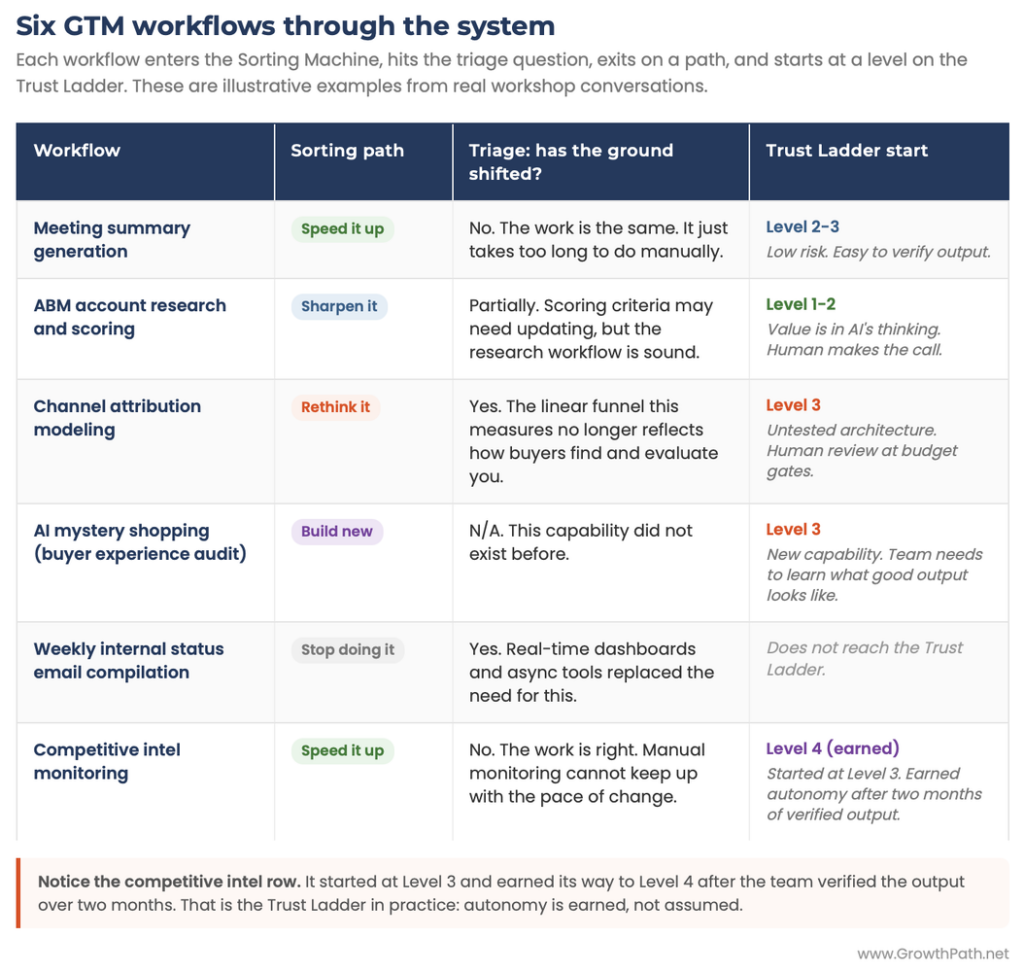
Six GTM workflows run through the Sorting Machine and Trust Ladder

“Speed it up” workflows start at Level 2 or 3 and earn their way to Level 4 because output is easy to verify. “Sharpen it” workflows live at Level 1 or 2 because the value is in AI’s thinking, not its execution. “Rethink it” and “build new” start at Level 3 because the work is untested and the team needs to see what good output looks like.

Run It Yourself

You can run both frameworks with your team in 30 minutes.

Step 1 (5 min): List every workflow your team runs regularly. Do not filter.

Step 2 (15 min): Run each workflow through the Sorting Machine. Start with the triage question: has the ground shifted?

Step 3 (10 min): For every workflow with a path forward, place it on the Trust Ladder. Place it where your team’s trust and experience are right now, not where you want it to end up.

The output is a map of your workflows, sorted by what to do with them and how much AI autonomy to give them. The “stop doing it” pile often creates the most room for everything else.

First, sort the work. Then, set the trust level. That is the whole system.

Megan Cabrera is one of my business partners who runs these frameworks with GTM teams. She previously led the AI transformation for a 150-person marketing organization at a global cybersecurity company, where her team converted 75% of manual execution time into higher-value work. She now works inside client organizations mapping workflows, interviewing stakeholders, and building the blueprint for what changes and how.

Headshot of Megan Cabrera, GTM Strategy and Operations Advisor
Megan Cabrera, GTM Strategy and Operations Advisor

“The sorting conversation changes when you are inside the actual workflow. A team will call something ‘speed it up’ until you walk through the steps together and realize half of them exist because of a handoff that does not need to happen anymore. That is when it moves to ‘rethink it.’ The framework gives you the question. The detail work gives you the honest answer.”

What’s Next

If you want to run this with your team, the two visuals in this newsletter are the worksheet. Save them, grab a whiteboard, and walk through the three steps above.

If you would rather have it facilitated with your team, that is what we do at GrowthPath Partners. Feel free to DM me or Megan.

And if you run it on your own and something works differently than I described, or you find a gap, I want to hear about it. These frameworks get better every time a team uses them.


The Practical AI in Go-to-Market newsletter shares learnings and insights in using AI responsibly. Subscribe today and let’s learn together on this AI journey.

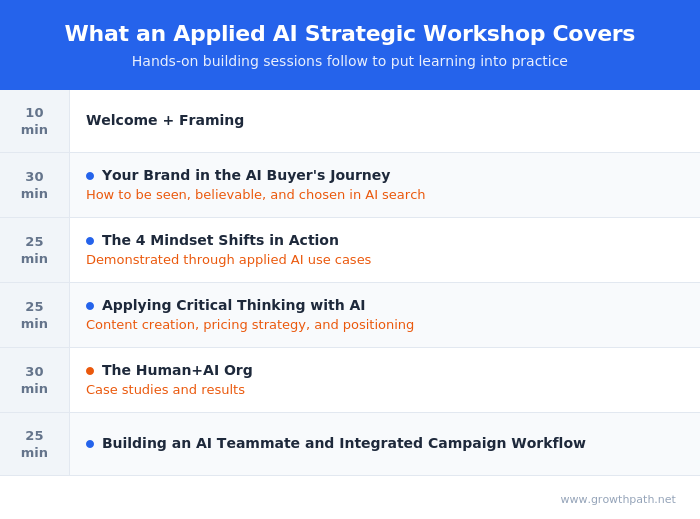
For applied learning: Explore our applied AI workshops, offering both strategic sessions (use cases and roadmaps) or hands-on building (create AI teammates during the workshop). You’ll leave with either a clear plan or working solutions. Office hours provide follow-on support to keep momentum going.

For ongoing advisory: I work with leaders as a strategic advisor through their AI transformation, providing guidance, frameworks, and a sounding board as they build. If that’s what you need, let’s talk.

For team transformation: I partner with GTM leaders to move from scattered AI adoption to an operating model where human and AI teammates work together across workflows. See real examples: a lean GTM team’s step-by-step playbook and a global cybersecurity leader scaling to 150+ marketers with 57 AI teammates integrated into daily workflows.

For speaking: Here are virtual and in-person events where I’ve covered a variety of AI topics. I’ve also keynoted at many organization and corporate-wide events.

If any of this resonated, I’d love to hear from you. Reply to this email, find me on LinkedIn, or come say hi at an event.
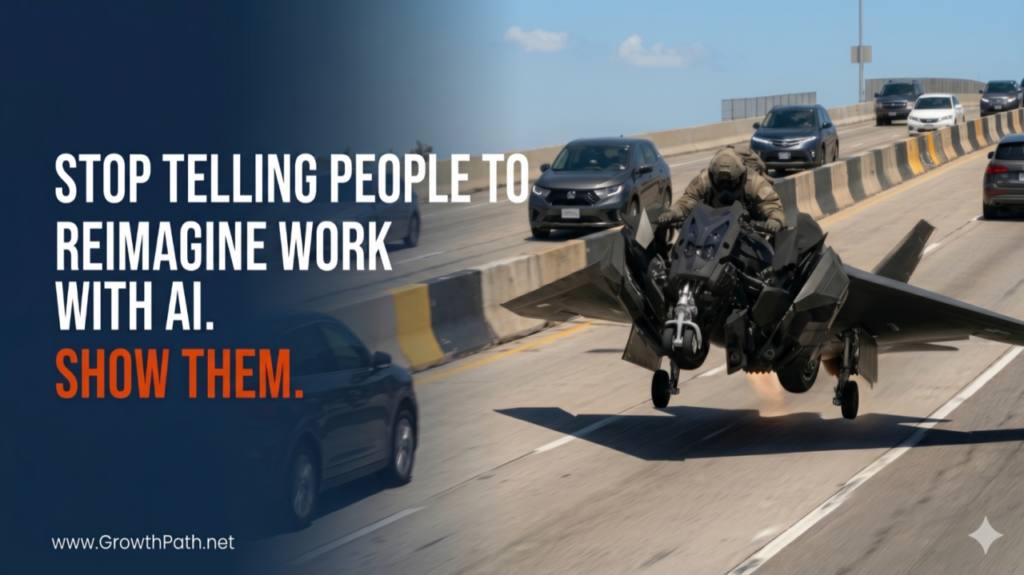
Stop Telling People to Reimagine Work With AI. Show Them.

Liza Adams · May 14, 2026 ·

Stop Telling People to Reimagine Work With AI. Show Them.

Your market intelligence is probably broken. Automating it as-is would just be a faster path to failure.

AR tracks the analyst reports. PMM runs customer interviews and listens to Gong calls. CI does competitive research. Brand watches customer reviews. Each team actions what they see. Rarely does anyone pull it all together, consistently, to find what cuts across every source. So you get fast action on individual signals and little action on the signals that only appear when you look at everything at once. Those that should drive your messaging, your positioning, and your buying committee strategy get missed.

You don’t fix that by adding more meetings or better hand-offs. You redesign the workflow.

Productivity-only AI makes the case for fewer people. Reimagined work makes the case for more of what people uniquely bring. This newsletter shows you what reimagined work looks like.

Why Reimagining Is Hard

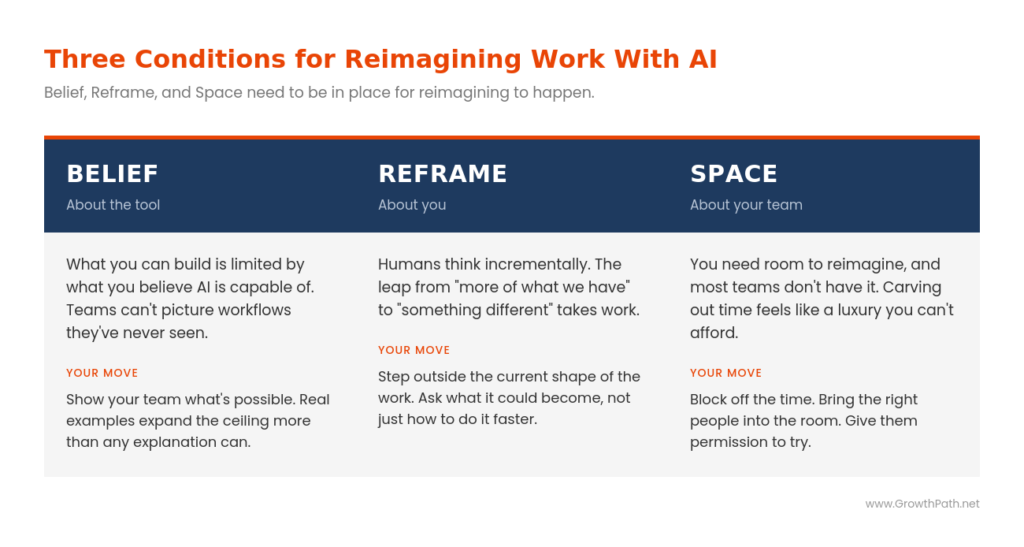
Writing a newsletter that says “reimagine your work” is easy. Doing the reimagining is much harder. Three conditions need to be in place. I call them Belief, Reframe, and Space.

  • Belief is about the tool. What you can build is limited by what you believe AI is capable of. If your team’s experience with AI is mostly faster drafts and summarized reports, that’s the ceiling they’ll build to. They can’t picture a workflow that reads every Gong call, customer review, win/loss note, and analyst report from the quarter and tells them which three buyer objections are gaining steam and what messaging is working against them. They’ve never seen one. (I went deeper on this in Your Team Will Only Build What They Believe AI Can Do.)
  • Reframe is about you. Humans think linearly and incrementally. Given the problem of unreliable taxis, the natural conclusion was “we need more taxis.” Uber and Lyft didn’t solve for more taxis. They reframed the problem as trust plus access to vehicles and built a different system: an app, drivers using their own cars, and a layer that made strangers comfortable getting in. The leap from “more of what we have” to “something different” takes work.
  • Space is about your team. You need room to innovate, and most teams don’t have it. Your people are already busy delivering on what’s on their plate. Carving out room to rethink the work itself feels like a luxury you can’t afford, even when you can’t afford not to.
Three conditions for reimagining work with AI: belief, reframe and space

This newsletter is here to give you a head start on all three.

Quick Take

This piece walks through a real workflow I built in Claude Cowork and demoed live at Content Jam in Chicago a few weeks ago. It shows what becomes possible when market intelligence stops sitting in silos and starts producing tailored content strategy for every member of a buying committee. It also covers what it takes to make the outputs genuinely good.

  • Reimagining a workflow means doing work that was not possible before. Faster reports and better drafts are good starting points, and they are not redesigned work.
  • AI can do things at scale that a human team cannot, no matter how well- coordinated. That is where redesign starts.
  • The quality of what comes out depends on the quality of thinking you put in. There are no shortcuts on that part.

AI Video Explainer and AI Podcast Versions of This Newsletter

To support different learning styles and time constraints, this newsletter is available as a 5-min AI cinematic video and a 19-min AI podcast with two AI hosts. I used Google’s NotebookLM to create these and personally reviewed them for accuracy and responsible AI use.

The Shift That Made This Possible

AI just crossed a capability threshold that changes what workflows can do. My friend Lisa Sharapata, Founder and CEO of 4Profit GTM and former CMO of Metadata, captured the change in a fun, visual way.

The old analogies (building the plane while flying it, changing a tire on a moving car) describe upgrades to something we already understood. Lisa reframed it with her post and the video below. It goes beyond fast. It’s different.

Headshot of Lisa Sharapata, Founder & CEO of 4Profit GTM
Lisa Sharapata, Founder & CEO of 4Profit GTM and former CMO of Metadata.io

“We’re not just building in motion anymore. The motion itself is transforming mid-flight. We’re dealing with a motorcycle on the highway that transforms into a plane and takes off while moving. It’s fundamentally different. That’s what agentic GTM actually feels like. I helped drive this at Metadata, and I’m guiding leaders as they work through the same right now.”

Still from Lisa Sharapata's AI transformation analogy video
AI Transformation Analogy Video by Lisa Sharapata

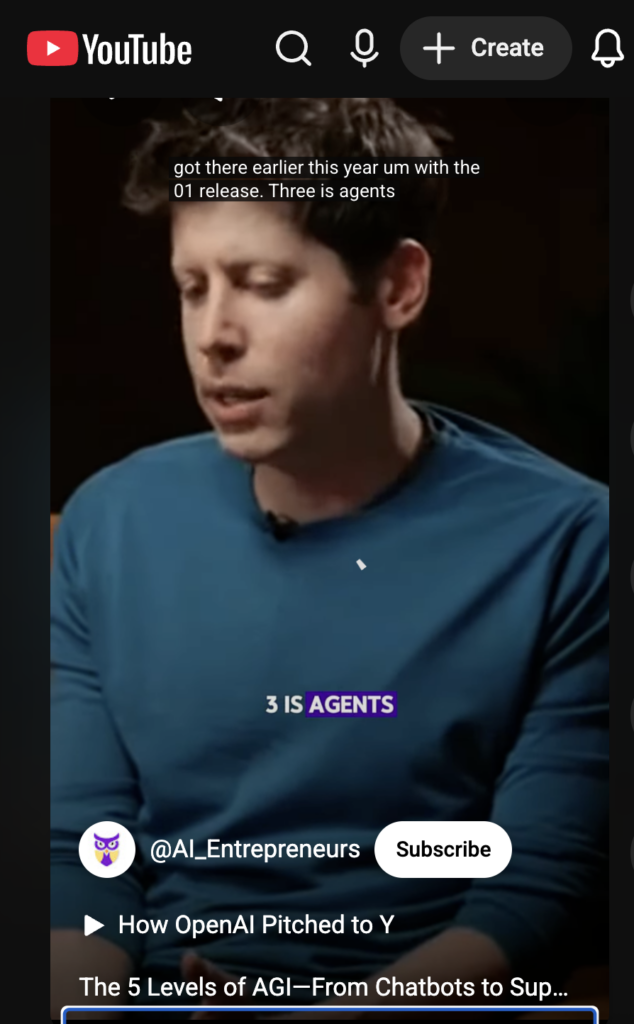
Sam Altman describes five levels of AI: Chatbot, Reasoner, Agent, Innovator, and Organization in the 60-sec video below. We just crossed from Reasoner into Agent late last year/early this year. Innovator and Organization come next.

YouTube Short on AI agents

What changed in practice: AI moved from giving answers to delivering work. That is the agentic shift, and it is what makes a new category of workflow possible. (More details here, AI Moved Fast: What Changed and What to Do Next.)

What AI Can Do That Your Team Can’t

Most of this work today gets done in batches by people doing their best with limited hours: a dozen Gong calls reviewed, a sample of reviews skimmed, one pricing scenario at a time. Rethinking starts with the capabilities that change what’s possible when you stop working in batches. Look for these in your own work.

What AI can do that your team can't

When you build a workflow around capabilities like these, the output is work a human team alone couldn’t produce at this quality, consistency, and cost.

One thing to check before you start: is the workflow itself sound? Automating a broken process gives you a faster path to failure. Innovating starts with workflows worth redesigning, not workflows that need fixing first.

The Workflow in Action

I built a Market Signals-to-Content Strategy workflow in Claude Cowork and demoed it live at Content Jam in Chicago. The workflow turns market intelligence into a persona-tailored content strategy. For the demo, I ran a product launch through it.

Note: the company and data in this demo are fictional. The workflow, the build, and the outputs are real.

Reimagined human+AI workflow: market signals to content strategy

The inputs were all market data:

  • The launch brief captured how the product fits the current market.
  • The beta survey reflected the voice of customer.
  • The case study showed where the market validated the product.
  • The ROI data quantified where the product creates value for the buyer.
  • The product specs translated market needs into capability.

The workflow doesn’t care what kind of market intelligence you load into it. The same workflow runs on analyst reports, Gong calls, competitive signals, or any combination you have.

AI reads everything and builds a content plan. You review and approve the plan, or redirect and challenge it, before a single asset gets produced. Then AI generates four outputs in parallel, each tailored to a different member of the buying committee, each quality-checked before it reaches you.

Imagine doing this with an all-human team in less than 10 mins. Not possible without AI.

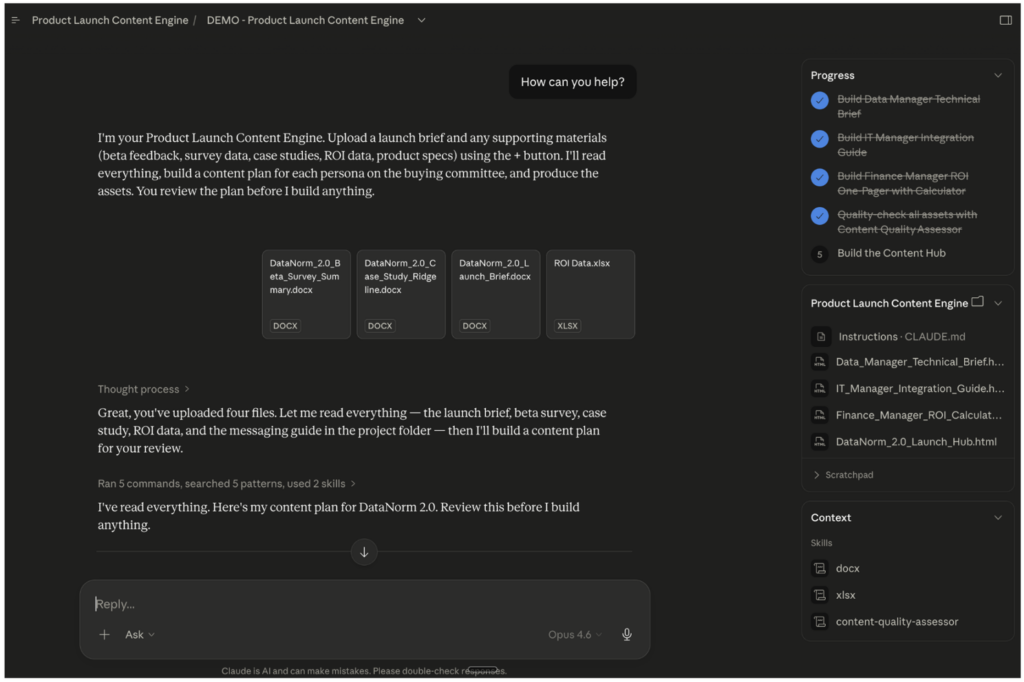
Agentic workflow running in Claude Cowork
Agentic Workflow Executed in Claude Cowork

Here are the outputs of the workflow.

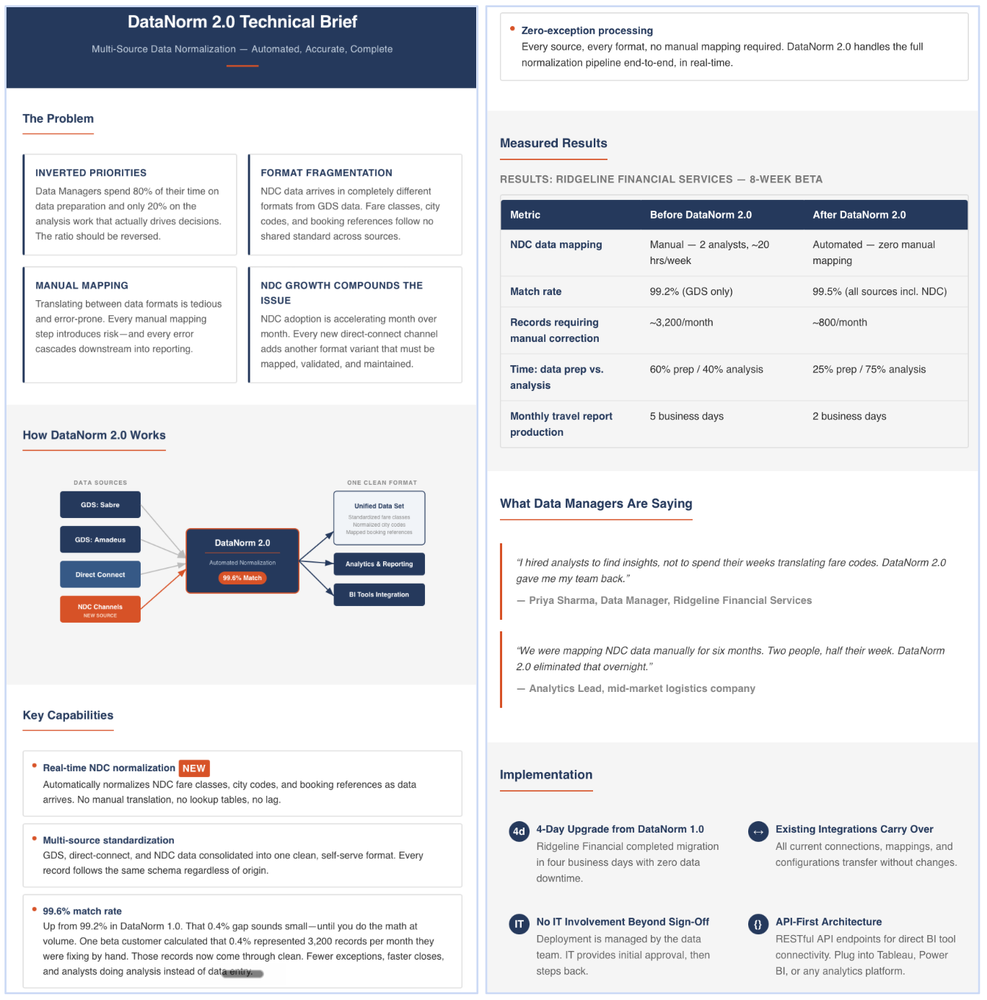
Data Manager: Technical Brief. Built for the person evaluating whether this fits the architecture.

Sample technical brief produced by the workflow

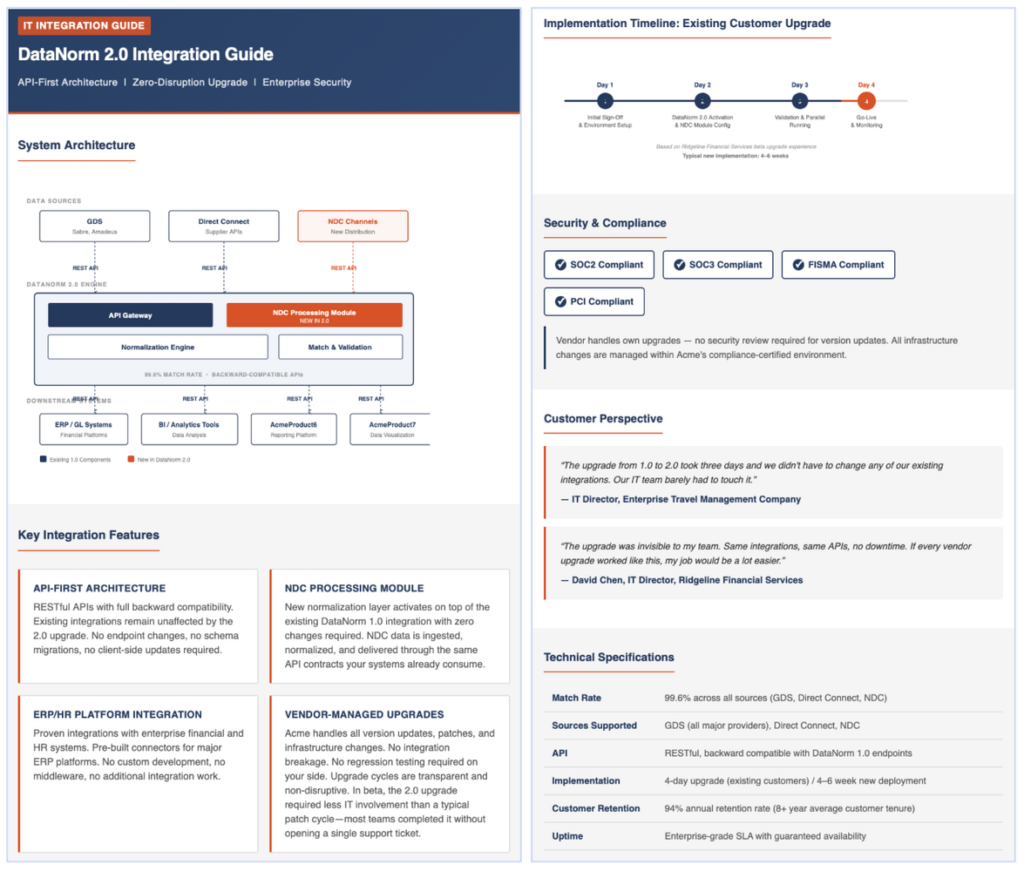
IT Manager: Integration Guide. Built for the person who has to set it up without breaking everything else.

Sample integration guide produced by the workflow

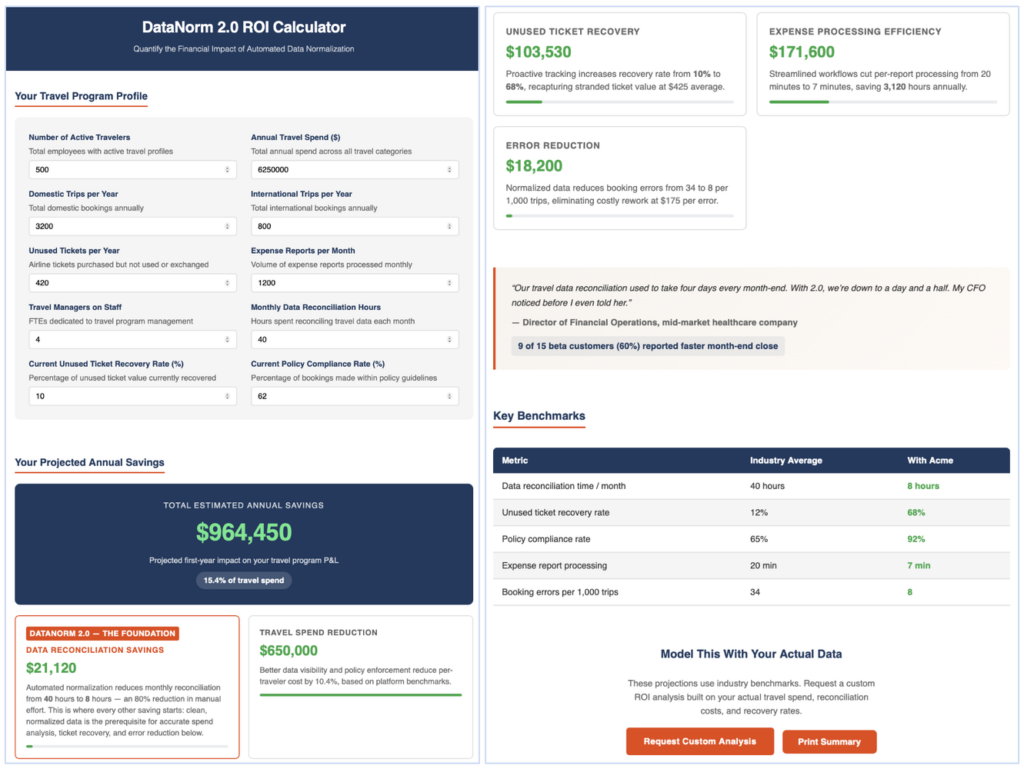
Finance Manager: ROI Calculator. Built for the person who has to justify the investment. Inputs are adjustable. The math updates as you change them.

Sample ROI calculator produced by the workflow

You are accountable for the outcome. You are in control at every gate. And even with the built-in quality check, you still review the outputs and make the final call.

Seeing a workflow run end to end is what shifts what teams believe is possible. That’s the first condition in motion.

If you’re interested, here are the links to each of the HTML outputs. Download them and run them on a browser:

  • Technical Brief
  • Integration Guide
  • ROI Calculator
  • Launch Hub

Also, here’s a 6-min cinematic video (built with NotebookLM) explaining this workflow.

Showing What’s Possible

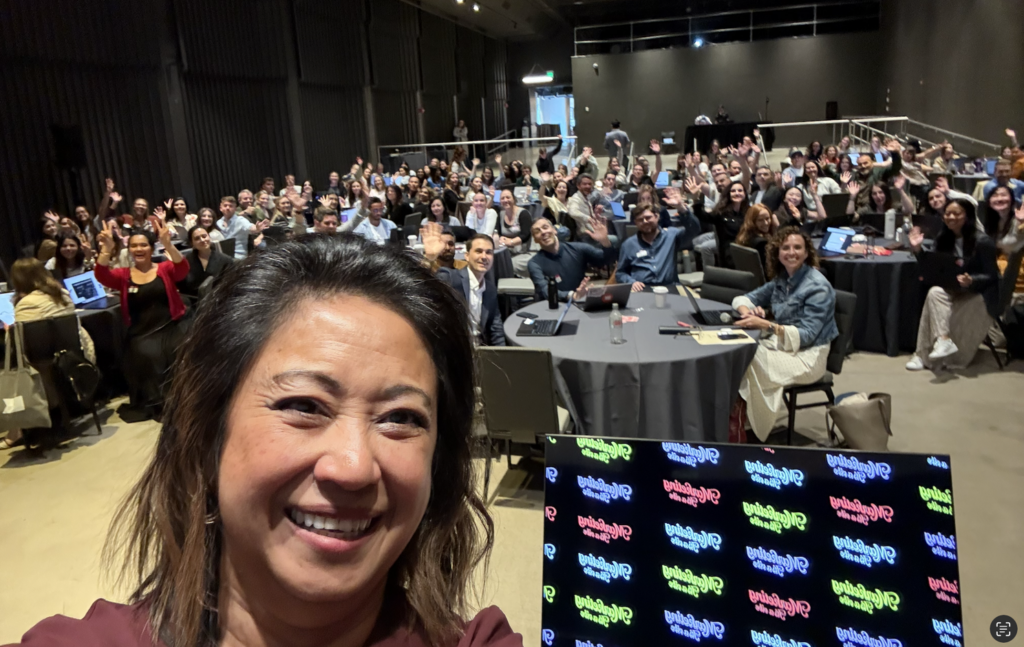
Last week, I ran a strategic hands-on AI workshop in Boston for the global marketing team at Klaviyo. About 200 marketers in cross-functional groups spent the day reimagining real workflows from their day-to-day work. By the end of the day, every group built something, and the show-and-tell was truly inspiring. Just as the team learned from me, I learned from them as well.

Klaviyo marketing team AI workshop in Boston, May 2026
Klaviyo Marketing Team AI Workshop to Reimagine Workflows, Boston, May 2026

The workshop worked because Jamie Domenici, CMO of Klaviyo, and her leadership team created Space. They blocked off the time, brought the right people into the room, put hands on keyboards, challenged the team, and gave them permission to try.

Headshot of Jamie Domenici, Chief Marketing Officer at Klaviyo
Jamie Domenici, Chief Marketing Officer at Klaviyo

Jamie put it plainly:

“We’re past, ‘How do we do this faster?’ The work now is rethinking how marketing grows the business: how to scale what works, how to use AI as a sparring partner, how to build secure infrastructure, and when to build versus buy. We carved out the time and put everyone in a room with hands on keyboards.

In just a few short hours, the teams built new workflows spanning creative, analytics, product launch, and integrated campaigns. That’s what it looks like when people can put the thinking into practice.”

You don’t get this kind of output by handing people the tools and asking them to innovate on their own time. You get it by giving them space, examples, and the chance to learn from each other in the same room. The conditions you create for your team count for more than the tools.

The Outputs Are Only as Good as Your Thinking

A word of caution before you walk away inspired.

Anthropic’s AI Fluency Index, published in February 2026, found that when AI produces a polished artifact, users are measurably less likely to question its reasoning. The more finished the output looks, the less people verify it.

The workflow handles execution. What it cannot do is supply good judgment, honest inputs, or the willingness to push back on what it gives you. Accept the first answer and you get average work at scale. Garbage in, garbage out is not a cliché. It is the most predictable failure mode in AI-assisted work.

The work pays off when you treat AI as a sparring partner, not an answer machine. Neuroscientist Vivienne Ming ran an experiment with real-world prediction teams and found that the 5 to 10 percent who outperformed everyone, including professional prediction market experts, were the ones who pushed back, demanded evidence, and challenged their own assumptions. The two qualities that separated them were perspective-taking and intellectual humility, or being ok with being wrong.

Keri Brooke, CMO of Enverus, saw this firsthand in a working session where we explored what reimagined workflows could look like for her team:

Headshot of Keri Brooke, Chief Marketing Officer at Enverus
Keri Brooke, Chief Marketing Officer at Enverus

“We’ve been pushing hard on automation and our team has built a lot. And while we’ve always worked well together, AI is pushing us to think and operate as one team in ways we hadn’t before.

Seeing real examples of reimagined workflows, not just faster automation, made it real and inspired the team. Now the question isn’t how we speed up what we’re already doing. It’s what we do with the time AI gives back.”

That last line is the Reframe in action. The question shifts from “how do we go faster” to “what do we do with the time AI gives back.” That’s a different conversation entirely.

Two prior newsletters go deeper on this. AI Made Me More Human covers five qualities AI develops in you when you treat it as a thinking partner. How to Think Critically with AI, No Matter What You’re Working On gives you a practical framework for getting past the first answer.

This Will Keep Evolving

Reimagining is a practice. As AI advances, the ceiling of what’s possible keeps rising. Keep innovating and you keep growing.

I’m still working through two things myself.

The first is where to put the human gates. Too few and quality drifts. Too many and the workflow stops being agentic. The right balance varies by team, by workflow, and by how much risk you can absorb if something slips through.

The second is when to rebuild. The capability is moving fast enough that a workflow you build today might be solvable with a single prompt in six months. Knowing when to invest versus when to wait is genuinely hard, and I don’t have a clean answer yet.

Where to Start

Productivity-only AI makes the case for fewer people. Reimagined work makes the case for more of what people uniquely bring.

Pick one workflow where your team is working harder than the output warrants. Map what AI can do in that workflow that your team can’t do at scale. Build a small version and test it.

You don’t need Belief, Reframe, and Space perfectly aligned to start. Pick one and the others tend to follow.

Think big, start small, move fast.


The Practical AI in Go-to-Market newsletter shares learnings and insights in using AI responsibly. Subscribe today and let’s learn together on this AI journey.

For applied learning: Explore our applied AI workshops, offering both strategic sessions (use cases and roadmaps) or hands-on building (create AI teammates during the workshop). You’ll leave with either a clear plan or working solutions. Office hours provide follow-on support to keep momentum going.

For ongoing advisory: I work with leaders as a strategic advisor through their AI transformation, providing guidance, frameworks, and a sounding board as they build. If that’s what you need, let’s talk.

For team transformation: I partner with GTM leaders to move from scattered AI adoption to an operating model where human and AI teammates work together across workflows. See real examples: a lean GTM team’s step-by-step playbook and a global cybersecurity leader scaling to 150+ marketers with 57 AI teammates integrated into daily workflows.

For speaking: Here are virtual and in-person events where I’ve covered a variety of AI topics. I’ve also keynoted at many organization and corporate-wide events.

If any of this resonated, I’d love to hear from you. Reply to this email, find me on LinkedIn, or come say hi at an event.

AI Made Me More Human

Liza Adams · April 29, 2026 ·

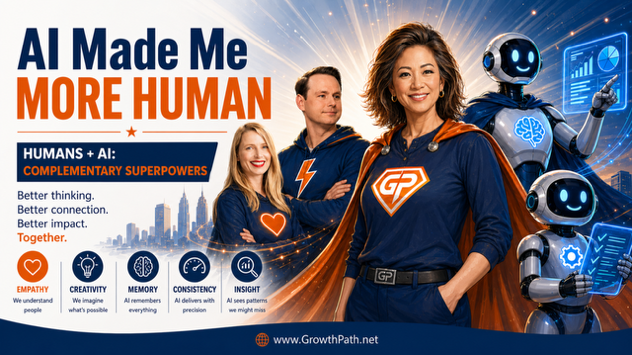
AI Made Me More Human: humans + AI, complementary superpowers

AI-generated content is everywhere and a lot of it is forgettable. You and I scroll past it. We all know it when we see it.

I collaborate with AI every day. We think through ideas together, challenge each other’s assumptions, and the work is better because of it. I draw the line when we outsource the thinking, when we take the first response without questioning it, when we skip the part where we consider who we’re writing for, what they actually need, and whether we’re saying something worth saying.

After 3+ years of this, I didn’t expect that AI has made me more open-minded, more understanding of people, more aware of how differently people think, more relatable in how I communicate, and more confident in the work I do.

I honestly believe I’m a better human today than I was three years ago, and AI is part of why. That’s my experience. I also know it can easily go the other direction. AI is a mirror of our intent. Use it to think deeper and it will. Use it to cut corners and it will do that just as well. A hammer builds a house or breaks a window.

Quick Take

I’ve spent the last few years writing about digital twins, critical thinking, people simulators, thinking systems, and NotebookLM workflows. Looking back, they all point to the same thing: AI, used as a thinking partner, develops five human qualities we’ve always had but rarely have time to fully use.

Key takeaways:

  • Humans and AI are like the Avengers. Each has superpowers the other doesn’t. Together we overcome each other’s limitations. This reframe changes how teams see AI.
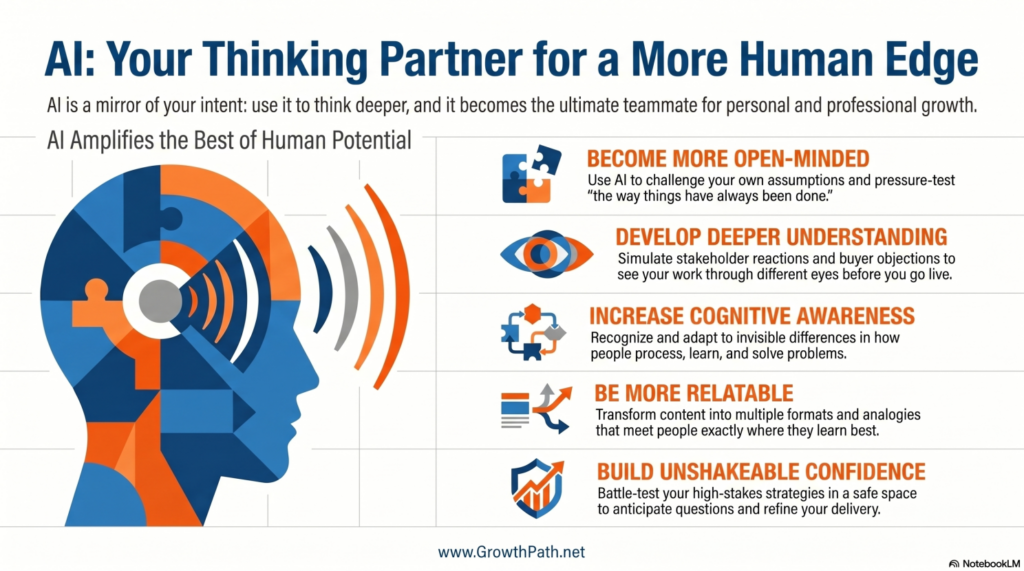
  • Five human qualities AI helps you develop: more open-minded (challenge your own assumptions), more understanding (see how others will react before they do), more aware (recognize cognitive differences in how people think and learn), more relatable (meet people where they learn), and more confident (you tested everything in a safe space first).
  • Change happens when you stop accepting AI’s first answer and start asking it to evaluate, challenge, and pressure-test your thinking. AI becomes a thought partner, not an answer machine. It helps you make better decisions. The final call is yours.
  • These qualities are the antidote to AI slop. Slop happens when the human skips the thinking and accepts generic AI content created using its general training data. Five quality moves put the human back in.
  • AI is an amplifier of what’s already there, good or bad. Be an amazing human and brand first.

AI Video Explainer and AI Podcast Versions of This Newsletter

To support different learning styles, this newsletter is available as a 7-min video explainer and a 21-min AI podcast with two AI hosts. I used Google’s NotebookLM to create these and personally reviewed them for accuracy and responsible AI use. Also check out the 30-sec animated overview below, created using Claude Design.

Complementary Superpowers

I use an analogy with every team I work with, and it changes how people see AI.

Humans and AI are like the Avengers. Each of us has superpowers the other doesn’t. I bring the moral compass, the empathy, the lived experience, the gut feeling that only comes from years of real work with real people. AI brings the memory, the consistency, the stamina, and the ability to have multiple perspectives at the same time. Each of us covers the other’s weaknesses.

Childhood photo of Liza Adams with her mother
Mommy and Me

I shared a story a couple of months ago about a morning when I was running on maybe 40% after being up most of the night worrying about my 90-year-old mom in Manila who I miss dearly. I couldn’t be my best self that day.

My digital twin (a Claude project trained on my frameworks, case studies, and communication style) stepped in. It caught inconsistencies I missed, remembered details from my frameworks that I had forgotten, and pressure- tested my ideas while I was barely holding it together. I still delivered strong work that day because I had an AI teammate that did what I couldn’t, and I did what it couldn’t. (Here’s the full post.)

When teams hear it this way, their guards come down. AI stops feeling like a threat and starts feeling like a teammate that helps them show up as better versions of themselves.

AI: your thinking partner for a more human edge

1. More Open-Minded

I was in Egypt last year with 27 friends, walking through temples and crossing the Sahara. I had ChatGPT in voice and video mode the whole trip, uploading images, asking about signs, food, history, even random rocks. I found myself more curious, not less. I asked about things I would have walked right past. I shared more in this post.

AI suggests something that doesn’t match how things have always been done, and the instinct is to override it, correct it, move on. Sometimes that’s right. But sometimes we’re closing doors before we even look through them. Creativity might just be hallucination that turned out to be useful. We only know the difference looking back.

Three Levels of Critical Thinking

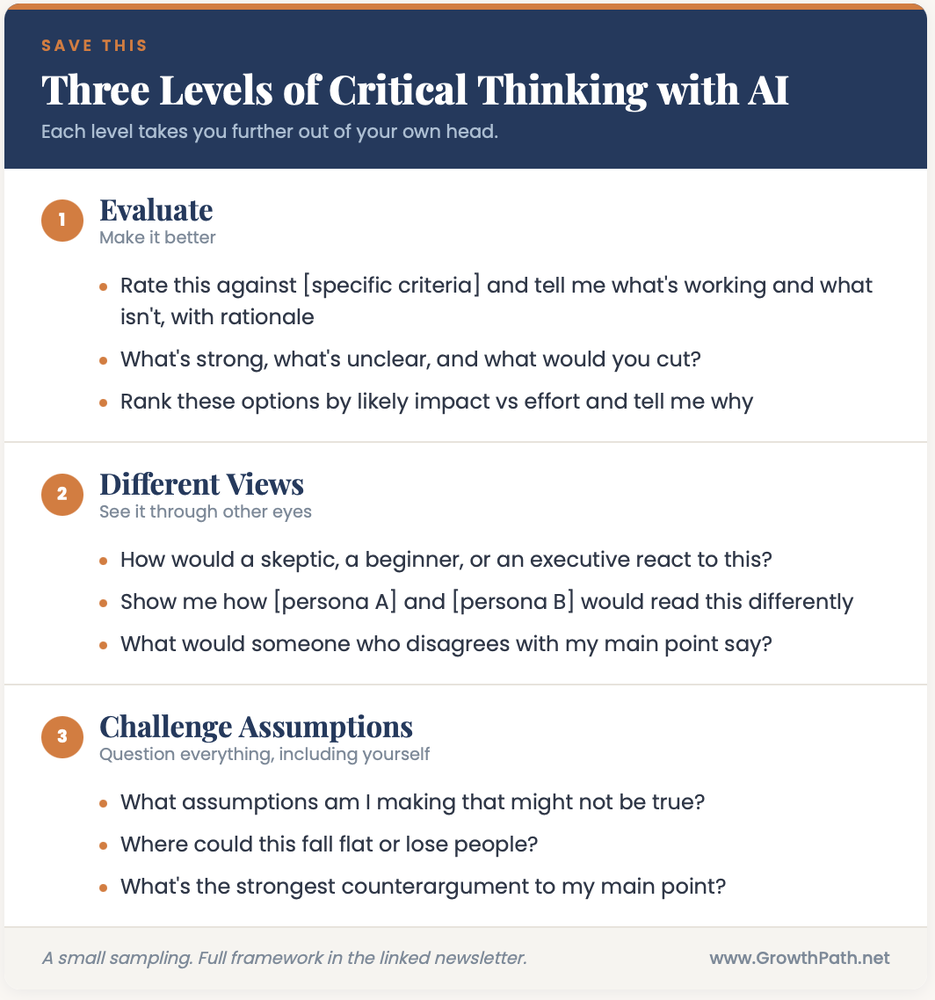
Staying open requires practice. I use a three-level approach to critical thinking that I’ve been sharing with teams for a couple of years, and my own thinking has gotten richer because of it. I was no longer bellybutton gazing. It opened up my aperture, considering different POVs and possibilities. More importantly, I freed myself from my perceived truths.

Three levels of critical thinking with AI: evaluate, different views, challenge assumptions

I use AI to help me judge and make better decisions. AI doesn’t make the final call, I do.

The questions I ask now are richer. I look for alternatives, ask for confidence levels, and pressure-test assumptions in ways I didn’t before. That habit carries over into every conversation, not just the ones with AI. (Full newsletter with detailed examples: How to Think Critically with AI, No Matter What You’re Working On.)

The Digital Twin

Digital Liza, my digital twin, is designed specifically for this. I built it to challenge my work, find blind spots, and push me when my thinking gets lazy. I even gave it a personality: bold, salty, and spicy, like a bowl of Chex Mix. (More on how I built it in my digital twins newsletter.)

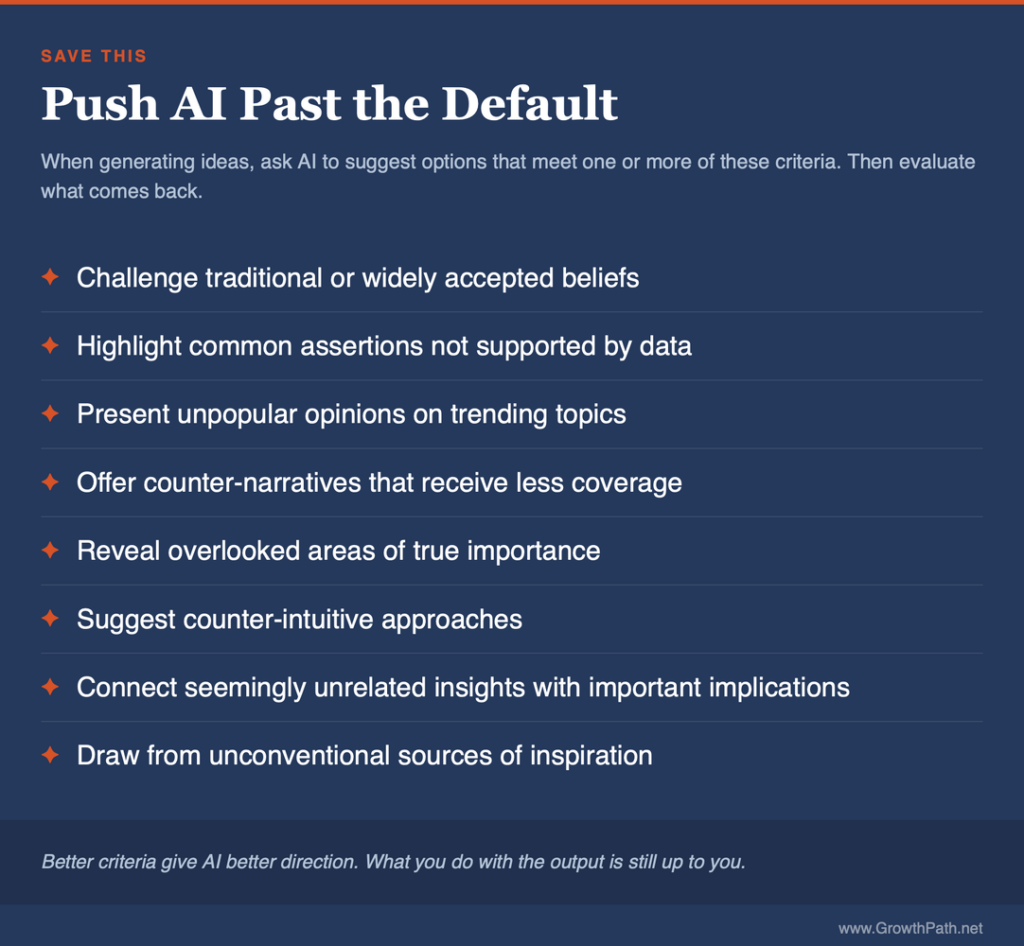
I also use a set of criteria to push AI past its default when generating ideas. Inspired by Andy Crestodina, I developed these and then used AI to suggest additional ones. These criteria go beyond aligning to buyer personas and stages. Without this kind of push, AI gives you the average of everything it was trained on. With it, you get something that could only have come from a human who asked a better question.

We’ve long focused on the right answers. AI pushes us to ask the right questions.

Push AI past the default: criteria for better AI answers

I’ve taken this further. At Content Jam in Chicago, I demoed a Product Launch Content Engine built in Claude Cowork that evaluates content against buyer personas and applies these criteria automatically. The human still makes the final decision, but the quality bar is built into the workflow. (Post with details here.)

2. More Understanding

NotebookLM is a Google tool that lets you upload documents and generate AI audio conversations, critiques, video explainers, and other formats based on your content. Try it, it’s free.

Debate Mode

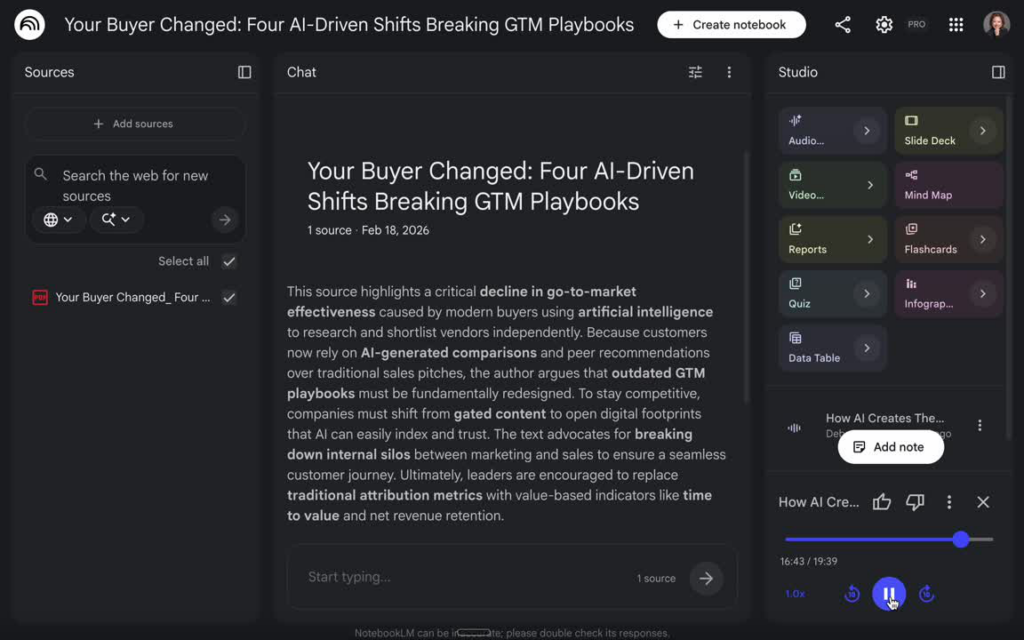
I put my newsletter called Your Buyer Changed: Four AI-Driven Shifts Breaking the GTM Playbook into NotebookLM’s debate mode and two AIs roasted my ideas harder than my CMO friends after a couple of margaritas.

One AI was a rebel: “kill all gates,” “burn attribution to the ground,” “free the content.” The other panicked about CFO accountability and quarterly forecasts. At one point, one called the state of GTM a “boardroom fire drill just waiting to happen.” The other said “the house is already on fire.”

I was cracking up thinking what the heck I wrote that caused these AI podcasters to go ballistic. I said “a trend worth paying attention to.” They turned my newsletter into a soap opera. Check out the short snippet below.

NotebookLM debate on Your Buyer Changed
Short Snippet of NotebookLM Debate

One AI argued a position opposite to mine and built a credible case using my own words. If an AI could read my writing and infer “she wants to ungate everything,” a human reader could too.

I went back and found the problem. Three statements about gated content that were individually true but together sounded like a mandate. I fixed two sentences. I never would have found the gaps without two AIs yelling at each other about my newsletter.

Critique Mode

NotebookLM’s critique mode works differently. Instead of a debate, you get an expert review with specific feedback on structure, argument, and clarity. I use it to catch the things I can’t see because I’m too close to my own work.

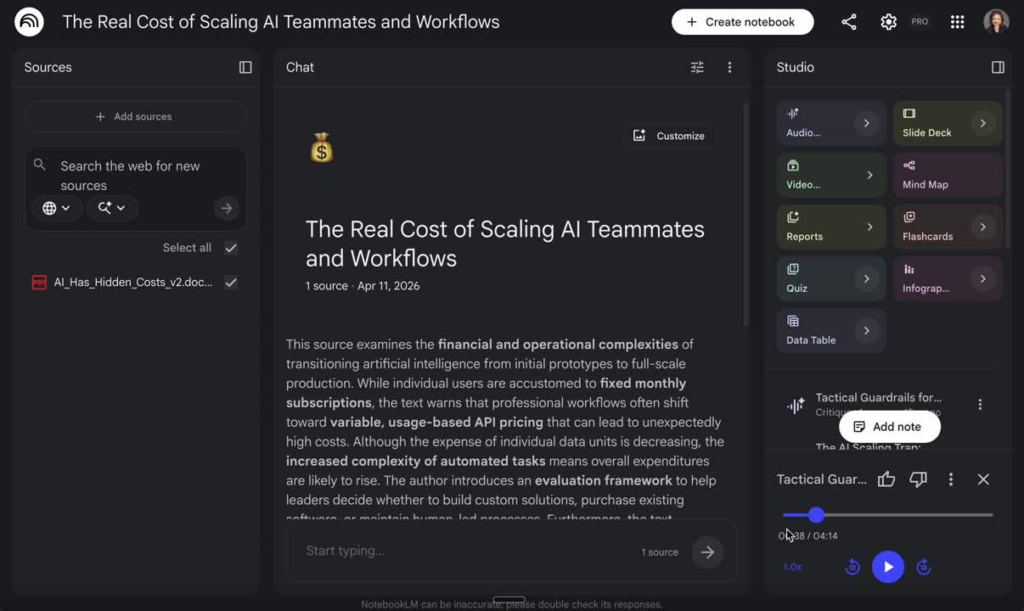
Below is a short NotebookLM critique of one of my newsletter drafts (You’re Building AI Teammates and Workflows. Do You Know What They Cost?).

NotebookLM debate on the real cost of scaling AI teammates and workflows

Simulations

There’s a big difference in the quality of our work when we go from asking “what would I do?” to “how would they respond?” You can build AI personas of your buyers, your executive team, your competitors, and use them to pressure-test messaging, anticipate objections, and refine strategies in a safe space.

When teams experience this for the first time, you can see it click. They go from “that’s interesting” to “I need this for my next launch” in about ten minutes. (Full newsletter: Great Strategies Die in the Reactions You Didn’t Simulate.)

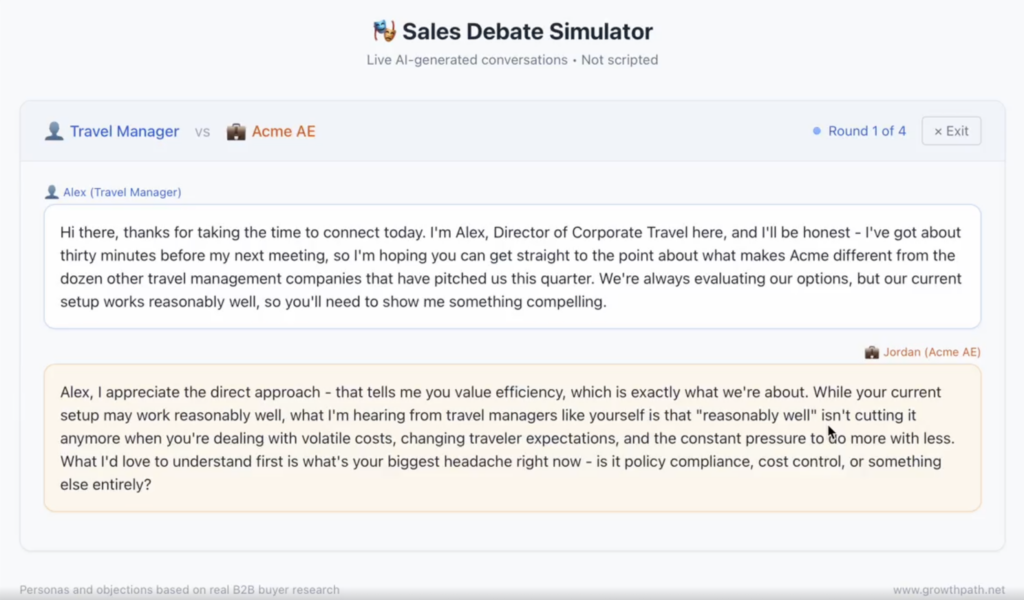
Also try the interactive Sales Debate Simulator below that helps coach sales reps through customer conversations.

Sales Debate Simulator showing a live AI-generated sales conversation
Sales Debate Simulator

Click here to learn how create a Sales Debate Simulator.

3. More Aware

AI made me more aware of cognitive differences.

I’m 4’10” on a good day. I once stood next to Zaza Pachulia, the former Golden State Warriors center, who is 6’11”. Nobody looks at that photo and thinks I should try harder to be taller. And nobody on a plane has ever asked me to help with the overhead bin. When the difference is visible, we just help.

Liza Adams with Zaza Pachulia, former Golden State Warriors center
Zaza Pachulia, Former Golden State Warriors Center, and Me

Very few people have that instinct with AI. AI right now rewards a specific way of thinking. If you naturally break problems into steps and structure prompts in sequence, it feels like a superpower. If your brain doesn’t work that way, the same tools feel confusing and frustrating, and it’s easy to assume you’re the problem. You’re not. But the gap is real. That awareness has changed how I design workshops, write newsletters, and build content for teams with different kinds of thinkers.

With visible differences like physical limitations, we give grace. When they’re invisible, like cognitive differences, we’re quick to judge. My work with AI has made me more aware of how differently people process, learn, and solve problems, and more empathetic because of it.

One example: I built an AI Teammate Instruction Builder prompt template that takes a conversational description of what you want an AI teammate to do and turns it into structured instructions to build custom GPTs, Claude Projects, Gemini Gems, or Copilot Agents. If prompting in steps feels unnatural to how your brain works, you don’t have to. You describe the outcome, and the builder handles the structure. (Try it here.)

4. More Relatable

The Format Transforms the Content

NotebookLM is part of my workflow in a way I didn’t anticipate.

I create a deep dive podcast, a video explainer, and an infographic for each newsletter so readers can choose the format that works for their brain. But the deep dive podcast does something more. Two voices having a conversation about your piece naturally use analogies, tell mini-stories, and riff on each other’s reactions. The content becomes more relatable because conversation is how humans naturally make sense of things. The format itself transforms the content. I’ve borrowed more than a few analogies from the AI podcast and used them in the next draft.

I’ve also created versions in different languages so my ideas can reach people who would never have engaged with the English version. But I’m transparent about my ability to check the work. I can check Filipino translation but not other languages.

Meeting People Where They Are

On a connecting flight through Frankfurt last year, I was on an airport bus with a woman from Cameroon. She was tired and visibly worried she’d gotten on the wrong bus. Her boarding pass didn’t show a gate, and the bus had no flight information. I pulled up Perplexity and asked about her Turkish Airlines flight to Istanbul using her flight number. She relaxed and we smiled.

Sharing and Extending Expertise

Sharing your digital twin with your team extends your expertise beyond yourself. I’ve seen this with clients who build twins trained on their strategy docs, messaging frameworks, and decision criteria. A new team member can pressure-test a campaign concept against the same thinking that a ten-year veteran would apply. Your best thinking is available at 11 pm on a Sunday when nobody’s around to ask. When your expertise lives inside a twin that others can access, it scales in ways that weren’t possible before.

5. More Confident

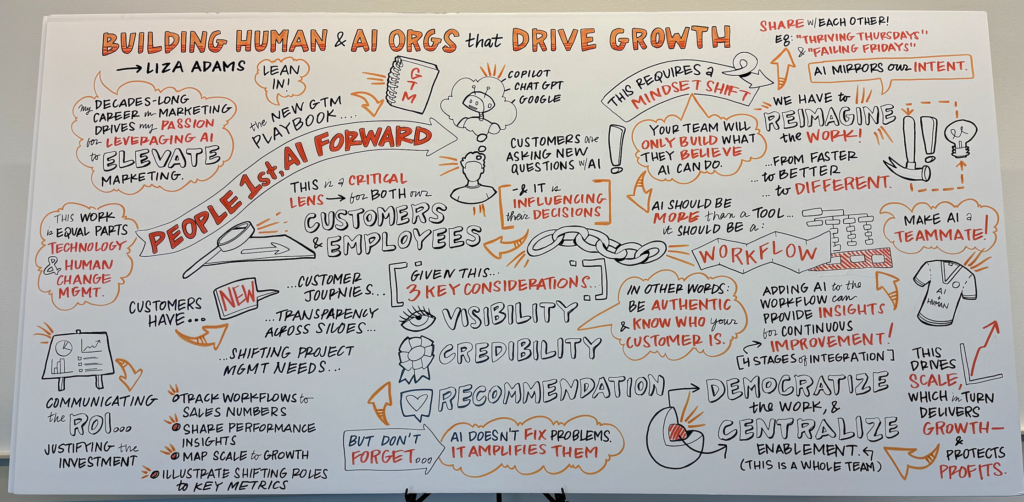
Recently, I was preparing a presentation for a room of 15 CMOs from companies you’d recognize. The session was about how marketing can become the most strategic seat in the C-suite by building human + AI organizations. These CMOs were at different phases of their AI journey, from teams still experimenting to organizations already scaling. I needed one cohesive session that met all of them where they were and brought them along.

Live illustration by a human artist capturing the session's topics and discussions
Human Artist’s Work Representing the Topics I Covered and Discussions During the Session

I approached it the way I approach every high-stakes session: think big, start small, move fast. I built the arc around the evolution from where teams are today to where they could be tomorrow, and grounded the impact in patterns I’ve seen across clients. Then I brought my frameworks, case studies, and learnings into AI and asked it to help me anticipate what would be top of mind for CMOs at each phase of the journey.

AI didn’t craft the answers. It brought up the situations I needed to elevate based on the pattern recognition I’d already built through my work. I adjusted the arc so that a CMO just starting out would feel seen in the same room as a CMO already scaling.

By the time I walked into that room, I knew which concerns would come up and I’d already thought through how to meet each one. The CMOs didn’t know that. They experienced a session that felt like it was built for them.

Every move I described above happened in private. There was no audience judging, no comments section, and no bruised egos.

You can test your ideas, anticipate the questions your audience will ask, and refine how you meet them where they are. The AI doesn’t make the final call. You do. But you make it informed, having already thought through the room before you walk into it.

That’s where the confidence comes from. You show up the way you would if you had more time, more distance, and an honest colleague helping you see what you might miss. AI gives you all three.

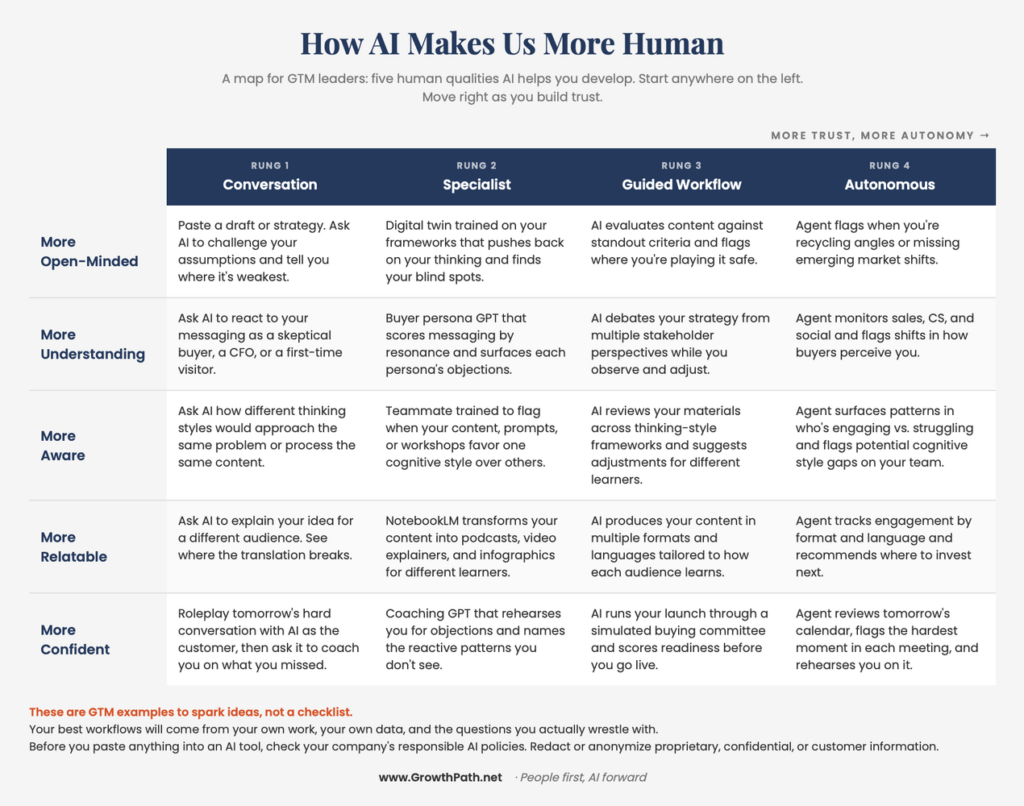
The Map

These are examples to spark ideas, not a checklist. Your best workflows will come from your own work, your own data, and the questions you actually wrestle with. Before you paste anything into an AI tool, check your company’s responsible AI policies. Redact or anonymize proprietary, confidential, or customer information.

How AI makes us more human: a map from conversation to autonomous workflows

AI is an amplifier of what’s already there, good or bad. If your intent is to genuinely understand your customers, AI will help you do that at a depth you couldn’t reach alone. If your intent is to game the algorithm, AI will help you do that too, and your audience will feel it.

The five qualities in this newsletter only work because the intent behind them is real. Without that, the same tools produce faster content that nobody remembers reading. AI gives you the time, the tools, and the safe space to be more human. But you have to want to be.

I built an interactive pressure-test tool that runs your draft through the same three questions I use on every piece of my own work. Paste anything you’re about to share and see what comes back. The final call is still yours. Try the pressure-test tool. (You need a Claude account to use the tool. Free version is fine.)

There’s something truly special about being more compassionate because while we can’t walk in everyone’s shoes, we can empathize and begin to live in this world in a more nuanced and richer way.

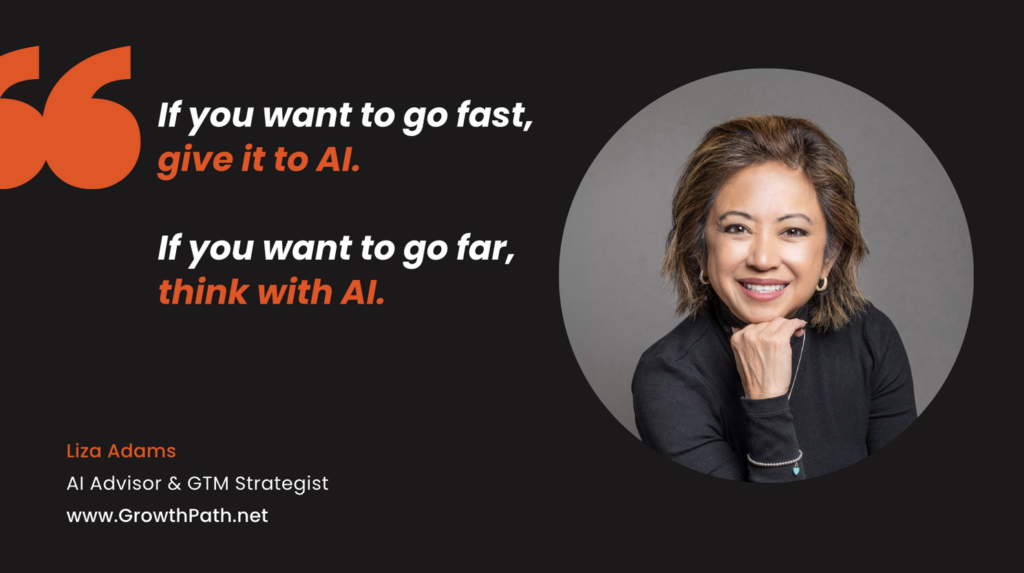
Quote: If you want to go fast, give it to AI. If you want to go far, think with AI. Liza Adams

This newsletter went through the same process I described. Digital Liza challenged the structure. NotebookLM Debate suggested an angle I missed. The critique caught two sections that were saying the same thing. I practice what I write about.

The Practical AI in Go-to-Market newsletter shares learnings and insights in using AI responsibly. Subscribe today and let’s learn together on this AI journey.

For applied learning: Explore our applied AI workshops, offering both strategic sessions (use cases and roadmaps) or hands-on building (create AI teammates during the workshop). You’ll leave with either a clear plan or working solutions. Office hours provide follow-on support to keep momentum going.

For ongoing advisory: I work with leaders as a strategic advisor through their AI transformation, providing guidance, frameworks, and a sounding board as they build. If that’s what you need, let’s talk.

For team transformation: I partner with GTM leaders to move from scattered AI adoption to an operating model where human and AI teammates work together across workflows. See real examples: a lean GTM team’s step-by-step playbook and a global cybersecurity leader scaling to 150+ marketers with 57 AI teammates integrated into daily workflows.

For speaking: Here are virtual and in-person events where I’ve covered a variety of AI topics. I’ve also keynoted at many organization and corporate-wide events.

If any of this resonated, I’d love to hear from you. Reply to this email, find me on LinkedIn, or come say hi at an event.

You’re Building AI Teammates and Workflows. Do You Know What They Cost?

Liza Adams · April 16, 2026 ·

What GTM teams need to know about AI pricing, prototypes and production before they scale

Most of us are focused on building AI teammates and workflows right now, and we should be. The early results are faster execution, better output, time back in the day, and even new ways to work that weren’t possible before. When something is working, you keep building.

What many haven’t bumped into yet is what these workflows cost when they move beyond individual use. When AI was just a chatbot, the cost was simple. You asked, it answered, your subscription covered it. Now AI is doing work on its own. It’s running steps, calling tools, and making choices while we’re not watching. That change is what makes the cost question different, and GTM teams don’t have to figure it out from scratch.

For this one, I asked Megan Cabrera to think it through with me. Megan is a GTM Operations Strategist and Advisor who works on the operational side of AI adoption, including the cost questions most GTM teams haven’t hit yet. Her perspective influences a lot of what’s in this piece.

I wanted to write this before most of us need it. This is what we think GTM teams should know to scale. We want to elevate the conversation so that we can all learn together and from each other.

Quick Take

We think of AI subscriptions as a fixed monthly cost. For individual use and even for connected workflows within your subscription, it is. When workflows need to run at org scale, production reliability, or in front of customers, the pricing shifts to variable, usage-based models that many GTM teams haven’t encountered yet.

Engineering and product teams have been managing this for a while. Megan and I are bringing what they’ve learned to GTM.

What we’re seeing so far:

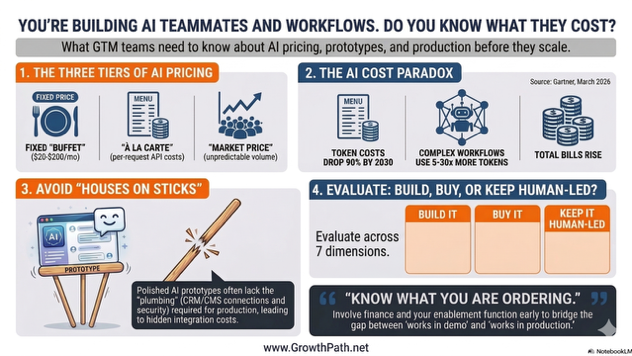
  • AI has three pricing tiers based on how and where your workflow runs: fixed subscription, variable API (Application Programming Interface) costs, and unpredictable volume when workflows are public-facing. This is like three tables at a restaurant, each with a different menu and a different level of visibility into what you’re spending.
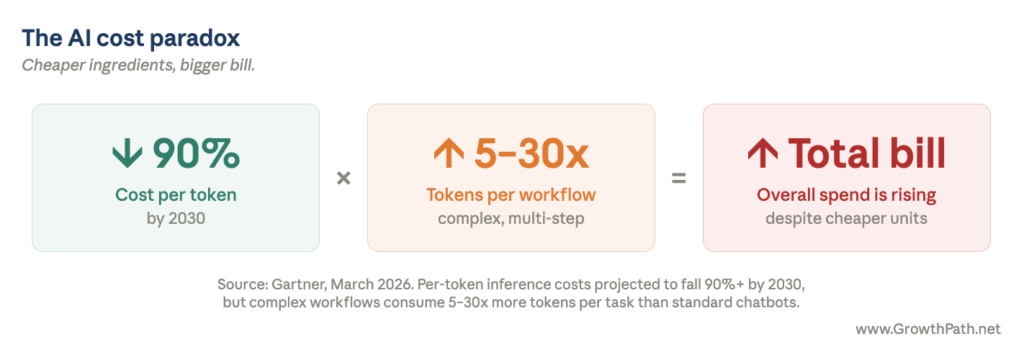
  • Per-token costs are dropping over 90% by 2030, but total spend is rising because complex workflows consume 5 to 30x more tokens per task (Gartner, March 2026). That’s cheaper ingredients but a bigger total bill.
  • Cost is one of several evaluation criteria. Architecture readiness, ongoing ownership, skills and team readiness, time to production, and business risk all factor into whether you should build a custom workflow, buy a specialized tool, or keep the work human-led.
  • The gap between a working prototype and a production-ready workflow is bigger than many teams expect. A polished demo is not a finished product.
  • The governance and enablement structure to manage this evaluation probably already exists on your team, often in your operations function. But it needs a new competency: understanding token economics well enough to simulate workflow costs before deployment.
  • The good news is your technical counterparts likely have experience with usage-based pricing, whether from cloud or AI. Whoever handles enablement can bridge what they’ve learned to what GTM needs to know. We don’t have to figure this out from scratch.

AI Video Explainer and AI Podcast Versions of This Newsletter

To support different learning styles, this newsletter is available as a 7-min video explainer and a 20-min AI podcast with two AI hosts. I used Google’s NotebookLM to create these and personally reviewed them for accuracy and responsible AI use.

Three Tables at the Same Restaurant

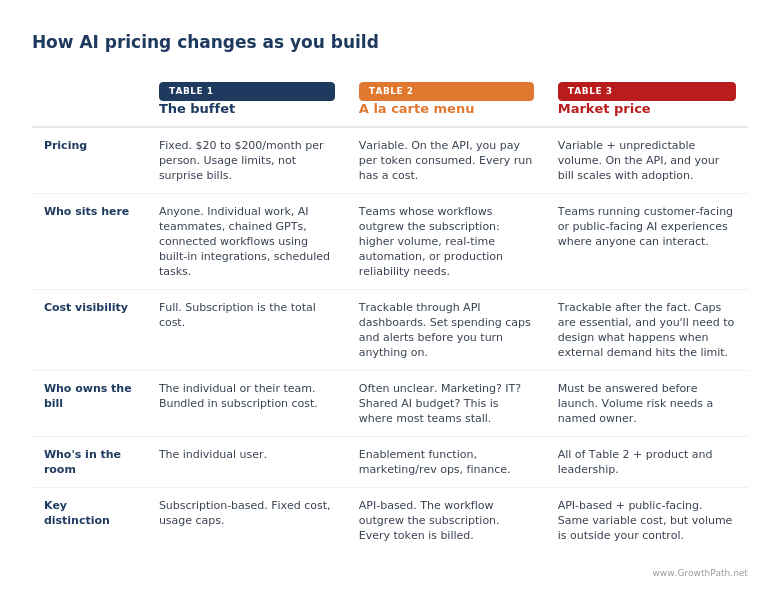
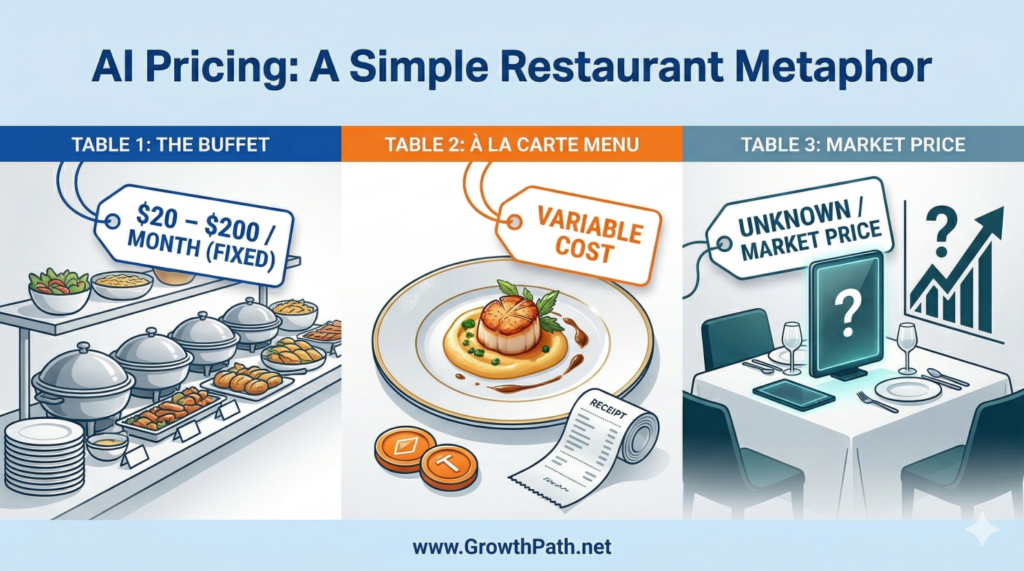
I think about AI pricing as three tables at a restaurant. Each one has a different cost model and a different level of visibility into what you’re spending.

How AI pricing changes as you build: buffet, à la carte and market price

Table 1 – The Buffet

Your subscription is $20 to $200 a month depending on the plan, fixed price, and more capable than many teams realize. You can build AI teammates, connect workflows to your email, Slack, and Google Drive through built-in integrations, and set up tasks that run on their own. You can even chain Custom GPTs (AI teammates you build in ChatGPT for specific tasks, trained on your data) or build workflows in Cowork (Claude’s desktop tool for knowledge work), all without leaving your subscription.

You’ll hit usage limits before you hit a surprise bill. For most individual and team- level work, you can stay here longer than you think, and you should. (Helpful tips: Charlie Hills shares 8 ways how you can get 3X more from your Claude subscription.)

Table 2 – The À La Carte Menu

When a workflow outgrows what your subscription can handle (volume exceeds usage caps, or it needs real-time responsiveness or production-level reliability), you move to the API, which is the direct connection used to build AI into custom applications and systems like your CRM, your project management platform, or workflows that run on their own.

Every time an agent (an AI teammate that takes actions on its own, not just a chatbot you prompt) runs, it’s consuming tokens, making API calls, and potentially invoking external tools or search. Tokens are the small chunks of text AI reads and generates, roughly one word each.

Megan pointed out that a single agentic workflow might look simple on the surface, say an automated competitive intel brief that pulls from web search, synthesizes findings, and shares via a Slack summary. Behind the scenes that one workflow is making a series of AI calls, often 10 to 20 or more depending on how it’s built, each one consuming tokens. Multiply that by frequency and team size, and you’re looking at real spend.

Gartner’s March 2026 research backs this up. Per-token costs for large AI models are projected to drop over 90% by 2030, but agentic workflows use five to 30 times more tokens per task than a simple chatbot conversation. The price per call is going down. The number of calls per workflow is going up much faster. Cheaper ingredients, bigger total bill.

The AI cost paradox: cost per token down 90%, tokens per workflow up 5–30x, total bill rising

A tech executive I know connected AI to his email, project tracking, and task management through the API and let it run on autopilot. He let it run without spending limits, and within weeks the charges were piling up. He described it as walking out of Costco with three carts full of tokens. The technology worked exactly as designed. The bill was a different story.

Once a workflow is running at scale, here’s one way to make the cost concrete: think of it as CPM by workflow type. Every marketer already knows how to manage cost per thousand impressions in a media buy. Cost per thousand runs of a specific workflow is the same shape, with one important difference. Each workflow has its own cost profile. A simple lookup and a multi-step agentic workflow on the same product can differ by 100x. Track and manage them separately, the way you’d track separate ad campaigns.

Megan flags that this is avoidable. The AI companies all support spending caps and usage alerts. Set them before you turn anything on, and the Costco moment doesn’t happen.

Table 3 – Market Price

AI pricing as a restaurant metaphor: buffet, à la carte menu and market price

The table with no prices listed. When your AI workflow is customer-facing, prospect-facing, or open to the public, you’re on the API and you’ve lost visibility into volume. Every person who interacts with it runs up a tab. If the experience works well and gets popular, your success is directly tied to your cost. Every time AI handles a request, that processing costs something.

Most GTM teams have operated in a world with seat-based SaaS pricing. You buy 10 licenses, and you know what you’re getting. With AI-powered experiences, every interaction has a compute cost. More usage means a bigger bill, even if the number of users stays the same.

Megan also points to model choice as a major lever. The difference between running a workflow on a larger, more capable model versus a smaller, faster one (for example, Claude Opus versus Claude Haiku) can be 10x to 30x on the same task. Think of it the way you’d think about delegation. You wouldn’t put your most expensive person on a task an intern could do. Use the bigger model for high-value, low-volume work where reasoning quality is important. Route the high-volume repetitive work to the smaller, faster, cheaper model. It’s one of the biggest levers teams can use to control cost at this table.

Caps are even more important here, and they work differently. You’re capping not just your own usage but also what happens when external demand exceeds your budget. Does the experience degrade gracefully, queue up requests, or pause until the next billing cycle? Worth thinking through before you go.

Workflows like personalized buyer experiences or automated onboarding can create real competitive advantage. Don’t avoid Table 3. Just understand the pricing model.

Who Should Own the Tab

One question GTM teams need to answer is who pays the tab. When marketing spins up an agentic workflow on the API, does that hit the marketing budget? IT budget? A shared AI center of excellence that may or may not exist yet? Most organizations haven’t answered that question, which means the bill is either going unmonitored or heading toward a finance clawback conversation.

When budget ownership is ambiguous, agentic initiatives stall at the worst possible moment: after the proof of concept works, right before scale. The conversation to have is “who will own the cost when it grows, and what does that approval chain look like.” That conversation turns AI adoption from an experiment into something procurement and finance can support.

Headshot of Megan Cabrera, GTM Operations Strategist & Advisor
Megan Cabrera, GTM Operations Strategist & Advisor

“In a lot of orgs, marketing ops or rev ops is already tracking vendor spend and tool budgets. Where that’s true, AI workflow costs are the next thing to add to the list, and most teams haven’t started. You don’t need a new function to do it. You need your existing ops lead talking to tech peers.”

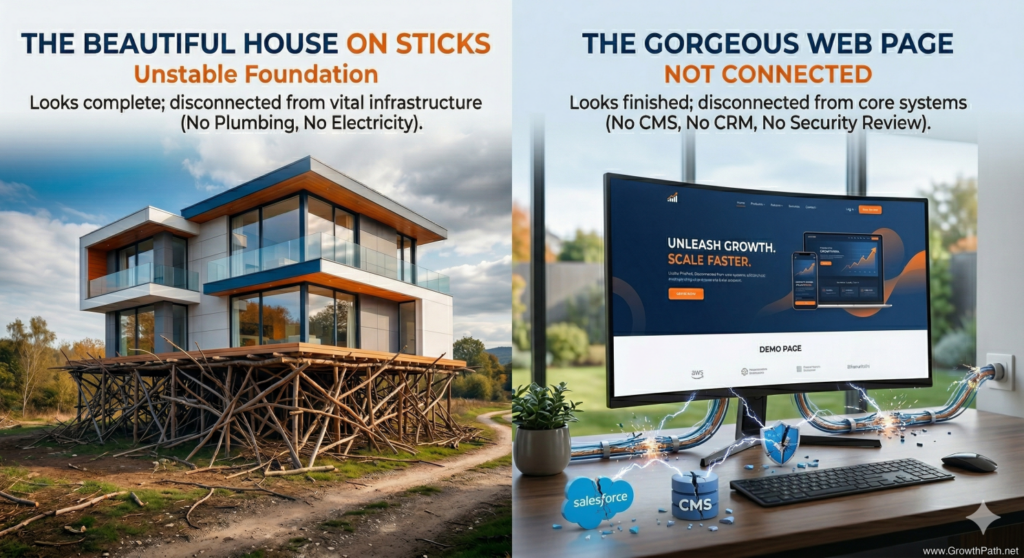
The Beautiful House on Sticks and Twigs

There’s another gap between prototype and production that isn’t about cost. It’s about whether the thing you built can function in a business context.

Vibe coding has made this more visible. If you haven’t heard the term, it means using AI to build software by describing what you want in plain language rather than writing code line by line. You vibe and AI codes. You can go from idea to working prototype in an afternoon. The result looks polished, it functions when you click around, and you can deploy it for people to use.

“Looks finished” and “is production-ready” are two very different things.

A head of demand gen I work with saw this across several teams. Someone builds an interactive ROI calculator, a competitive comparison tool, or a custom landing page in a day. The demo is impressive and leadership gets excited. Then someone asks whether the components are built in the CMS, whether the lead forms flow into Salesforce, whether there’s analytics tracking, or whether the content team can update anything without going into the custom HTML. The answer is usually no across the board.

She described it as building a beautiful house on a foundation of sticks and twigs. It looks like a house. You can walk through the rooms. There’s no plumbing, no electrical, and no foundation that will hold up in bad weather.

A beautiful house on sticks and a web page with no connections: prototypes without infrastructure

The prototype took an afternoon. Connecting it to your business systems, getting it through security review, configuring it for your environment, and testing it against real data is where the real time and budget go. AI has made the integration work faster (writing connectors and configuration code goes much quicker now), but the approvals, testing, and rollout still take days to weeks. Those timelines are mostly organizational, not technical.

Some teams discover that the cost and effort of making a prototype production- ready ends up being more than a purpose-built SaaS tool would have cost for that same job. Worth knowing before you commit to either path.

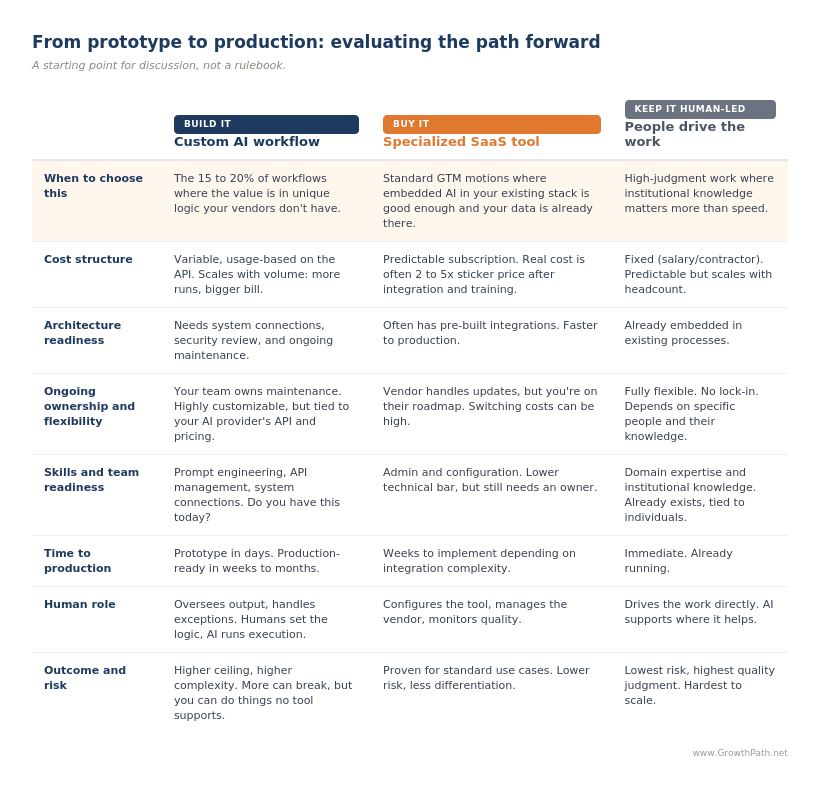
Build It, Buy It, or Keep It Human-Led

Megan and I have been working through an evaluation rubric for this. It covers cost structure (including what happens at scale), architecture readiness, ongoing ownership and flexibility, skills and team readiness, time to production, human role, and outcome and risk. It applies whether you’re running on the subscription or on the API. The cost row changes, but the rest of the evaluation applies either way.

This builds on the three-layer tech stack approach I’ve written about before: start with what you already have, then go deep on AI models, then add specialized tools where they solve a clear problem. The rubric below is the cost and readiness lens you layer on top of that decision. (Also refer to “Your AI Teammates Aren’t a Team Yet” and the Cin7 AI growth engine case study for more insights.)

This assumes your team is already reviewing for security and compliance. These are the additional criteria to layer in.

From prototype to production: build, buy or keep it human-led

Megan and I agree that the case for Buy is often stronger than it gets credit for. Your CRM, MAP, ABM tools, and workflow platforms are all embedding AI features quickly. For standard GTM motions like lead scoring, email personalization, and call analysis, the embedded AI in your existing stack is usually good enough, and it comes with a big advantage. It’s already connected to your data, your team knows the interface, and the cost is often bundled into your existing contract. Watch for the exceptions, but there’s value in the default.

Teams that rush into building agentic workflows can end up duplicating what they already have, then carry the maintenance burden when those tools need debugging, updating, or scaling.

There’s another angle to the Buy case. The companies offering specialized SaaS tools have people whose entire job is thinking about one problem. They’re talking to dozens of customers solving the same thing, watching what’s working, and shipping improvements. Your in-house build is competing for attention with six other priorities, and the workflow you launched six months ago is probably not getting the iteration cycles it needs. Focused beats distracted, even when distracted is more customized.

The case for Build is real, and narrower than it looks at first. Custom AI workflows win in the gaps between your tools, in the connective tissue and processes that are unique to how your organization operates. The value is in the logic itself, which is unique to how your business operates.

A competitive intelligence pipeline that pulls from specific sources, synthesizes against your positioning framework, and distributes to sales in a format they’ll actually use is a good example. Build for the 15 to 20% (range may vary by company) of workflows that are genuinely differentiated, that connect systems in ways your vendors don’t, or that create customer-facing experiences you can’t buy off the shelf.

Sri Srinivasan, Chief AI Officer at Hellman & Friedman, shared the guidance he gives their portfolio companies.

Headshot of Sri Srinivasan, Chief AI Officer at Hellman & Friedman
Sri Srinivasan, Chief AI Officer at Hellman & Friedman

“Before building custom AI, ask what makes you special. If AI is your product’s advantage, build it. If it’s just how you run your business, use existing tools. Many teams waste time building things that will soon be standard features. The real cost isn’t building—it’s maintaining and improving it over time. Most value comes from configuring what already exists, not creating something new.”

The Structure Probably Already Exists

If you’ve been reading my newsletters, you’ve seen me write about the enablement function: the group (or person) that handles governance, IT and legal coordination, system integrations, and cost management on behalf of builders. (For how this works in practice, see “AI Moved Fast: What Changed and What to Do Next” and the cybersecurity company case study.)

The model is democratized building, centralized enablement. Everyone closest to the work keeps building. A smaller team makes it safe and scalable. In some organizations that’s a dedicated team. In others it’s one person in ops who manages governance alongside everything else. The roles still apply. How they map depends on your team’s size and structure.

Many organizations already have some version of this: marketing ops, rev ops, or an AI governance council. Builders submit use cases. Legal weighs in on risk. IT weighs in on security. Builders then build the workflows.

What I’m finding in my own client work is that the economic lens is the piece usually missing. Cost governance for AI workflows is new territory because the cost model itself is new. The review structures teams use for security and compliance can extend to cover it, but the economic lens has to be added on purpose. When teams see the move from buffet to à la carte, the gap is obvious, and the conversation turns to whether finance and P&L owners should be in the review.

Charlie Treadwell, CMO at Elisity, leads the strategy and rolls up his sleeves on the build. He’s been working through this in real time and shared what his team is doing.

Headshot of Charlie Treadwell, Chief Marketing Officer at Elisity
Charlie Treadwell, Chief Marketing Officer at Elisity

“Our finance team is working hard to rebuild our budget models. We used to plan around program spend plus headcount, that was the fixed part of the equation. Now there’s a new variable.

The easy case would be: AI makes someone 2x more productive, you cut a role, you spend that money on tokens. That’s not what we’re seeing. We’re getting more productivity out of the same people, but it’s costing more money, and it’s hard to predict.”

Kelly Herrell, a CEO, posted a response on LinkedIn that takes this further, connecting AI workflow costs directly to the profitability question the CEO cares about.

Megan’s framing on this is that GTM teams should treat AI consumption like usage-based infrastructure. Engineering teams have been managing usage- based pricing for a while, whether it’s cloud bills or AI inference costs (what it costs to run a model in production), and they know what visibility and controls this kind of pricing needs. You need active visibility into what’s running, how often, and what it costs per execution, or you’ll find your team facing a monthly invoice you didn’t expect.

If you’re adding the cost lens to your existing process, here are some questions to start with.

  • What does this workflow cost to run at production volume, not just at prototype scale?
  • Is there an existing tool, vendor, or human-led process that gets the same outcome? How does it compare across the evaluation rubric?
  • Is this connected to our business systems, or is it a standalone prototype that still needs integration work?
  • If this is customer-facing or public-facing, have we modeled what happens to cost and performance when volume spikes?
  • Who on the team will maintain this after it launches?

If the builder can’t answer all of these, that’s expected. That’s what the enablement function is for. Your marketing or rev ops lead who already tracks vendor spend and tool budgets is a natural owner, and they’ll want to connect with their technical counterparts to learn how usage-based AI costs work. Many engineering and product teams have been tracking inference costs, setting token budgets, and evaluating build-vs-buy trade-offs. The ones that haven’t yet are working through the same questions we are. Either way, we can learn from them instead of rediscovering it on our own.

What We’re Still Figuring Out

The evaluation rubric is a starting point, and we expect it to evolve as we all learn more. A few open questions we’re sitting with:

  • How do you compare truly different cost structures? A SaaS subscription is predictable but rigid. A custom AI workflow is flexible but variable. A human-led process comes with institutional knowledge you can’t replicate but doesn’t scale cheaply. We’re still learning how to evaluate these side by side in a way that’s useful.
  • How should this change as AI matures? A workflow that’s too expensive or too complex to run on the API today might make sense in 18 months. Do you build now and wait for the rest to catch up, or pilot at low volume and revisit later? Teams are making different calls depending on how strategic the workflow is.

If you’ve started running workflows through a cost lens, what’s on your rubric that isn’t on ours? We’ll share what comes back.

Know What You’re Ordering

AI is worth the investment. The people on your team who are experimenting and building are doing exactly the right thing. They need better visibility into what happens when a workflow moves from prototype to production, and a place to ask questions before the bill shows up.

The structure to manage this probably already exists on your team, whether that’s a dedicated enablement function, your ops lead, or someone who wears that hat part-time. Add the economic and readiness lens. Bring finance into the conversation. Learn from your technical counterparts, whether they’ve figured it out or are figuring it out with you. And actively monitor any live workflows.

This week, whoever handles enablement on your team should connect with engineering or product about how they’re managing usage-based infrastructure costs. Then pick one workflow your team is building or recently launched and run it through the evaluation rubric.


The Practical AI in Go-to-Market newsletter shares learnings and insights in using AI responsibly. Subscribe today and let’s learn together on this AI journey.

For applied learning: Explore our applied AI workshops, offering both strategic sessions (use cases and roadmaps) or hands-on building (create AI teammates during the workshop). You’ll leave with either a clear plan or working solutions. Office hours provide follow-on support to keep momentum going.

For ongoing advisory: I work with leaders as a strategic advisor through their AI transformation, providing guidance, frameworks, and a sounding board as they build. If that’s what you need, let’s talk.

For team transformation: I partner with GTM leaders to move from scattered AI adoption to an operating model where human and AI teammates work together across workflows. See real examples: a lean GTM team’s step-by-step playbook and a global cybersecurity leader scaling to 150+ marketers with 57 AI teammates integrated into daily workflows.

For speaking: Here are virtual and in-person events where I’ve covered a variety of AI topics. I’ve also keynoted at many organization and corporate-wide events.

If any of this resonated, I’d love to hear from you. Reply to this email, find me on LinkedIn, or come say hi at an event.
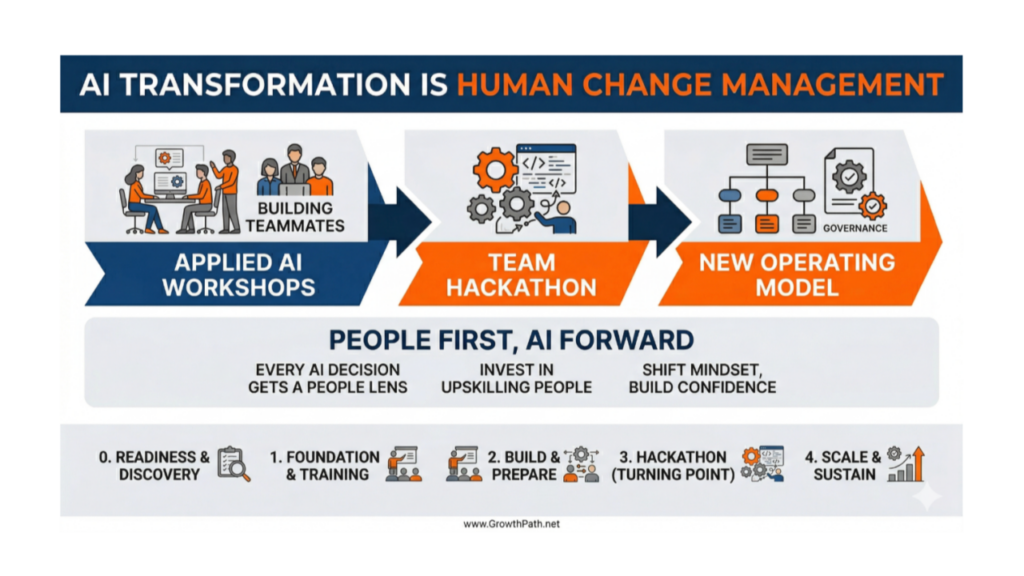
Human Change Management: From Applied AI Workshops to Hackathon to New Operating Model

Liza Adams · April 2, 2026 ·

AI transformation is human change management: workshops, hackathon, new operating model

The workshops worked. People built their first AI teammates and workflows, saw what AI could do with their actual work, and left excited to keep building.

But few teams have a plan for what comes after. The experiments stay scattered. The early excitement doesn’t connect into a sustained operating model. The hardest parts aren’t technical.

This is Part 2 of a two-part series. Part 1 covered four dimensions for seeing where your team is with AI: Q&A machine to thought partner, tool to workflow, faster to different, and org chart to work chart. You don’t need it to get value from this one, but it’s a useful companion.

Quick Take

AI transformation is human change management. Every phase exists to serve the people going through it.

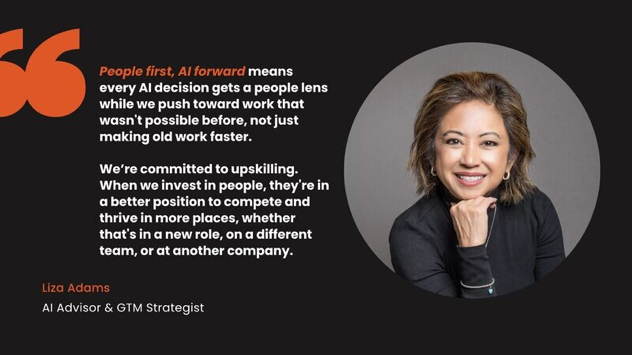
Quote: People first, AI forward. Liza Adams

What I’m sharing here comes from working with teams through the full journey. There aren’t best practices yet. We’re all figuring this out. But I’ve seen enough patterns to know what tends to work, what tends to stall, and where teams get stuck. This is a starting point, not a playbook to follow step by step. Adapt everything to your goals, culture, and pace.

Key takeaways:

  • Mindset shifts happen through demos of what’s possible with applied AI use cases and actually building for their own work
  • A hackathon gives a team the moment to stop experimenting in pockets and start building together
  • Workshops start the change. Weekly office hours, show-and-tells, and a safe space for failure are what keep it going.
  • The goal of every phase is to make the team capable of evolving on their own

AI Video Explainer and AI Podcast Versions of This Newsletter

To support different learning styles and time constraints, this newsletter is available as an 5-min AI video explainer and a 20-min AI podcast with two AI hosts. If you haven’t seen these AIs in action, they’re worth a view. I used Google’s NotebookLM to create these and personally reviewed them for accuracy and responsible AI use.

The Full Path

You can run a workshop in an afternoon. Taking a team from experimentation to a sustained operating model takes months.

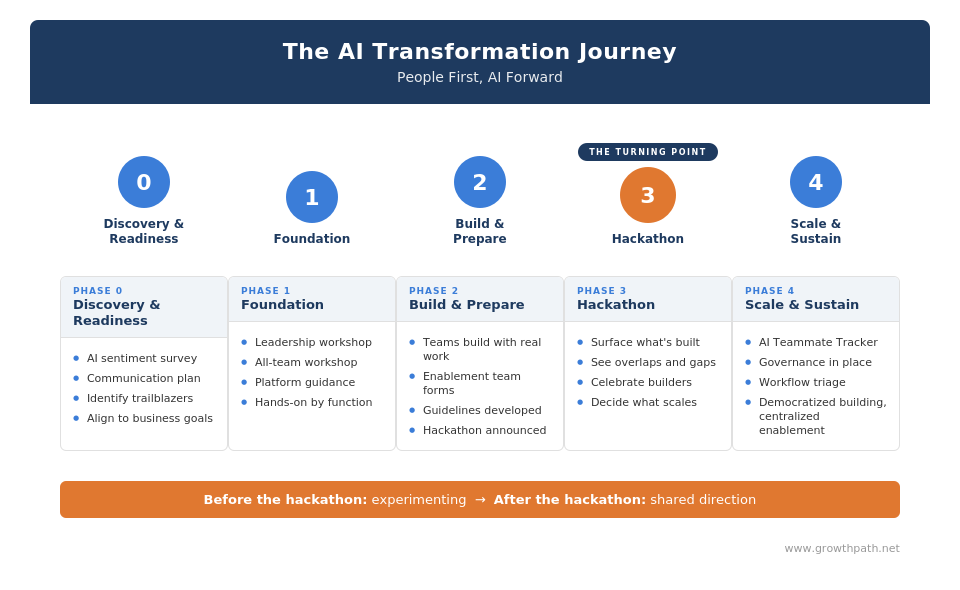
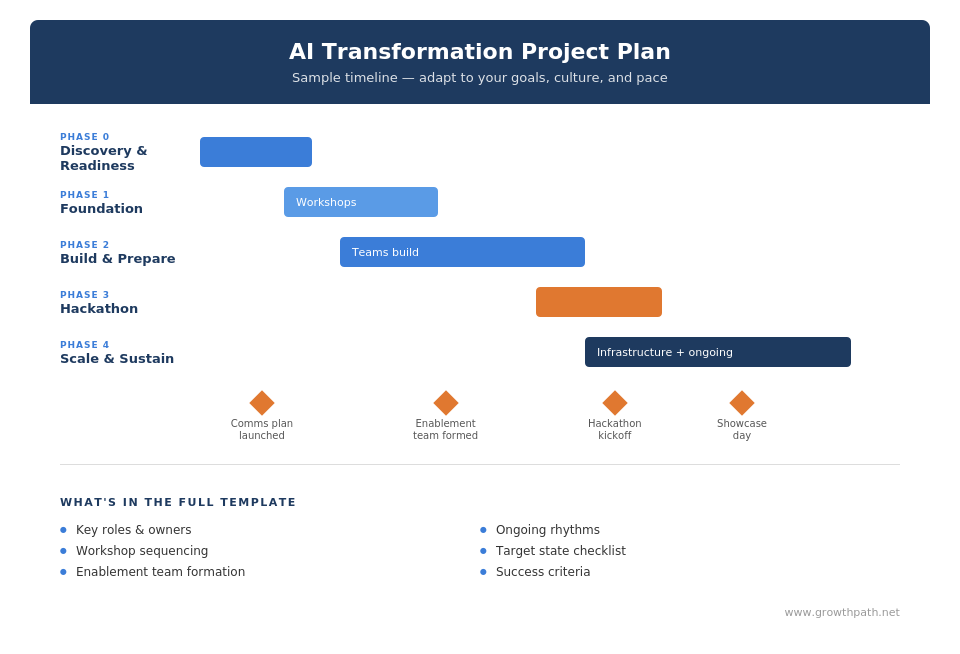
The AI transformation journey: five phases from discovery to scale and sustain

Every team adapts this differently. Some compress phases, some skip Phase 0 because they’ve already done the groundwork, some run all the workshops at once instead of sequencing them. The value of seeing the full path is knowing what’s involved so you can plan for it.

Phase 0: Discovery and Readiness

Before any workshops, understand where people are. Some teams already know this from conversations and observation. Others benefit from a structured approach, like an employee AI sentiment survey, to surface concerns that don’t come up in meetings.

A communication plan is one of the most underestimated steps. And I think the honest version works better than the safe one. People come in with different concerns: some feel overwhelmed, some are skeptical that AI applies to their work, some worry about looking like beginners. Acknowledging those concerns directly builds more trust than ignoring them.

Regardless of how anyone feels about AI, being AI literate is baseline. When people are literate, they make better decisions for themselves, their families, their teams, and their organizations.

Upskilling is a gift to your team. It helps the business, and it helps them compete in their careers beyond your company. That message, when it’s genuine, builds trust in ways that corporate talking points can’t.

Identify your trailblazers early: the people already experimenting on their own. They become peer mentors, early testers, and proof to the rest of the team that this is doable. They pull people forward in ways that leadership support alone can’t.

Teams that skip the communication work tend to spend months fighting resistance that could have been addressed early.

Phase 1: Foundation

This phase grounds everyone in why AI adoption connects to customers and business outcomes, and gives people hands-on experience building.

In larger organizations or teams where alignment isn’t strong yet, leadership often goes first so they can champion what comes next. In smaller or more aligned teams, you might bring everyone in together.

The four mindset shifts from Part 1 develop when people see what’s possible through applied use case demos and build something real with their own work and see it produce results.

A workshop like this typically covers five areas:

What an applied AI strategic workshop covers

Hands-on building workshops follow, organized by function so people build with use cases relevant to their role before connecting to broader workflows. I’ve seen these work well virtually and in person.

I recently ran a workshop with the marketing team at Applied Systems. Their CMO, Courtney Rains, described the shift she saw:

Headshot of Courtney Rains, CMO of Applied Systems
Courtney Rains, CMO of Applied Systems

“When the demos started, you could see it click. People watched use cases they do every day, competitive intel, campaign planning, customer content, get built live in front of them. Light bulbs were going off around the room.

During the hands-on session, people progressed at different speeds, and that’s completely fine. Some were still exploring prompts. Others built full workflows. Everyone left with a clearer picture of what’s possible.”

Applied Systems marketing team in a hands-on AI session
Applied Systems Marketing Team in Hands-On AI Session

Whether you run workshops yourself or bring in outside help, the structure works because it moves from why to what to how. People leave with something they built and a different sense of what AI can do for their work.

Need a starting point for what to build? This interactive tool helps teams explore AI teammate and workflow ideas.

There’s also a separate workshop for what I call enablers: the people who will eventually form the enablement team. This covers cross-system automation, agent orchestration, and workflow design into business systems, because these folks need different skills than the rest of the team. Not everyone should have read/write access into every business system. This team helps with those connections, data, security, compliance, governance, and cost management.

Phase 2: Build and Prepare

Sometimes it’s a cross-functional team and sometimes it’s a select operations group like Marketing Ops and Rev Ops that has the skillset needed and that works with Legal, IT, and Finance. Responsible AI guidelines get developed collaboratively. A tracker shows what’s being built across the org.

This phase gets messy. People build teammates that overlap with what someone else built. Some experiments don’t get used. That’s learning by doing. The tracker helps make the work visible so the mess can eventually become structure.

What keeps the momentum going between the workshop and the hackathon is the habits and routines you put in place:

  • Reprioritizing people’s work to give them the space and time to learn AI
  • Weekly office hours for support, inspiration, learning, and troubleshooting
  • Show-and-tells where teams share what’s working, what’s not, and what they’ve learned
  • Failure sharing to normalize experimentation. One CMO I work with runs “Thriving Thursdays” and “Failing Fridays,” giving equal time to both
  • A Slack or Teams channel for ongoing peer sharing and learning
  • Trailblazer spotlights at all-hands to recognize early adopters

Sarah Weddle, VP of Brand Marketing at Harbor Capital Advisors, Inc., described what weekly sessions did for her team:

Headshot of Sarah Weddle, VP of Brand Marketing at Harbor Capital
Sarah Weddle, VP of Brand Marketing at Harbor Capital

“AI can answer a lot of questions we have about how to use it, but what actually moved our team forward was the live sessions. Having a space to troubleshoot real challenges, see what others were building, and learn in real time made it practical.

At Harbor, we talk a lot about the value of access, and having direct access to that kind of expertise made all the difference. You could see the shift—team members became more creative and intentional in how they leveraged AI as a thought partner. That change in mindset alone was a game changer.”

The safe space for failure is where I see teams struggle most. Some leaders say they want experimentation but shut it down the first time something doesn’t work. When people can share what didn’t work without judgment, experimentation stays alive. When it gets shut down or ignored, people stop trying new things.

For a deeper look at how this works in practice, see How a Lean Team Transformed into a Human+AI Powerhouse.

Somewhere in this phase, you announce a hackathon. Two signals tell you the team is ready. People start building workflows that cross functions on their own, like a marketing and sales team connecting an SDR research workflow without being asked. And your AI teammate tracker starts showing overlaps, duplicates, and clear gaps, which means enough people are building that coordination is needed.

Phase 3: Hackathon

I’ve started calling this the turning point. A team goes from building in pockets to building together.

In the teams I’ve worked with, a hackathon is a multi-week build window where people refine what they’ve already started, followed by a showcase day where teams present their work. It’s not a weekend sprint or a competition for bragging rights.

AI teammate hackathon: kickoff, build window, showcase day, filter and scale

When responsible AI adoption enables strategic initiatives, the C-suite typically gets involved. They champion it and even get their hands dirty building teammates and workflows themselves. This is a cultural shift.

A judging panel reviews submissions against criteria like business impact, scalability, and readiness for responsible use. The payoff goes beyond the judging. For the first time, the full team sees everything that’s been built. The team decides together what’s worth scaling.

Rhiannon Naslund, CMO of Origami Risk, used a leadership workshop to prepare her marketing team for a companywide hackathon.

Headshot of Rhiannon Naslund, CMO of Origami Risk
Rhiannon Naslund, CMO of Origami Risk

When the company held a hackathon, our team was ready. We had seven submissions, the most of any team, and we’re one of the smallest in the org. One of our submissions was a campaign analyzer that turned a weeks-long quarterly review into a one- day process. The hackathon got people collaborating on ideas and most have continued building since.

I think it’s important to mandate experimentation, not simply roll out tools. The workshop we did before the hackathon was a really important step to help my team develop new skills and be successful.

Phase 4: Scale and Sustain

The operating model is democratized building, centralized enablement. Everyone closest to the work keeps building. The enablement team makes it safe and scalable. When a new workflow needs to connect to business systems, the enablement team triages it: who builds it, what systems it touches, what reviews it needs.

To see what this model looks like in practice, see AI Moved Fast: What Changed and What to Do Next.

You don’t need dozens of workflows to prove this works. Think big, start small, move fast. Pick a handful, make them work well, and add on. Some will crop up organically from trailblazers already building. Others come from leaders who prioritize workflows tied to strategic initiatives, address the biggest pain points, or reimagine processes that were built for a world that no longer exists.

The AI growth dashboard from Part 1 helps leaders track progression across the four dimensions and see where people need support, including where someone’s confidence has grown and where they might be stuck.

Governance is where teams often get stuck. Too little and you get risk. Too much and you slow everyone down.

One framework worth considering: Brice Challamel, who was VP of Products & Innovation at Moderna managing 1,800+ GPTs (now Head of AI Strategy & Adoption at OpenAI), uses a two-axis matrix to rate every AI teammate by scope of impact (individual, team, company) and severity if it goes wrong (mild disturbance, really annoying, catastrophic).

The combination gives you a criticality rating that determines how much oversight each teammate needs. (He describes this framework in Beyond the Prompt podcast.)

AI teammate criticality matrix: how much oversight each AI teammate needs

To see what Phase 4 looks like at scale, see How a Leading Cybersecurity Company Redesigned Marketing Workflows to Scale Business Impact with AI.

The goal of this entire phase is to make the team capable of evolving on their own. Here’s what the full arc looks like when you put it all together.

Sample AI transformation project plan timeline

Phase 0 readiness is easy to skip and expensive to skip. Ongoing habits need to continue after any formal initiative ends. Define what success looks like before you start. Teams that wait end up scrambling for metrics after the fact to prove the work was worth it.

No two teams run this the same way. But seeing what’s involved helps leaders plan.

The Bottom Line

AI transformation is human change management. We need to meet people where they are and bring them along with compassion and grace.

If you’re not sure where to start, pick one workflow that crosses two teams and look at what breaks at the handoff. That’s where an AI teammate can do real work, and it’s the fastest way to show your team what’s possible.

This is doable. Teams are doing it right now, across industries, at different sizes, at different paces. Some run the full path on their own. Others bring in someone who has been through it before to move faster. Either way, the playbook is the same: invest in your people, create space for applied learning, and build the structure so new ways of working stick.

If any of this resonated and you want to compare notes, I’d welcome the conversation.


The Practical AI in Go-to-Market newsletter shares learnings and insights in using AI responsibly. Subscribe today and let’s learn together on this AI journey.

For applied learning: Explore our applied AI workshops, offering both strategic sessions (use cases and roadmaps) or hands-on building (create AI teammates during the workshop). You’ll leave with either a clear plan or working solutions. Office hours provide follow-on support to keep momentum going.

For ongoing advisory: I work with leaders as a strategic advisor through their AI transformation, providing guidance, frameworks, and a sounding board as they build. If that’s what you need, let’s talk.

For team transformation: I partner with GTM leaders to move from scattered AI adoption to an operating model where human and AI teammates work together across workflows. See real examples: a lean GTM team’s step-by-step playbook and a global cybersecurity leader scaling to 150+ marketers with 57 AI teammates integrated into daily workflows.

For speaking: Here are virtual and in-person events where I’ve covered a variety of AI topics. I’ve also keynoted at many organization and corporate-wide events.

If any of this resonated, I’d love to hear from you. Reply to this email, find me on LinkedIn, or come say hi at an event.
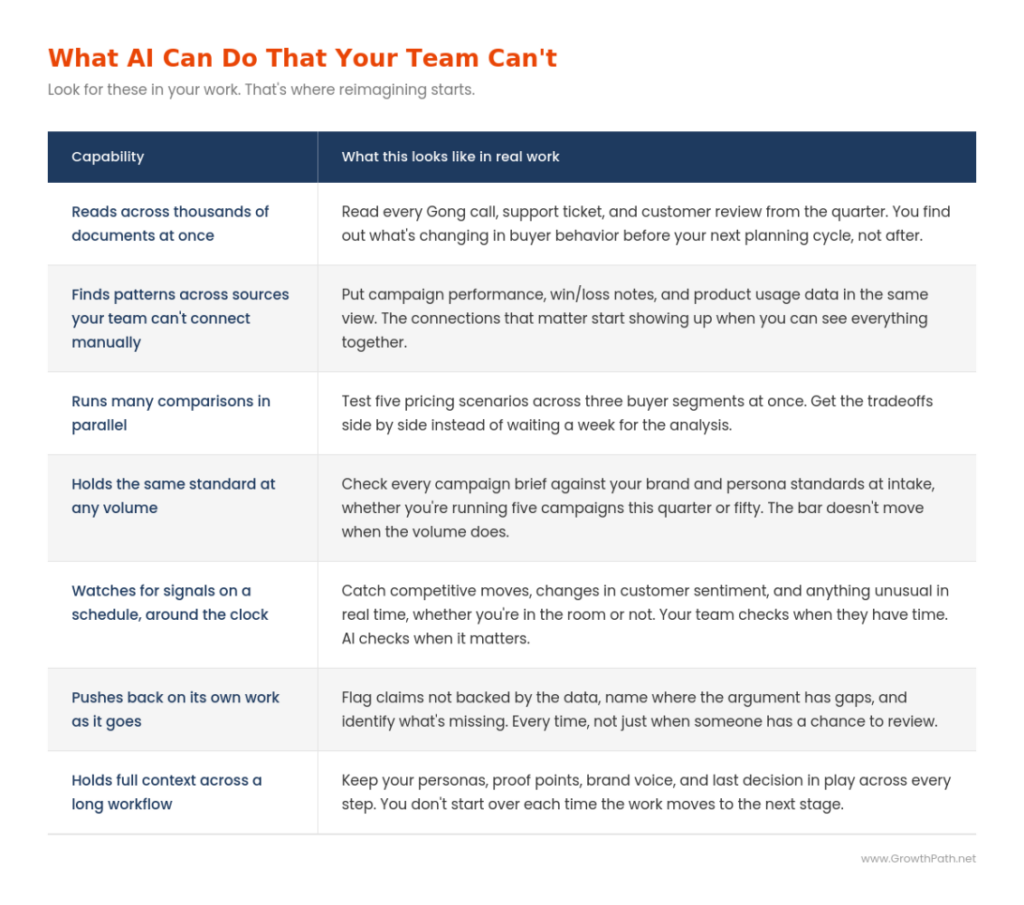
  • « Go to Previous Page
  • Page 1
  • Page 2
  • Page 3
  • Page 4
  • Page 5
  • Interim pages omitted …
  • Page 126
  • Go to Next Page »

Copyright © 2026 · GrowthPath Partners LLC · Log in

  • LinkedIn